While creating the versions module the budget doesn't show up why?
Help me here plz.
@Csta
Two questions:
Did you use built-in Versions list?
Have you created Budget version in the versions tab?
It looks like you don't have Budget added as a version.
Once you have Budget as a Version then you should see it appear as a column and you can add a formula to your "Budget?" line item.
I used the built in version.
Got it.
Thanks.
Just wondering, as I ran into the same issue. Was there somewhere before Lesson 6 where we were asked to manually created a 'budget' version in the versions tab? I don't remember receiving this instruction so I didn't that the 'Budget' column either. Thanks for your help!
No, It was miss, there was no such budget creation is mentioned.
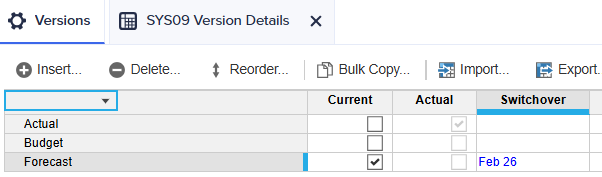
under Versions, i have created Budget and selected Forecast (enabled) under Current.
Result under "SYS09 Version Details"
Anaplan's next quarterly platform release webinar will be held April 29, 2026 at 8 a.m. Pacific Time. During this session, we will explore the latest features so you can optimize your Anaplan experience. Our expert-led session will equip you with a practical guide and live demonstrations to help you get the most out of new…
Check out the latest Anaplan feature updates and enhancements in our March 2026 official release notes. There you'll find information on: Intelligence Anaplan CoModeler Anaplan Analyst Anaplan Agent Studio User Experience Data driven hierarchies with drag-and-drop Enable or disable comments Module-driven navigation actions…
_147547.png "Screenshot (5).png")