Hi All,
How do i find from the start time and end time the difference and further convert to mins?
Example : my start time is : 18.40 and end time is : 17.05
Another Ex : Start Time is :12.00 and end time is : 02.00
Thanks
Hi @aishabhy05
Assuming that you have a start date and end date also associated with the time: If the start date and end date are the same then use text to number conversion formula ("value" in Anaplan) in conjunction with Mid to find out the hours and minutes. If the end date is not same as start date, then add 24 hours for every day difference between start and end date.
Example formula:
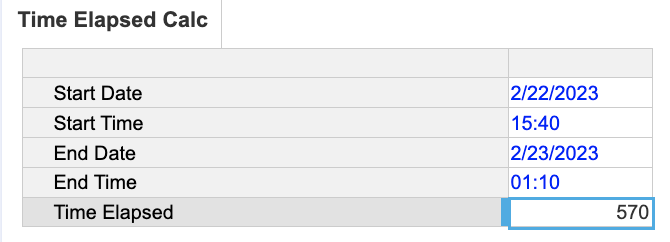
(End Date - Start Date) * 24 * 60 + (VALUE(LEFT(End Time, 2)) - VALUE(LEFT(Start Time, 2))) * 60 + VALUE(RIGHT(End Time, 2)) - VALUE(RIGHT(Start Time, 2))
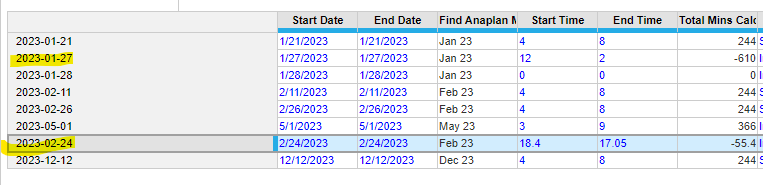
@anikdas thanks for the help. But i m not able to get it right for the highlight. Also, the mins calculation is wrong. For the First item in the list below: The start time is 4 and the end time is 8. It should be 240 mins. but from the calculation which you stated is giving me 244.
@aishabhy05, you need to have the start/ end time with a certain format. As its a text input, it needs to have a certain format in order for the number formulas to work.
We're looking to feed live or near-live Anaplan data into Claude through MCP, but our current approach — exporting CSV files via the Anaplan Bulk Export API, loading them into MySQL, and querying from there — has a significant lag (hour-long turnaround). Curious if anyone has found a faster path, whether that's through the…
Has anyone tested Analyst’s response quality/speed on large, sparse models (think 10+ dimensions, millions of line items)? Wondering if there’s a practical ceiling before it starts timing out.
We've been building a tool called aplan4sheets and we'd genuinely like input from this community — both on what we've built so far and on what we should prioritize next. The problem we set out to solve: Anaplan's Excel add-in is Windows-centric, and there's no real native way to pivot Anaplan data in Google Sheets. We…