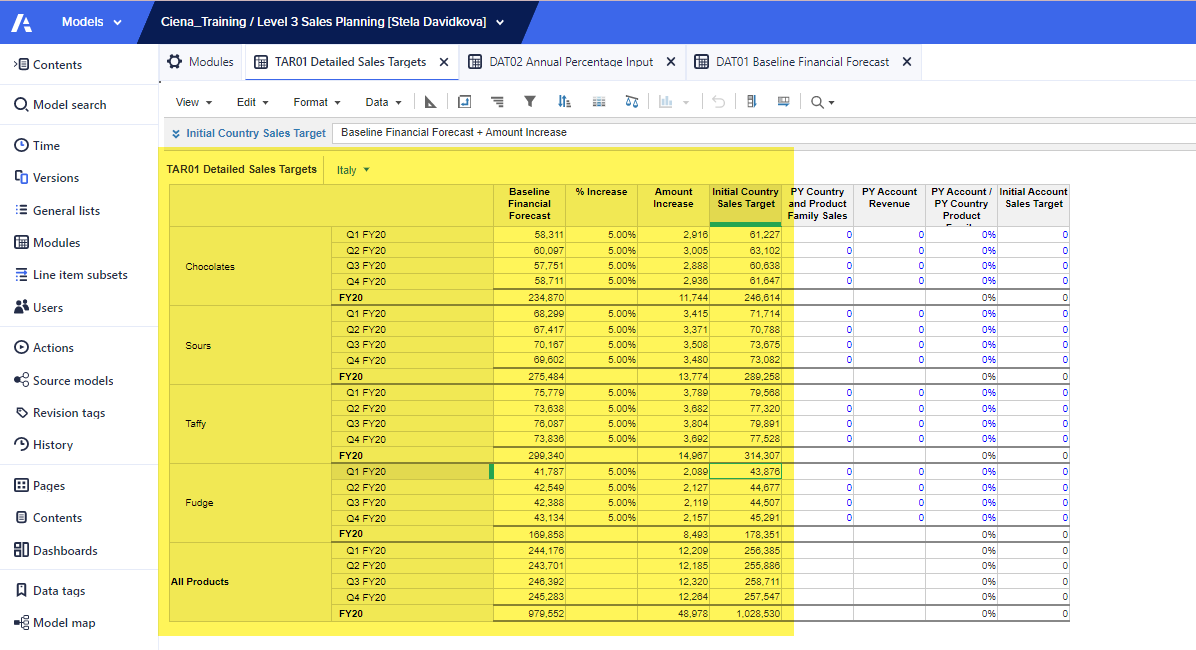
I am getting the exact same amounts are per the screen shot from the training. Why does your % show as 105? If i leave mine the way i have it would that cause me any issues with the training downstream?
Thank you
No, your usage of the % looks good and hence your output matched with that of screenshot. My statement is just an alert to keep in mind if & when you use this % anywhere else :)
Hi @sdavidko@ciena.com ,
Since this is a percentage 'increase', it has to be applied over and above the baseline forecast. Meaning, initial target would be baseline forecast * (1 + increase%). You have applied this directly within the formula of initial country sales target, while some might have created a different lineitem to show "1 + increase%". This won't have any downstream impact as long as you are applying the % correctly.
Cheers!
Hi @AjayM
Firstly, thank you very much for the quick replay.
If i am not applying the % correctly, i would not match to the screen shot they gave us in the training, right? I was fine with your answer untill i read "as long as you are applying the % correctly". Did you notice something wrong that I am not seeing?
@AjayM :) Thank you :)
There was an error rendering this rich post.
Hi all, The Client ID and Client Secret are available, intended for uploading and downloading files. Could anyone advise how to use these credentials DIRECTLY to make API requests? Thank you!
I have A6 as the parent list and two sibling lists: A6.5 and A7. The A7 list includes an attribute that maps to A6.5. In the UX, the user will select A6.5 using a content selector, and the grid (dimensioned by A7) should display only the A7 items associated with that selected A6.5. Since the selector is a page context and…