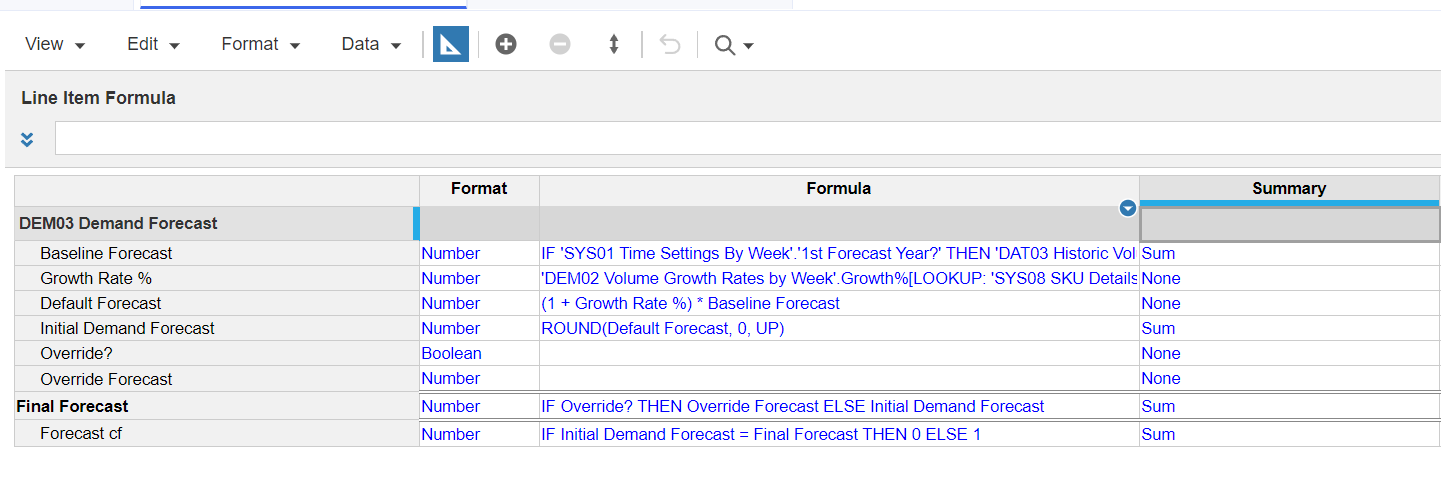
I have completely cleared the Override? Boolean but now I am unable to reselect the checkbox for Nutzo Bar_EN, Candyate, Week 2 FY20.
Can someone please help me with this?
Here's a screenshot of what I have
@PAmoak
it is because the summary of the line item is NONE, which is correct, but your view is an aggregated level. Change your view to the most detailed level and then the boolean will show up again.
@rob_marshall how exactly do I get to the most detailed level. I am a bit confused about that part
To answer your question, make sure both dimensions/lists are the bottom level. But on second look, you are on the bottom or most detailed level…Do you have DCA defined for Override?
@rob_marshall I do not have DCA defined for Override?
@rob_marshall I was able to resolve it. I had the 'AD01 P3 by Account by Week'.Write? in the write acess column for override? instead of Override forecast. The DCA is for Override Forecast line item not Override?
@fstragliotto
In the 2nd picture, you are looking at an aggregated "slice" of data…change your dimensionality to the bottom level. You can't see the boolean because the Summary of that line item is set to None.
Has anyone tested Analyst’s response quality/speed on large, sparse models (think 10+ dimensions, millions of line items)? Wondering if there’s a practical ceiling before it starts timing out.
We've been building a tool called aplan4sheets and we'd genuinely like input from this community — both on what we've built so far and on what we should prioritize next. The problem we set out to solve: Anaplan's Excel add-in is Windows-centric, and there's no real native way to pivot Anaplan data in Google Sheets. We…
We are looking for Anaplan end-users to provide feedback on their experiences with the Excel add-in. Interested individuals will respond to this 5-minute survey to help us understand personal needs and behavior when using the add-in. The feedback provided by survey takers is essential to the roadmap of Anaplan's products.…