When using list versions, how do I make the movingsum formula include the forecast output for previous months in the calculation of a given months forecast??I cant include a "previous" function within the movingsum formula
@estebanmartinezanavate
This is the constraint that MOVINGSUM has. To achieve this functionality, break your formula in two different line items. In the first line item calculate the PREVIOUS value and in the second calculate the MOVINGSUM of the previous value.
~Anand
@estebanmartinezanavate the trick is to know that most of the Time functions, if you "look in the past", you can reference the line-item itself, including the MOVINGSUM function (like a recursive reference).
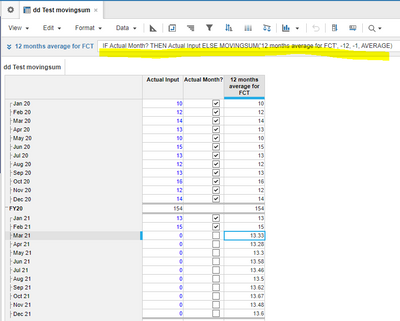
Below is an example to calculate the Forecast months as AVG of the previous 12 months:
in a line-item called '12 months average for FCT' you can put a formula like:
IF Actual Month? THEN Actual Input ELSE MOVINGSUM('12 months average for FCT', -12, -1, AVERAGE)
How to consider a month as Actual or not, there are different ways to do it...
You can have the same approach for this formula also when you use Versions.
Hope it helps
Alex
Reading your query closely can I clarify your question.
Are you looking to include values from a diffferent version in your MOVINGSUM?
For example;
Current version is Forecast P2.
Do you need to pull the MOVINGSUM value relating to a previous version, in this case Forecast P1?
There was an error rendering this rich post.
Hi all, The Client ID and Client Secret are available, intended for uploading and downloading files. Could anyone advise how to use these credentials DIRECTLY to make API requests? Thank you!
I have A6 as the parent list and two sibling lists: A6.5 and A7. The A7 list includes an attribute that maps to A6.5. In the UX, the user will select A6.5 using a content selector, and the grid (dimensioned by A7) should display only the A7 items associated with that selected A6.5. Since the selector is a page context and…