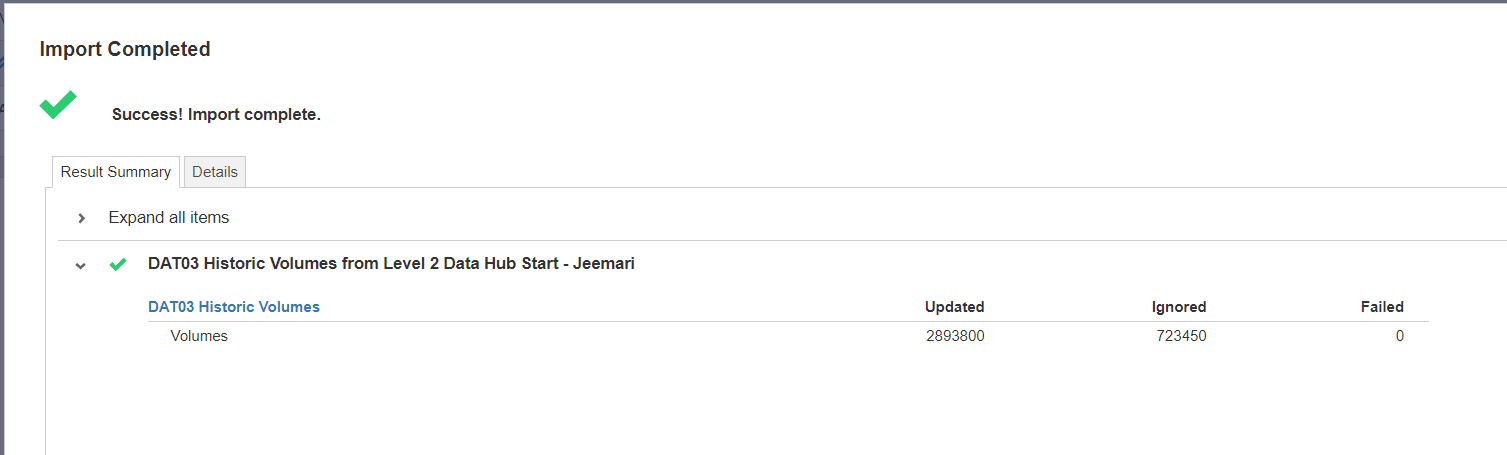
Hello,
Below are the steps I followed for this activity and the corresponding outcome
*All other tabs are mapped correctly
Outcome:
Is there anything I'm missing that causes the other data to be ignored?
Thank you in advance!
Hello @JeemarieB ,
It looks like your model is not connected with the source. Go to the tab that says "Source models" on the left panel and repoint your datahub with your model.
Cheers!
It looks to me like the import is correct. Are you getting all the values in Anaplan?
With regards to the ignore, have you modified the excel file in any way? It looks to me like +2.5M entries modified is too many.
Hi Bruno,
No, I haven't modified the excel in a way. It was an import right from a saved view from the Data Hub Model.
And yes, I'm getting FY19 values but not 100% sure if it's complete due to the ignored data
@BrunoRodriguez I also run the process but was unsuccessful. See outcome below:
@BrunoRodriguez works now! Thank you!
There was an error rendering this rich post.
Hi all, The Client ID and Client Secret are available, intended for uploading and downloading files. Could anyone advise how to use these credentials DIRECTLY to make API requests? Thank you!
I have A6 as the parent list and two sibling lists: A6.5 and A7. The A7 list includes an attribute that maps to A6.5. In the UX, the user will select A6.5 using a content selector, and the grid (dimensioned by A7) should display only the A7 items associated with that selected A6.5. Since the selector is a page context and…