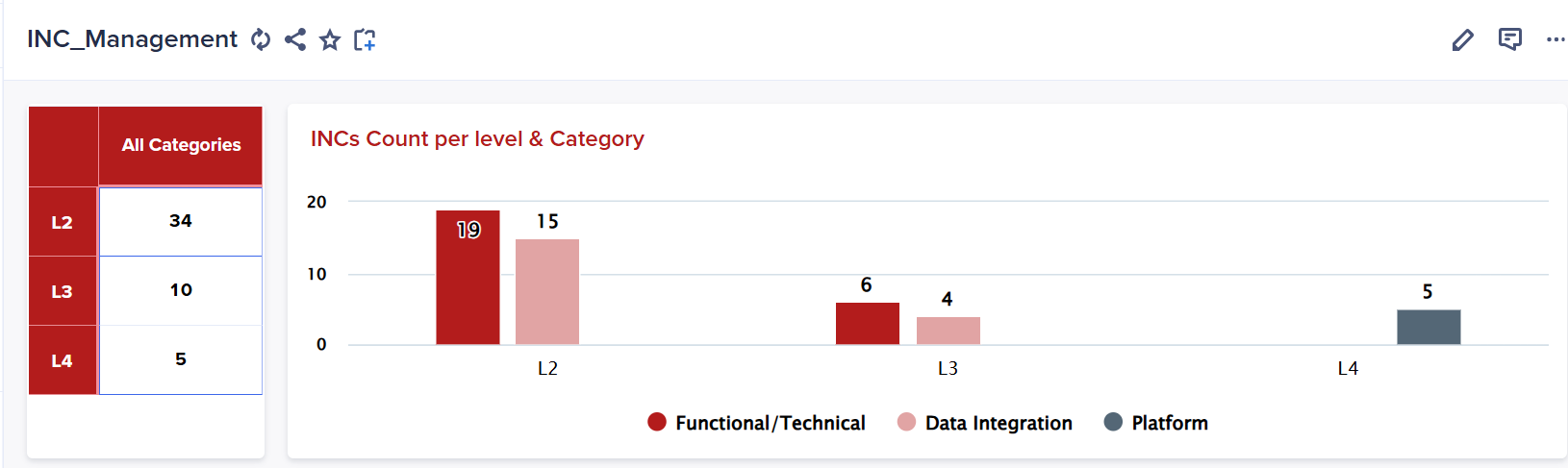
I want to add another coloumn to show percentage for example level 2 % will be equal to 34/total no of inc and so on? how to do that
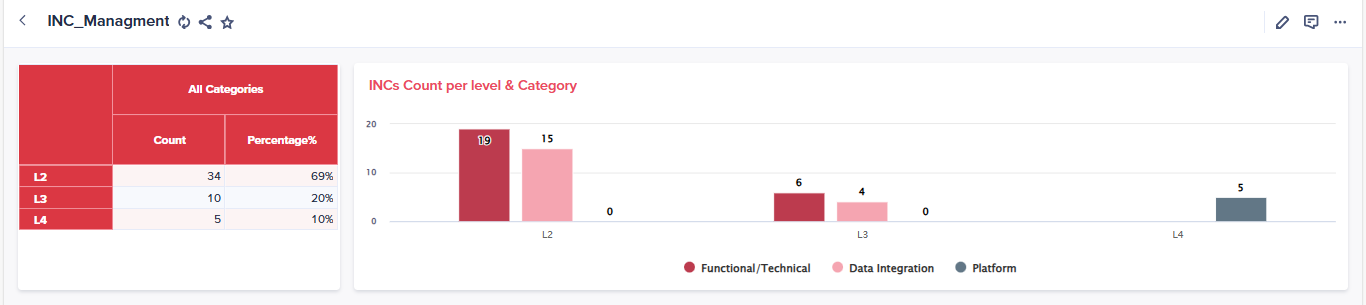
Assuming the grid has two list dimensions and a line item as a selector, I created a backend solution where a summary is generated using the SUM function across both lists. This summary is then referenced in a system module. In the main module, I created a line item for percentage calculation by dividing the value by the referenced summary from the system module. The line item is formatted as a percentage. With this setup, the percentage can be correctly displayed in the NUX as required. I’ve attached screenshots of two UX views for reference.
Thanks alot for your feedback @102049
I think I have a problem with the summary system module could you guide me
Glad to help you. To collect summary, just make a line item in the system module and directly refer "Count" line item to that newly created line item (Make sure summary in on in the source module).
Can someone help me i am unable to login anaplan portal using my credentials
Dear Hive Mind, Do we have a way to get the history of a particular List Item, from its creation into a model up until its removal ? I am trying to chase when / how an item has been added into a model and how / when it would have been deleted and then recreated with the same code. Is there a pattern (manual or API) to get…
I have an action in a process which is getting failed since 2 days when run via CloudWorks with below error . No issues when run manually . Same error occurs when run manually but as a warning "Import complete but with failures" This action is running since almost a year without any issue . No change has been made to…