I would like the ability to add a dynamic subtotal to a grid, so when rows are filtered out the total is updated on the fly
Yes, we need to have dynamic summary totals that adjust based on filters and selective access. To work around this, we have to create new modules and line itmes that create redundancy and inefficiencies in the model. In some cases, there is no way to work around this issue and sumary totals must be hidden. This is a major issue for my clients.
This is definitely a major improvement to the grid that is requested by almost all my customers.
This is also a major issue for my customers. Many of them have requested a total based on what they can see through filters/selective access.
Does this exist? I find it extremely painful that this basic functionality is not intuitive.
This would save so much time and is useful for most customers
Hello, is there any update on when a solution will be implemented?
I've been asking this since we started with Anaplan in 2021
YES PLEASE !
I think as the hyper-block calculates the summaries at the dimensionality this is not possible (I.e. the list items are summed up at their parent level and the filter is just a view/cut of this).
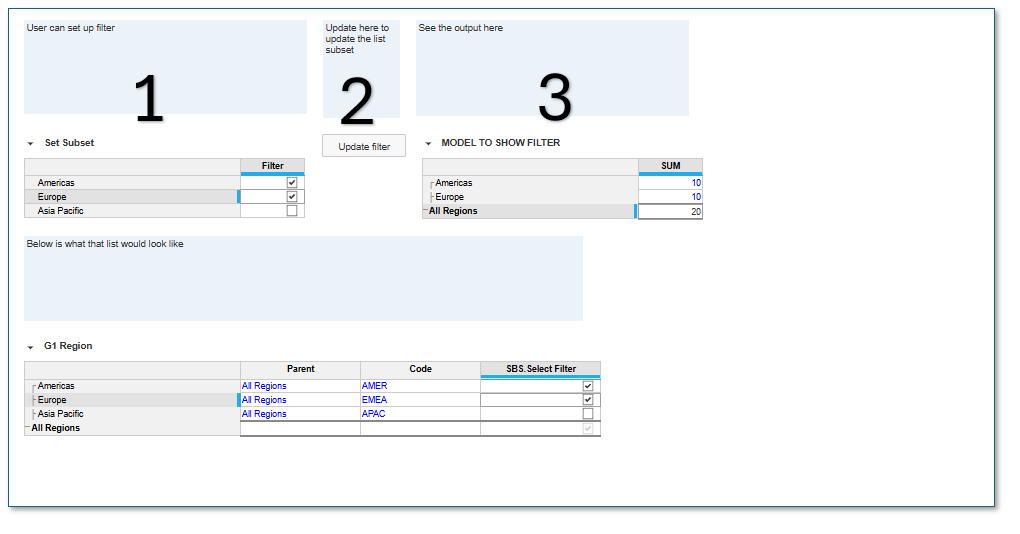
The only way I could suggest doing this is to create a Subset of the list items you want to filter on and then updating that subset with an action. The user can then in effect create a custom "LIST" for their purpose. I hope the below is understandable:
Please note the data in (Table 3) below should be a formula and not data thats been imported as changing the subset removes data (If deselected)
Also if you do set it up as per below the subset would change for all users.
(Although not advisable you can give users access to the the list property that drives the subset and then you wont need the process button)
Business Problem & Current Limitation Current State: In our current Polaris implementation, the cumulative dimension index across just five core business dimensions has reached 55. The Constraint: With a hard ceiling at 64, this leaves a headroom of only 9 remaining indexes across the entire workspace/model scope. Direct…
Dear all, Some times your system refuses us to log in. It seems it is because the password is no longer valid and has to be renewed. However absolutely no information is given to the user. Therefore he/she tries to connect again and again, until he/she thinks "oh, that should be the password that has expired". This is…
I've come across this need more than once now so I figured I'd post it here for the Anaplan product team! We have a client who utilizes a primary hierarchy for a core list but developed the need to see the lowest level in that primary hierarchy rolling up to an alternate hierarchy of parent list members. In their Polaris…