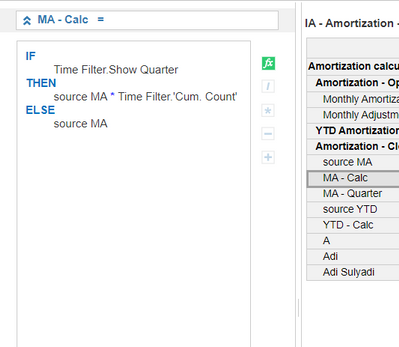
I have a case, i want Monthly Amortization Line item can show Quater amount. but not show because on Summary have Sum,Time:Formula. Can give me a answer. Thank you. Help me
Hi,
I think maybe in your source module you using closing balance, so it will make you Q1 amount will 0.
you can change closing balance to another format.
Thanks
If the formula references another module, then you will need to ensure that the quarterly totals are reflecting there correctly. Can share the formula on the line item in question? It's difficult to determine the root issue just looking at the values alone.
this formula for final report: * time filter. **bleep** count for calculation Quarter, Q1: 3, Q2: 6, Q:9
this formula for **bleep**. count
Hi,I think the best approach is to spread this out over multiple line items.The Quarterly summary is cumulative while the months are not and this is causing you the issues.Create the following line items -1. Monthly2. Monthly Cumulate
3. Cumulate reset4. Ref1. Monthly will house you monthly movement2. Monthly cumulate will be the cumulative of the 1.Monthly, set summary to SUM, formula = CUMULATE( 1.Monthly, 3. Cumulate reset )3. Cumulate reset, boolean format and time set to Quarters, formula = true4. Will contain a formula = 1, set summary to formulaIn line item 1. Monthly set your summary to ratio - 2. Monthly Cumulate / 3. RefThis will result in the your months showing the monthly movement and the quarters to cumulative for that quarter.
XL3SetProperty to navigate
Hi, Where are the member properties for lists defined in Anaplan XL? In the training documentation there is an example showing a property such as “Birth Date”, which appears to be a list-item attribute. That suggests you can create custom list properties from the Anaplan list. However, when I connect through Anaplan XL, I…
Hi all I have a list of networks organized hierarchically on a list of entities, which is itself organized hierarchically on a list of divisions (organization). An entity can have several networks. I also have a list of product models, which is itself ranked with three higher levels: this “Models” L4 list is ranked at a…