Hi -
I am trying to bring in Role. I added them as a line item in my module:
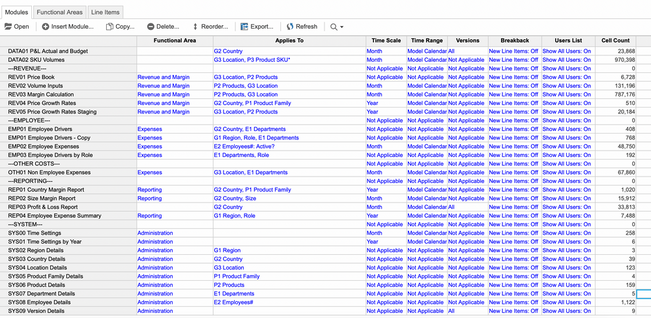
Here are all the modules:
And here are my lists:
There is a dropdown for me to manually put in the roles, but I just don't know what to do for the formula.
Can anyone please help me with how to write a formula to bring in Role?
Hi @M.Kierepka
So there is a list called 'Roles':
And they need to be assigned to people via this module (here is the grid view):
You can see in regular view that choices are already there as a drop down but I need them automatically populated:
Any ideas on a formula to do this?
Hi,
From your question, it is understandable that roles are to be assigned to users. To determine the formula, please first describe the logic on how a role should be decided for a particular user. If you're trying to bring in native 'User Roles' to a line item , that won't be possible.
Anyone would be better aligned to help you once you describe the exact logic you require
Regards,Aakash Sachdeva
@tspoon
As far as I know you need to Import the data into the module. Roles must also be available in the source file, all you have to do is to map the Roles from Source to the Roles from Anaplan. You have already imported Name, Country and other fields, similarly Roles also need to be imported.
Not sure how and why was this missed in the import action that you might have run earlier. It should have been auto mapped. Anyway just go to the "Action" and hit "Edit" option and map this line as well and run the import again
Hope that helps
Misbah
MIZ LOGIX
There was an error rendering this rich post.
Hi all, The Client ID and Client Secret are available, intended for uploading and downloading files. Could anyone advise how to use these credentials DIRECTLY to make API requests? Thank you!
I have A6 as the parent list and two sibling lists: A6.5 and A7. The A7 list includes an attribute that maps to A6.5. In the UX, the user will select A6.5 using a content selector, and the grid (dimensioned by A7) should display only the A7 items associated with that selected A6.5. Since the selector is a page context and…