Hi
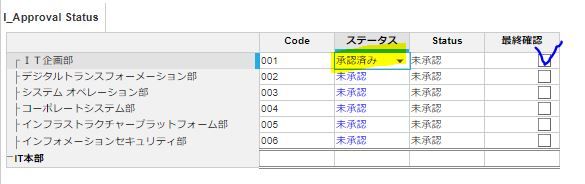
I'm trying to make formula but it's not going well
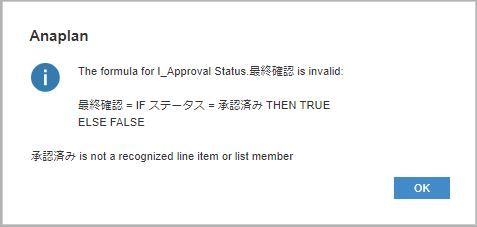
IF ステータス = 承認済み THEN TRUE ELSE FALSE
how can i make this formula?
I need your help... please help me
Hey,
Don't know the language, but understood something
I guess formula should be like
IF name(List formatted line item) = "alert text" THEN TRUE ELSE FALSE or it can be
IF name(List formatted line item) = Line item [Remove name if it's Line item is list format] THEN TRUE ELSE FALSE
You can write formula little better => name(List formatted line item) = "alert text" [No need of use for IF Else condition in this case]
Thanks & Regards,
Sai Bharadwaj
https://www.linkedin.com/in/sai-bharadwaj-venati/
Hi @Baek
You need to ensure you're comparing the same data types in your equality.
The line item ステータス is formatted as S_Status, so the right hand side of your equation "承認済み" needs to also be a list formatted line item or value.
If 承認済み is an item in S_Status, then it would need to be rewritten as:
ステータス = 'S_Status'.承認済み
As @Sai_Bharadwaj_Venati also said, rather than doing the
IF ステータス = 'S_Status'.承認済み THEN TRUE ELSE FALSE
You can just leave it as:
Since if this is TRUE, then it will return TRUE, and if it's false it will return FALSE.
Hi @Baek you can code something like thisName(ステータス)= "承認済み"Thanks,Manjunath
Hi,
Thank you for answerit really helped!
Have a wonderful week ahead!
Hi,Thank you for answer!you are a genius.Thanks for your help in solving this problem.I will never forget what I learned.Have a nice day!!!
Hi all, The Client ID and Client Secret are available, intended for uploading and downloading files. Could anyone advise how to use these credentials DIRECTLY to make API requests? Thank you!
At Uphold customer support ⭐+1-888-355-2348 accounts may be temporarily disabled or restricted for various reasons. Raise a concern on priority basis at Uphold support ⭐+1-888-355-2348 if you notice any suspected malicious activity, or a problem during account recovery. To contact Uphold support directly at…
I have A6 as the parent list and two sibling lists: A6.5 and A7. The A7 list includes an attribute that maps to A6.5. In the UX, the user will select A6.5 using a content selector, and the grid (dimensioned by A7) should display only the A7 items associated with that selected A6.5. Since the selector is a page context and…