Hi guys, how can i get the totals of my subsets in my formula so the totals of my denominator will only be the totals of the subsets? Thanks in advance.
Hi,
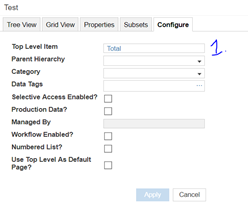
You can use Sum & Select function to get the value of the total of subset in formula by selecting the Top level item of the list .
Please find the detailed snapshots below
Step 1: Create Top level item in the List.
Step 2: Check with the List and the subset
Step 3: In the Module Create a Boolean formatted line Item where the subset is in “Applies to” with TRUE. As shown below
Refer this line item to get the totals of Subset as in “ss total” line item using Sum & select item.
You will get the desired subset totals in line items.
Hope this helps.
Thanks
It worked. Thank you so much! 🙂
@Jitendra.Vishnolia Would you mind explaining this a little bit in detail. I am facing a similar issue wherein I need to calculate the ratio each list subset item makes of the total but I am unable to use list subset in the sum or lookup function. The screenshots you have pasted in your post do not seem to align with the description.
I have a module that has 4 line items, 2 of which work on Month which results in the correct values, however 2 work on something called Cohort - so for example 202204 is Apr 22. See module below, the top 2 result in blanks/zeros and the bottom 2 result in correct values. So I want somehow to map the Cohorts to the time…
XL3SetProperty to navigate
Hi, Where are the member properties for lists defined in Anaplan XL? In the training documentation there is an example showing a property such as “Birth Date”, which appears to be a list-item attribute. That suggests you can create custom list properties from the Anaplan list. However, when I connect through Anaplan XL, I…