Hello,
I am trying to count how many items are in a list and display it in a module?
In the example below we have 3 items in the list.
Does a function like this exist?
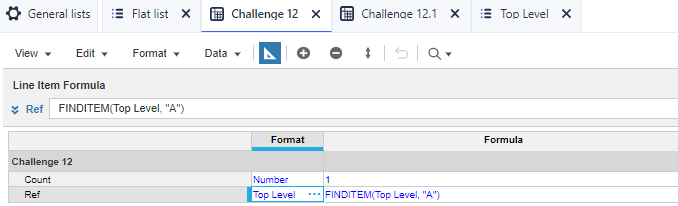
Create a system module (with #promotion flat as a dimension) with a line item called "count" and a formula of just "1". Create a second module which is a "totals module" (without #promotion flat as a dimension). In the totals module create a line item called count that directly references the system module (system module.count). It should naturally grab the top level.
Thanks! That worked. I was overthinking it.
if the flat list don't have top level item, how it will calculate?
hey @Javvaji45 , if you see at the screenshot there is top level item present.
Note: flat list cannot be a part of hierarchy.
Thanks.
I got the solution for the with out top level item , we can calculate the count of items in flat list , by using the Another dimension based on the dimension we can calculate it .
Hi @Javvaji45 can you explain how to calculate count of items in flat list without top level
@SyedArbaz create one more list and add the item like "Top level" , you can hard code this item in the flat list dimensioned module and write the sum formula in the target module. see the below screen shots
Thank you @Javvaji45 it worked :)
Would someone kindly assist with helping me identify the errors with the following perimeters I have set?
I’m trying to understand how Anaplan Data Orchestrator (ADO) connects to an on-premises SQL Server. In Anapedia, I found this: An MSSQL instance hosted on a cloud platform, such as Amazon Web Services (AWS), Azure, Google Cloud Platform (GCP), or any other cloud provider. The solution is compatible with on-premises SQL…
Title: How to get most recent actual year value into a non-time (staging) module and use it for forecast calculations? Question Body: Hello Anaplan Community, I am working on a financial model (Higher-Ed long-range planning) and need guidance on a best-practice pattern to retrieve the most recent actual year value and use…