Hi, good morning.
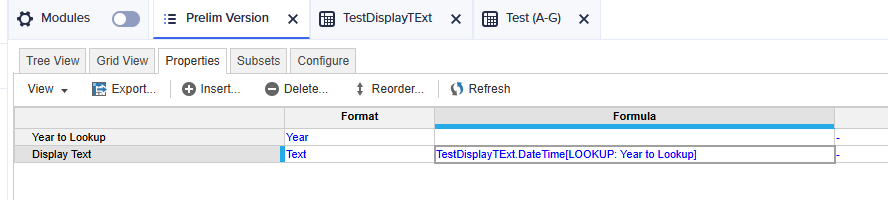
I have the following list (Prelim Version) that I would like to set its Display Text to download time from another module as below:
But I always get blank. My LOOKUP always give me error.
May I know how to LOOKUP?
Thank you.
In order to write lookup can you tell which module you want to lookup from and what is the dimensions of that module and better send a screenshot as well.
Thank you. Mr. Dlkhsant.
I would like to LOOKUP from module 'SYS04 Prelim Download Time - vs3 (shown below and its Dimension.
My formula is
'SYS04 Prelim Download Time - v3'.DateTime[LOOKUP: Month(Time), LOOKUP: Prelim Version]
Hi @WaiWah ,
Since your source module (SYS04 Prelim Download Time - v3) has Time (Months) as an additional dimension, so ideally you'll have to create a lookup based on that, no lookup is required for Prelim version list. Also I'm hoping as you have multiple inputs in different Months you might be considering the Last Non blanks so you firstly need to set the summary setting as Last Non blank and then you if you want to lookup from Summary values say FY23 in my example, you can make a separate list property or a mapping module to get those time values by lookup, please refer to example screenshots attached below,
SYS04 Prelim Download Time - v3
Note that for getting Summary values you can also use TIMESUM() in formula by defining start and end periods or SELECT() in formula if you have total of time periods on. Hope this helps.
Thank you for your reply.
My Display Text (DateTime) is different every month. Which means every month I may download 6 times (6 versions of data), therefore the Display Text is different in all the months all the versions.
I tested the above, which display 6 versions Date Time the same in all months of the year.
The Display Text in all the months all the versions can be all different but they are all the same.
We are looking for Anaplan end-users to provide feedback on their experiences with the Excel add-in. Interested individuals will respond to this 5-minute survey to help us understand personal needs and behavior when using the add-in. The feedback provided by survey takers is essential to the roadmap of Anaplan's products.…
Estimated Level of Effort:4-8 Hours of Model Building Level of Difficulty: Beginner Recommended Training: L2 Model Builder Training Persona: Casual Model Builder Potential ROI: Decreased planning time Increased accuracy of targets/spreads You Might Also Like: * Historical Snapshotting Top-Down Allocations Whether it's…
Retail Knowledge | Detecting Trend INTRODUCTION Using machine learning to detect a sales trend is a science and an art. Obviously no computer program or set of calculations could ever know everything that’s going on with your business. The creative side of detecting a trend is built upon your familiarity with the way your…