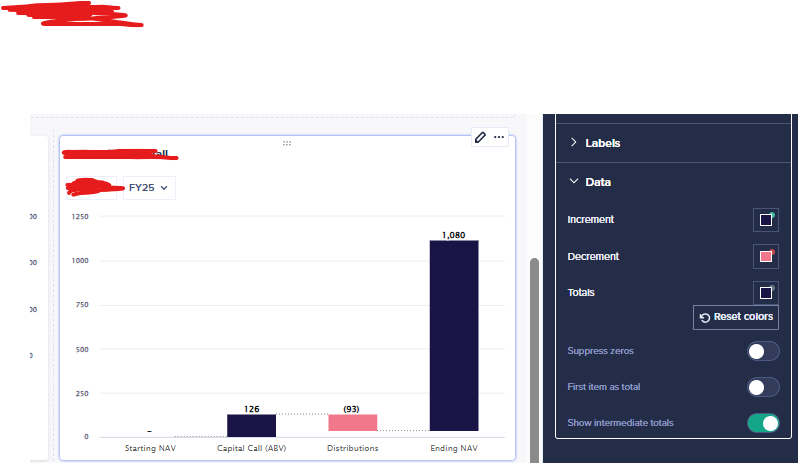
Is there any way to have the last item of the waterfall be a running total that starts from 0 and shows the net of the previous waterfall components? I'm using line items here, would just want the Ending NAV to always start at 0
Hi @mwu214 , What do you mean by always start at 0? Do you want that bar to show the result of 0+126-93?
Hi @devrathahuja , sorry for the confusion - to clarify:
I meant 0 as in the last waterfall field (ending NAV in this case) should be a cumulative bar/total of the previous components and start from 0 on the y-axis, as opposed to starting at 33 like it is now.
Would look something like this
@mwu214 - Got it, can you share the blueprint view of the module? Seems like the parent-child relation is not being recognized in this case.
@devrathahuja apologies, don't think I'll be able to share blueprint view but I see your point now - so this waterfall view can only aggregate the last field the way I want it to IF there is a proper parent/child relation between that field & the rest of the fields that should add up to it?
Will need to find a way to establish that type of relationship between line items vs. list dimension
@mwu214 - Yes that is correct. It needs A+B+C=Final line for it to work. It can be set up as a list or as line items, either way.
We've been building a tool called aplan4sheets and we'd genuinely like input from this community — both on what we've built so far and on what we should prioritize next. The problem we set out to solve: Anaplan's Excel add-in is Windows-centric, and there's no real native way to pivot Anaplan data in Google Sheets. We…
We are looking for Anaplan end-users to provide feedback on their experiences with the Excel add-in. Interested individuals will respond to this 5-minute survey to help us understand personal needs and behavior when using the add-in. The feedback provided by survey takers is essential to the roadmap of Anaplan's products.…
Estimated Level of Effort:4-8 Hours of Model Building Level of Difficulty: Beginner Recommended Training: L2 Model Builder Training Persona: Casual Model Builder Potential ROI: Decreased planning time Increased accuracy of targets/spreads You Might Also Like: * Historical Snapshotting Top-Down Allocations Whether it's…