Hi Team,
Inserting formula for a boolean line item as:
IF Override? THEN Final Forecast = Override Forecast ELSE Final Forecast = Initial Demand Forecast
Error is throwing as "Circular references:Override?" What am i doing wrong? please help.
Hi Kunal,
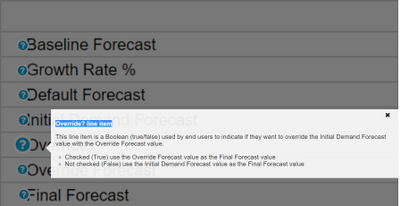
Override Line Item is a driver that indicates whether to take Initial Demand Forecast Value or Override Forecast Value and it is a manual input by end-user, not formula driven. Based on it the Final Forecast Value Line item will give the result
Write the formula in Final Forecast line item,
If Override is true, then take value from the Override Forecast Value line item else take it from the Initial Demand Forecast Value.
.
~Vignesh M
Hi Vignesh,
I was looking for the solution for the same question too. My formula for DEM03 final forecast is IF Override? THEN Override Forecast ELSE Initial Demand Forecast
The data appears to be correct in the module, but when I copy this formula to the sprint 2 exam it is wrong. Would you please give some more advice?
I really appreciate it if you can help with this question.
I am getting the same error. The formula is working in the module, but when i paste or type it in the text box, it shows INCORRECT answer.
Can anyone help!
Hi @jingru and @ymandre ,
When building a formula you need to think which is the most possible occurrence of the condition: is it more likely to have overrides in the data or not? In this case overrides are not that frequent so you should switch your conditions starting with IF NOT Override? THEN .... ELSE ...
This is the best practice when building formulas so try it, it should work.
Elisabet
Thank you Elisabet for explaining in a simple way. This is helpful!
I had the same thing. The module is calculating correctly so I can't figure out why it is marked wrong on the exam.
So the formula I used was the IF NOT, the exam still states that it is wrong. It is calculating in the model correctly though.
I have A6 as the parent list and two sibling lists: A6.5 and A7. The A7 list includes an attribute that maps to A6.5. In the UX, the user will select A6.5 using a content selector, and the grid (dimensioned by A7) should display only the A7 items associated with that selected A6.5. Since the selector is a page context and…
A quick reminder of the Bulk Copy functionality. Bulk Copy allows you copy large volumes of data from one slice of a model to another in a single, optimised operation, instead of using formulas or imports. Use case: copy a version (RF1) into a prior year version (PY RF1) using a versions list to allow for year-on-year…
We are looking for Anaplan end-users to provide feedback on their experiences with the Excel add-in. Interested individuals will respond to this 5-minute survey to help us understand personal needs and behavior when using the add-in. The feedback provided by survey takers is essential to the roadmap of Anaplan's products.…