Hi,
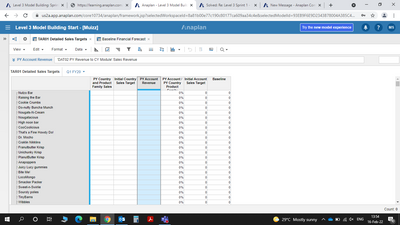
I am unable to view the values even after entering the formulas in the TAR01 module. The dimensions are quarterly but no value is being displayed in any format. Please refer the screenshots attached below.
Please help in this anyone.
Regards,
@muizzsk9890
check out QUARTERVALUE() formula
Make sure summary methods are set via blueprint.
Hi @KirillKuznetsov sir,
The values are still being shown as 0 everywhere. In all the formats It is being displayed as 0.
Check dimensions in source DAT02 module and find which are not matching with target module. I think it may be time (LY vs CY) and in this case you need to use LAG formula. please compare blueprints of the two.
@KirillKuznetsov
I have quarter as time dimension for DAT02 PY to CY & the Baseline Financial Forecast. Whereas the TAR01 is having Month as time dimension. I have used Baseline financial forecast Initial country sales target along with lookup for product family & country from SYS03 module.
@KirillKuznetsov Sir,
I also needed to confirm whether my selection of ICST in Baseline financial forecast was correct pick for this formula of PY Country & Product Family sales.
A quick reminder of the Bulk Copy functionality. Bulk Copy allows you copy large volumes of data from one slice of a model to another in a single, optimised operation, instead of using formulas or imports. Use case: copy a version (RF1) into a prior year version (PY RF1) using a versions list to allow for year-on-year…
We are looking for Anaplan end-users to provide feedback on their experiences with the Excel add-in. Interested individuals will respond to this 5-minute survey to help us understand personal needs and behavior when using the add-in. The feedback provided by survey takers is essential to the roadmap of Anaplan's products.…
Anaplan Champions! The Community team just posted this announcement that certification badges may not be showing up on your profile probably until next year. Rest assured, you will get credit once you complete and pass the exams. https://community.anaplan.com/t5/Blog/Badges-Back-Soon/ba-p/123385