Hi
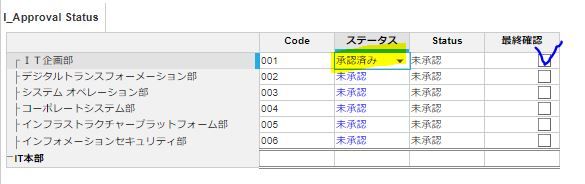
I'm trying to make formula but it's not going well
IF ステータス = 承認済み THEN TRUE ELSE FALSE
how can i make this formula?
I need your help... please help me
Hey,
Don't know the language, but understood something
I guess formula should be like
IF name(List formatted line item) = "alert text" THEN TRUE ELSE FALSE or it can be
IF name(List formatted line item) = Line item [Remove name if it's Line item is list format] THEN TRUE ELSE FALSE
You can write formula little better => name(List formatted line item) = "alert text" [No need of use for IF Else condition in this case]
Thanks & Regards,
Sai Bharadwaj
https://www.linkedin.com/in/sai-bharadwaj-venati/
Hi @Baek
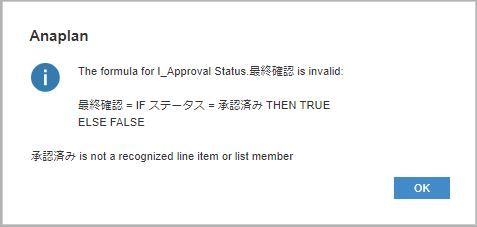
You need to ensure you're comparing the same data types in your equality.
The line item ステータス is formatted as S_Status, so the right hand side of your equation "承認済み" needs to also be a list formatted line item or value.
If 承認済み is an item in S_Status, then it would need to be rewritten as:
ステータス = 'S_Status'.承認済み
As @Sai_Bharadwaj_Venati also said, rather than doing the
IF ステータス = 'S_Status'.承認済み THEN TRUE ELSE FALSE
You can just leave it as:
Since if this is TRUE, then it will return TRUE, and if it's false it will return FALSE.
Hi @Baek you can code something like thisName(ステータス)= "承認済み"Thanks,Manjunath
Hi,
Thank you for answerit really helped!
Have a wonderful week ahead!
Hi,Thank you for answer!you are a genius.Thanks for your help in solving this problem.I will never forget what I learned.Have a nice day!!!
Does anyone have any documentation on the trade-offs of having 1 model for all components of planning (service revenue, product revenue, labour planning), vs multiple models 1 for each and a consolidation model to tie it all together?
A quick reminder of the Bulk Copy functionality. Bulk Copy allows you copy large volumes of data from one slice of a model to another in a single, optimised operation, instead of using formulas or imports. Use case: copy a version (RF1) into a prior year version (PY RF1) using a versions list to allow for year-on-year…
We are looking for Anaplan end-users to provide feedback on their experiences with the Excel add-in. Interested individuals will respond to this 5-minute survey to help us understand personal needs and behavior when using the add-in. The feedback provided by survey takers is essential to the roadmap of Anaplan's products.…