Hello Anaplan,
Using breakback we can hold cell by cell to keep an amount. We can then "release all" hold cells of the grid. But is there a way to release only one cell ?
Exemple :
Hold cell 1
Hold cell 2
Finally release cell 1 only
With breakback you can use DCA to select which cells are held so you should be able to do it with that
Hi @Celine.P
in addition to @josephwood 's answer, which is very insightful, i was wondering: what is the issue with the built-in functionality to release a single cell?
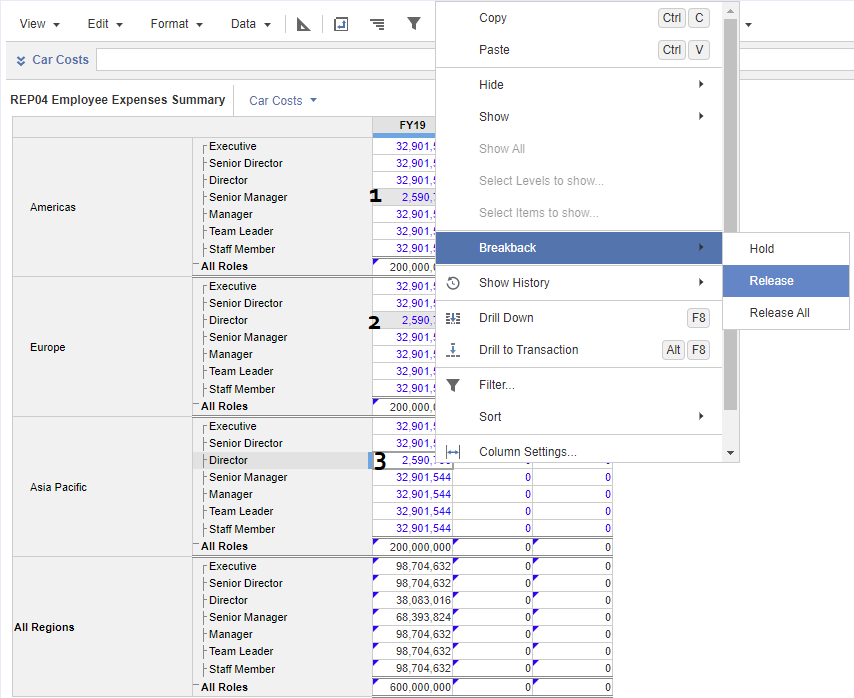
in the example below you can see how, by doing right-click on a given cell, you are presented with the option to Release just that single cell or All the cells. In my example, cells flagged as "1" and "2" are held, while cell "3" can be released individually (it was previously held).
Sorry if I did not fully understand your question, I hope this helps.
A quick reminder of the Bulk Copy functionality. Bulk Copy allows you copy large volumes of data from one slice of a model to another in a single, optimised operation, instead of using formulas or imports. Use case: copy a version (RF1) into a prior year version (PY RF1) using a versions list to allow for year-on-year…
We are looking for Anaplan end-users to provide feedback on their experiences with the Excel add-in. Interested individuals will respond to this 5-minute survey to help us understand personal needs and behavior when using the add-in. The feedback provided by survey takers is essential to the roadmap of Anaplan's products.…
Anaplan Champions! The Community team just posted this announcement that certification badges may not be showing up on your profile probably until next year. Rest assured, you will get credit once you complete and pass the exams. https://community.anaplan.com/t5/Blog/Badges-Back-Soon/ba-p/123385