Hello Anaplan,
Using breakback we can hold cell by cell to keep an amount. We can then "release all" hold cells of the grid. But is there a way to release only one cell ?
Exemple :
Hold cell 1
Hold cell 2
Finally release cell 1 only
With breakback you can use DCA to select which cells are held so you should be able to do it with that
Hi @Celine.P
in addition to @josephwood 's answer, which is very insightful, i was wondering: what is the issue with the built-in functionality to release a single cell?
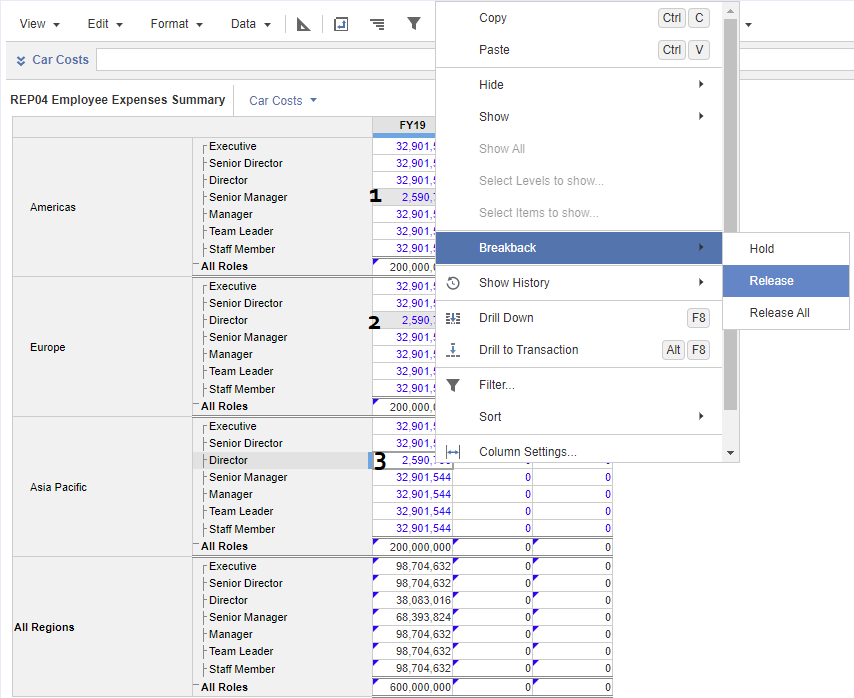
in the example below you can see how, by doing right-click on a given cell, you are presented with the option to Release just that single cell or All the cells. In my example, cells flagged as "1" and "2" are held, while cell "3" can be released individually (it was previously held).
Sorry if I did not fully understand your question, I hope this helps.
Hi all, The Client ID and Client Secret are available, intended for uploading and downloading files. Could anyone advise how to use these credentials DIRECTLY to make API requests? Thank you!
I have A6 as the parent list and two sibling lists: A6.5 and A7. The A7 list includes an attribute that maps to A6.5. In the UX, the user will select A6.5 using a content selector, and the grid (dimensioned by A7) should display only the A7 items associated with that selected A6.5. Since the selector is a page context and…
A quick reminder of the Bulk Copy functionality. Bulk Copy allows you copy large volumes of data from one slice of a model to another in a single, optimised operation, instead of using formulas or imports. Use case: copy a version (RF1) into a prior year version (PY RF1) using a versions list to allow for year-on-year…