Is there a function where I can cumulate an amount but reset it to zero when January is reached in the next year (we are using a 2 year timescale)?
Hi,
We have a start of April in our FY. I have used this formula
CUMULATE(VALUE) - OFFSET(CUMULATE(VALUE), IF MONTH(START()) > 3 THEN -MONTH(START()) + 3 ELSE -MONTH(START()) - 9, 0)
However this is summing into the next year too. Am I doing something wrong?
@pchandalia
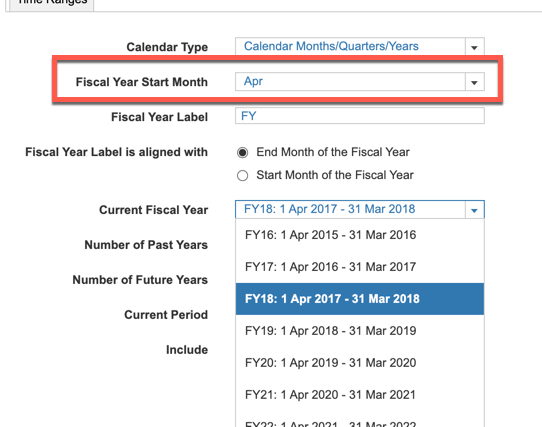
This thread was before the YeartoDate function was created. If your Fiscal Year starts in April, why not change the time settings to begin in April
I have A6 as the parent list and two sibling lists: A6.5 and A7. The A7 list includes an attribute that maps to A6.5. In the UX, the user will select A6.5 using a content selector, and the grid (dimensioned by A7) should display only the A7 items associated with that selected A6.5. Since the selector is a page context and…
A quick reminder of the Bulk Copy functionality. Bulk Copy allows you copy large volumes of data from one slice of a model to another in a single, optimised operation, instead of using formulas or imports. Use case: copy a version (RF1) into a prior year version (PY RF1) using a versions list to allow for year-on-year…
We are looking for Anaplan end-users to provide feedback on their experiences with the Excel add-in. Interested individuals will respond to this 5-minute survey to help us understand personal needs and behavior when using the add-in. The feedback provided by survey takers is essential to the roadmap of Anaplan's products.…