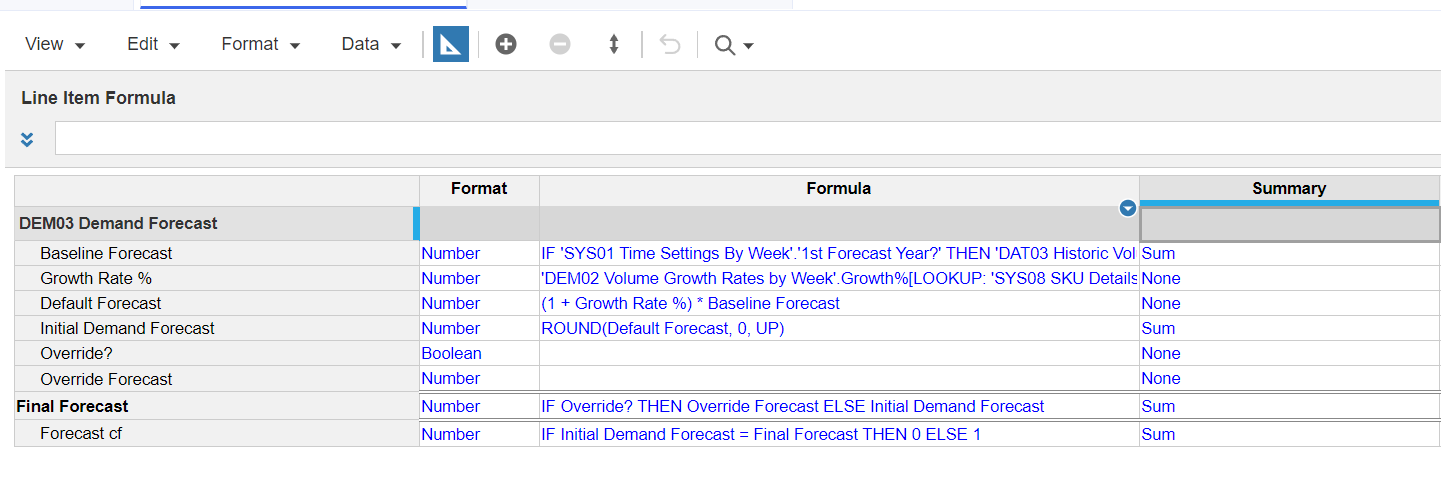
I have completely cleared the Override? Boolean but now I am unable to reselect the checkbox for Nutzo Bar_EN, Candyate, Week 2 FY20.
Can someone please help me with this?
Here's a screenshot of what I have
@PAmoak
it is because the summary of the line item is NONE, which is correct, but your view is an aggregated level. Change your view to the most detailed level and then the boolean will show up again.
@rob_marshall how exactly do I get to the most detailed level. I am a bit confused about that part
To answer your question, make sure both dimensions/lists are the bottom level. But on second look, you are on the bottom or most detailed level…Do you have DCA defined for Override?
@rob_marshall I do not have DCA defined for Override?
@rob_marshall I was able to resolve it. I had the 'AD01 P3 by Account by Week'.Write? in the write acess column for override? instead of Override forecast. The DCA is for Override Forecast line item not Override?
@fstragliotto
In the 2nd picture, you are looking at an aggregated "slice" of data…change your dimensionality to the bottom level. You can't see the boolean because the Summary of that line item is set to None.
Hello everyone, I hope you're doing well. I'm posting because two of my coworkers are trying to use the Anaplan Excel Add-In Series 4, but they're running into an issue during the connection setup process. When they go to New → New Read-Only Connection (or New Connection) and reach the "Select a Customer" step, no…
Why in my model output is blank, after send explainability data.
I am working on a use case where I need to display the top 5 lines of a module as individual lines, while grouping all remaining lines under an "Others" category. The module is dimensioned by multiple composite hierarchy lists, along with Time and Version. To achieve this, I need to use the RANK function with the Ranking…