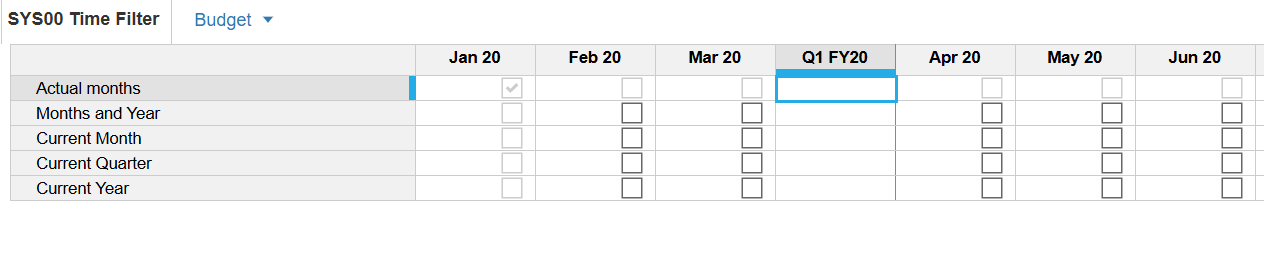
i have a time settings module dimensioned by time and version. I need to check for months and years in one line item. Is there a formula i can use that will only allow me to tick for months and year and exclude Quarter?
You are not able to directly enter data into Summary level/periods. So when a line item is dimensioned by the month time scale, inputs may only be made at the monthly level.
There are approaches you can use to create a formula which brings together inputs from line items with differing time scales. I'm including some examples below to help you understand the approach.
Here is a similar question - regarding how to exclude half year summary:
Also check out this how I built it video which is illustrating how multiple line items can be brought together, the approach can be modified for your specific needs but having this walk though might help you to envision a solution:
Hi @Kireshma1234,
Take a look at these front-end and back-end views.
I hope this helps. 🙂🌷
Seyma
Hi thank you for your solution!! but i was looking for a method where i didnt have to use subsidiary line item views.
Hi everyone 👋 If you build or maintain Anaplan models, you've probably hit the same walls I kept hitting. Some basic questions about a model's structure have no single screen to answer them. You end up clicking through modules and pages one by one, or writing API scripts just to get a list. These were the gaps that…
Hi Everyone, We have a requirement in Anaplan Consolidation & Reporting (Fluence) where the Entity Structure needs to change effective January 2026. The key requirement is that the existing entity structure should continue to be applicable for all reporting and consolidation periods through December 2025, while the new…
We've been building a tool called aplan4sheets and we'd genuinely like input from this community — both on what we've built so far and on what we should prioritize next. The problem we set out to solve: Anaplan's Excel add-in is Windows-centric, and there's no real native way to pivot Anaplan data in Google Sheets. We…