
Author: Anish There has 2.5 years of experience in Anaplan and is an Analyst at Deloitte.
Managing user licenses and keeping track of model sizes in Anaplan can be daunting for teams juggling multiple models across DEV, QA, and PROD environments. Traditionally, consolidating user information means manually exporting from each model — a time-consuming and error-prone process. This article outlines how an integrated license and size management model can centralize user details, automate license calculations, and improve oversight, saving teams significant effort.
When your organization scales with Anaplan, the administrative aspect grows:
- Multiple models, multiple environments: You likely have separate DEV, QA, and PROD models. Consolidating user data means visiting each model, downloading user lists, and merging them into a single sheet.
- Manual consolidation: This task is not only painstaking but also prone to mistakes, especially as model counts rise or users change frequently.
- License management challenges: Determining how many Model Builder, Enterprise, or Limited Finance licenses you need — and identifying gaps— becomes an exercise in guesswork. Workspace Admin permissions further complicate things.
How license and size management solves these pain points
A centralized Anaplan module for license and size management can address these common challenges:
- Consolidated user data: Users from all models and environments are collected into one dashboard, reducing the risk of missing anyone or duplicating records.
- Integrated license calculation: Simply input the number of licenses owned by type (Model Builder, Enterprise, Limited Finance). The model automatically calculates each user’s license type based on their role and workspace admin access.
- Model size tracking: All models' sizes are displayed in one place, giving you immediate visibility into resource consumption.
- Automated gap analysis: The module highlights if your current license allocation matches your actual need, pointing out shortages or surplus.
- Time savings and accuracy: Manual downloading and consolidation is eliminated; changes in user roles or models update automatically.
- User-friendly dashboards: Visuals and summaries present actionable insights for admins, budget owners, and IT teams.
Potential gotchas and considerations
- Data integration: You’ll need regular feeds from each environment to keep the model current. Solution: Automated batch scripts which export, import, and run processes.
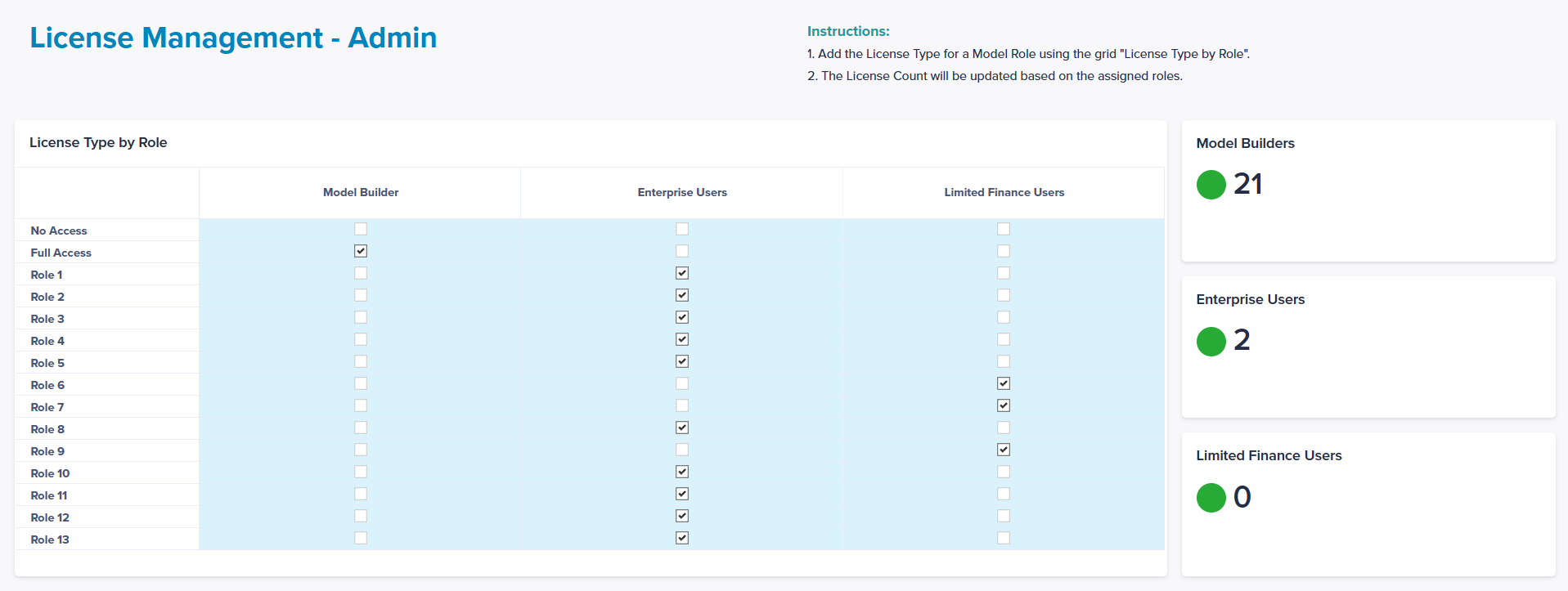
- Role mapping: Ensure roles and workspace admin permissions are set consistently for license calculations. Solution: dashboard where an admin and assign a license type to a role.
Images
Dashboard 1: Consolidated view of licenses and size of all models

Dashboard 2: Size management

Dashboard 3: Role management
Conclusion
A robust license and size management model transforms Anaplan administration from a labor-intensive process to a streamlined, reliable workflow. By automating consolidation and providing actionable clarity, teams save time, reduce errors, and are better equipped for audits and growth. As next steps, consider piloting the module in your environments — or share your thoughts in the comments: What challenges do you face in model administration, and what features would help you most?


