Check out the latest Anaplan feature updates and enhancements in our September 2026 official release notes. There you'll find information on:
- User Experience
- Mobile
- Zoom and pan
- KPI Conditional formatting
- Intelligence
- CoModeler
- Analyst
- Optimizer
- Disclosure Management
- Anaplan Data Orchestrator
- ADO Pipelines
- Pipelines support decryption of PGP-encrypted data through file-based connectors
- Anaplan XL Reporting
What's next?
Please note: The information here is subject to change right up to release go-live time. This post is not a commitment to provide any features by a certain time frame and enhancements to the product may change before release.
Modeling Experience
- Faster, more reliable model history.
We are soon introducing a performance upgrade to the Anaplan experience for model history queries and audit exports, which will now run significantly faster.
This upgrade reduces background lock times, allowing users to continue modeling and planning without interruption, even while running comprehensive model history queries. This update will ensure large history files export smoothly, enhancing overall workspace stability and platform uptime.
Modeling Experience (CoModeler)
- Visual module lineage and calculation dependency maps.
We are soon introducing an interactive module dependency and lineage diagram within CoModeler. This will mean model builders can visually trace module connections, understand interoperability, and map calculation dependencies at a glance for faster, more confident model building & documentation. - DISCO skill (Model design standards).
We are soon introducing a newly integrated skill to bring foundational adherence to the D.I.S.C.O. methodology (Data, Input, System, Calculation, Output) for CoModeler. This will enable CoModeler to adhere to the structural methodology and best-practice framework used by model builders to design clean, high-performing, and scalable models. - Broader tool coverage (Extended CoModeler UI capabilities).
We are soon expanding the range of actions that CoModeler can execute on behalf of the user. This update will introduce tooling that allows CoModeler to perform more of the hands-on tasks that model builders typically have to complete manually through the Anaplan UI.
Anaplan Data Orchestrator (ADO)
- Push down row filters for JDBC connectors through pipelines.
Pipelines pulling data from JDBC Source can have filters configured which are pushed down to the source to limit the volume of data that is extracted and brought from ADO. This reduces the need for custom views to be created in the source systems. This applies to:- Databricks
- GBQ
- MSSQL
- MySQL
- Snowflake
- Pipelines Support decryption of PGP encrypted data though file based connectors.
File based connectors will soon handle PGP encrypted files when sourced through a pipeline. This is available for all file based connectors:- Azure Blob
- GCS
- S3
- SFTP
ADO detects that the file is PGP encrypted based on the file suffix (.pgp or .gpg) this is stripped off and the underlying type used, this could be .csv or .csv.gz (if zipped).
You can obtain the public key here (this URL will be replaced with a new one after some time, which we will provide once available). Learn more in this video:
- Model as a pipeline source.
Anaplan models will soon be available as a pipeline source. This includes lists, hierarchies, modules and saved views. This allows data to be moved between models or from model to external systems with zero copy of the data. Model data can also be written to an ADO dataset allowing data to be stored in ADO and distributed to multiple targets. - SFTP, Oracle RDBMS, Snowflake connections as pipeline source and sink.
SFTP connections, Oracle RDBMS connections and Snowflake connections will soon be available as a pipeline source and pipeline sink. - Exporting large datasets to AWS S3, Azure Blob and Google Cloud Storage.
When configuring a pipeline sink an option will soon be added to process in parallel when possible. It is recommended that a specific folder is created for the file path to contain the multiple files that are generated. The file names follow the defined pattern with a suffix of "-sub-{n}" where {n} is the number.
The number and size of the files is based on the number of threads assigned to the process which is currently up to 8. If there are not sufficient rows to be output the additional files will include headers only. This enhancement improves performance and overcomes limitations for file sizes.
If the pipeline steps cannot support parallel processing as it includes a single threaded pipeline process (such as an aggregation or sort), this will result fewer files.
Platform Close and consolidation
- System-native LTM calculation.
The system will soon automatically calculate Last Twelve Months (LTM) or Trailing Twelve Months (TTM) data using this calculation. This will be stored as a measure with tag #LTM_Amount and will be included as part of Run All calculation. This will give customers automatic trailing-12-month reporting without having to build it themselves, enabling them to speed up reporting.
Disclosure management
- Refreshed UI for the Anaplan DM Web App.
Anaplan Disclosure Management introduces a refreshed user interface, giving the DM Web App a cleaner, simplified look that's aligned with the broader Anaplan UI. This update modernizes navigation and visual consistency across the application.
AI and Analytics: Forecaster
- Advanced Explainability for Algorithms.
Forecaster users will soon leverage advanced explainability within the powerful prediction engines, keeping the "black box" problem in check. This is a crucial step to not only know what the future planning numbers look like, but also get a clearer picture into the reasons behind the forecasts, thus giving you even more confidence to make the right business decisions. - Pre-configured Forecast actions.
Forecaster users will soon benefit from the capability to pre-configure Forecast actions in the same flow as Forecast model creation. This saves users the waiting time to get the Forecast model created before they could create a Forecast action using it. - Exposing winning algorithm for each item in Ensemble.
We will soon add a text field called Best Fit Algorithm to Ensemble explainability to denote the winning algorithm per item in text format. This means business Planners and finance teams can finally see which method is driving each number, rather than trusting an invisible internal decision. When a forecast looks off, teams can check which algorithm was used and investigate from there, rather than treating the whole Ensemble as an unexplainable black box. For regulated industries or audit-heavy finance functions, being able to document why a specific method was used per line item is often a real requirement, not just a nice-to-have. - Scheduling capability for forecast actions.
Forecaster users will soon be able to automate when forecasts refresh, rather than someone having to manually trigger them every time. You can see in the screenshot below how the forecast can be scheduled:- A toggle to turn scheduling on ("Set up a schedule for this forecast action"): scheduling is optional, so forecast actions can still be run on-demand if preferred.
- Trigger frequency (e.g., Daily): how often the forecast re-runs.
- Start/end dates and execution time: when the schedule kicks in, how long it runs for (indefinitely if no end date is set), and the exact time of day it executes, in the workspace's time zone.
- Queuing logic: if multiple scheduled actions land at the same time, they queue up and run in order rather than colliding, with a tip to avoid peak hours.
- "Run the forecast action after creation" toggle: lets you kick off an immediate run in addition to the schedule, so you don't have to wait for the first scheduled trigger to see results.

AI and Analytics: Optimizer
- Automatic retries.
To improve reliability during peak usage, Optimizer will soon automatically retry server requests several times. This will help reduce disruption caused by temporary delays or high server load, providing a smoother experience for users.
Enterprise Experience
New customization options are landing for Page Builders working with Field Cards and Boards, all aimed at giving more control over visual hierarchy and brand consistency without extra configuration effort.
- Field Card updates
- Label Colors: set the label color for fields directly in the Field Card configuration panel.
- Background Toggle: switch the Field Card background to let the page background show through.
- Available across Boards, Insights and Reports.

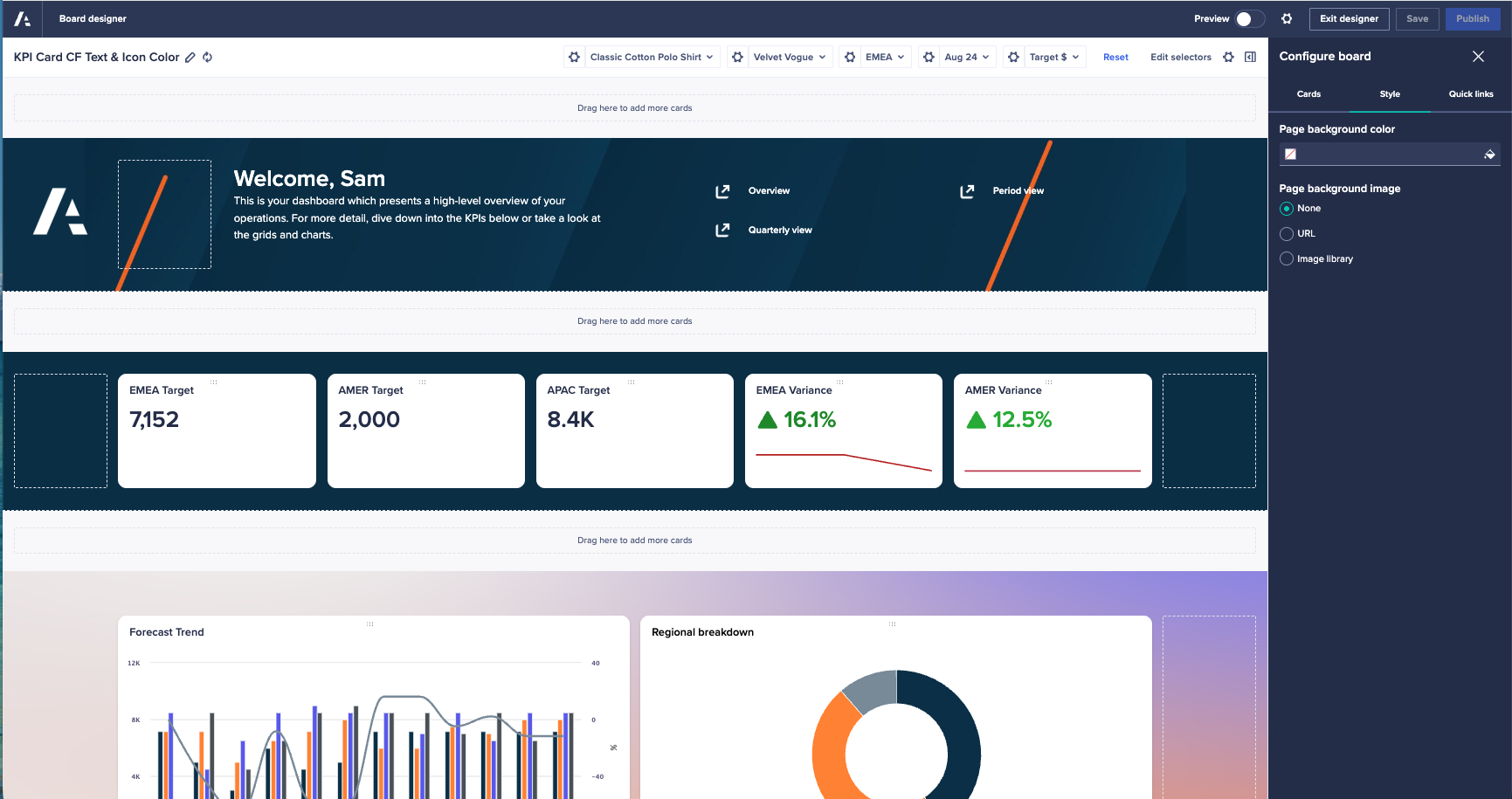
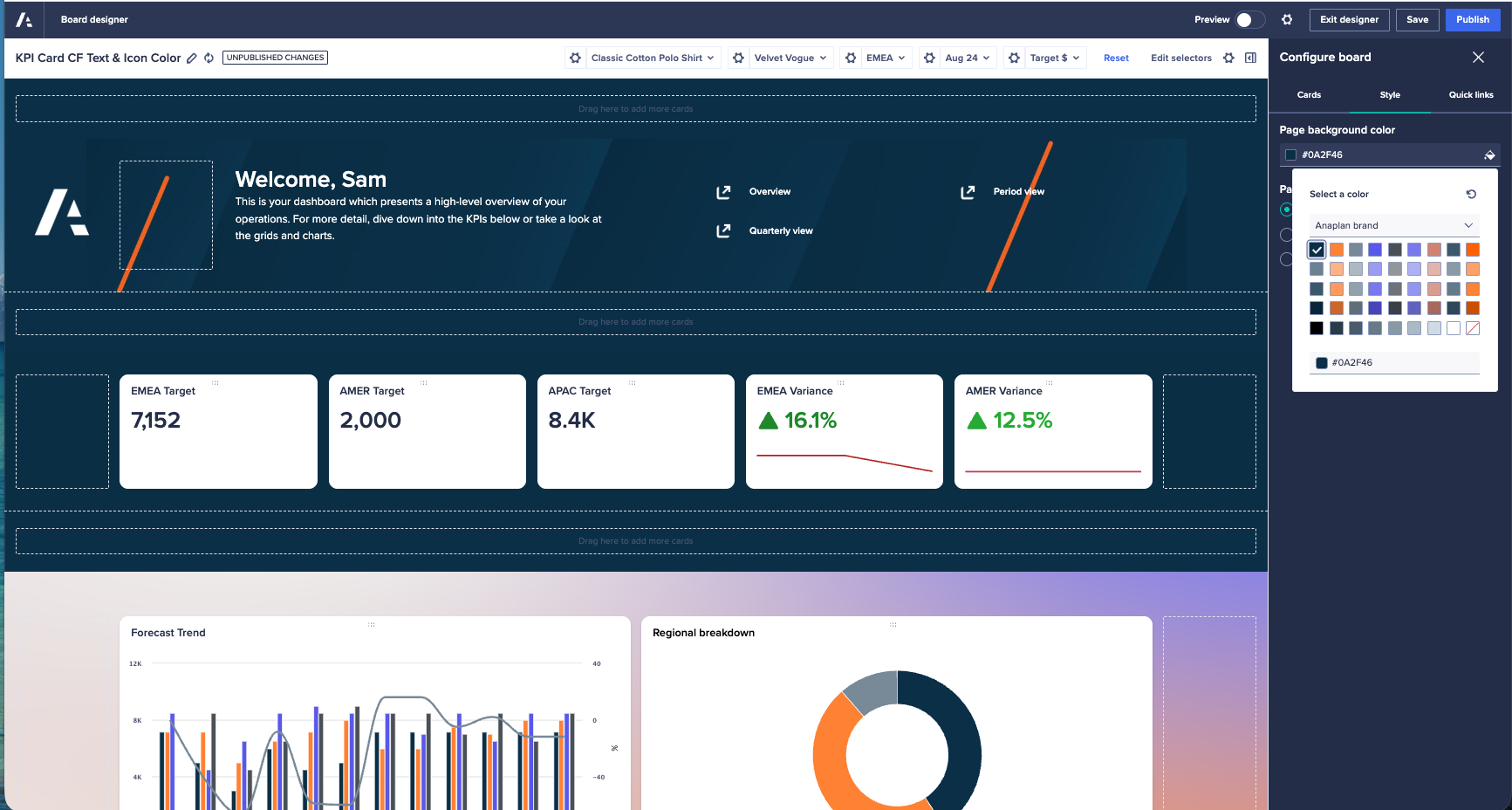
- Background color for Boards
- Pick a background color from a newly introduced Style tab
- Default Context Selectors
Page builders will soon be able to configure default context at the page level for individual context selectors, allowing those who design pages to establish sensible presets for different scenarios.
This feature will enable end users to concentrate on the underlying data and content rather than spending time managing every individual setting.

Don't miss our next Quarterly Platform Release webinar!
Anaplan's next quarterly platform release webinar will be held October 28 at 11:00 a.m. ET. Join us to learn how to optimize your Anaplan experience as we explore the latest features! Our expert-led session will equip you with live demonstrations to help you get the most out of new innovations. Get your questions answered live during Q&A.
Register here.
Other upcoming events: