Check out the latest Anaplan feature updates and enhancements in our January 2026 official release notes. The information below offers supplemental information to that post.
Dataspaces in Anaplan Data Orchestrator
Dataspaces are partitioned areas of a tenant-wide Anaplan Data Orchestrator instance. Integration Administrators can create private dataspaces, and Tenant Administrators can assign and remove access permissions for individual ADO users, enhancing security and governance. Each ADO object resides within the dataspace where it is created, whether the default dataspace for the tenant or a private dataspace.
Link to Dataspaces micro-lesson (you must be logged into Community to access).
Hierarchy Chart Pagination
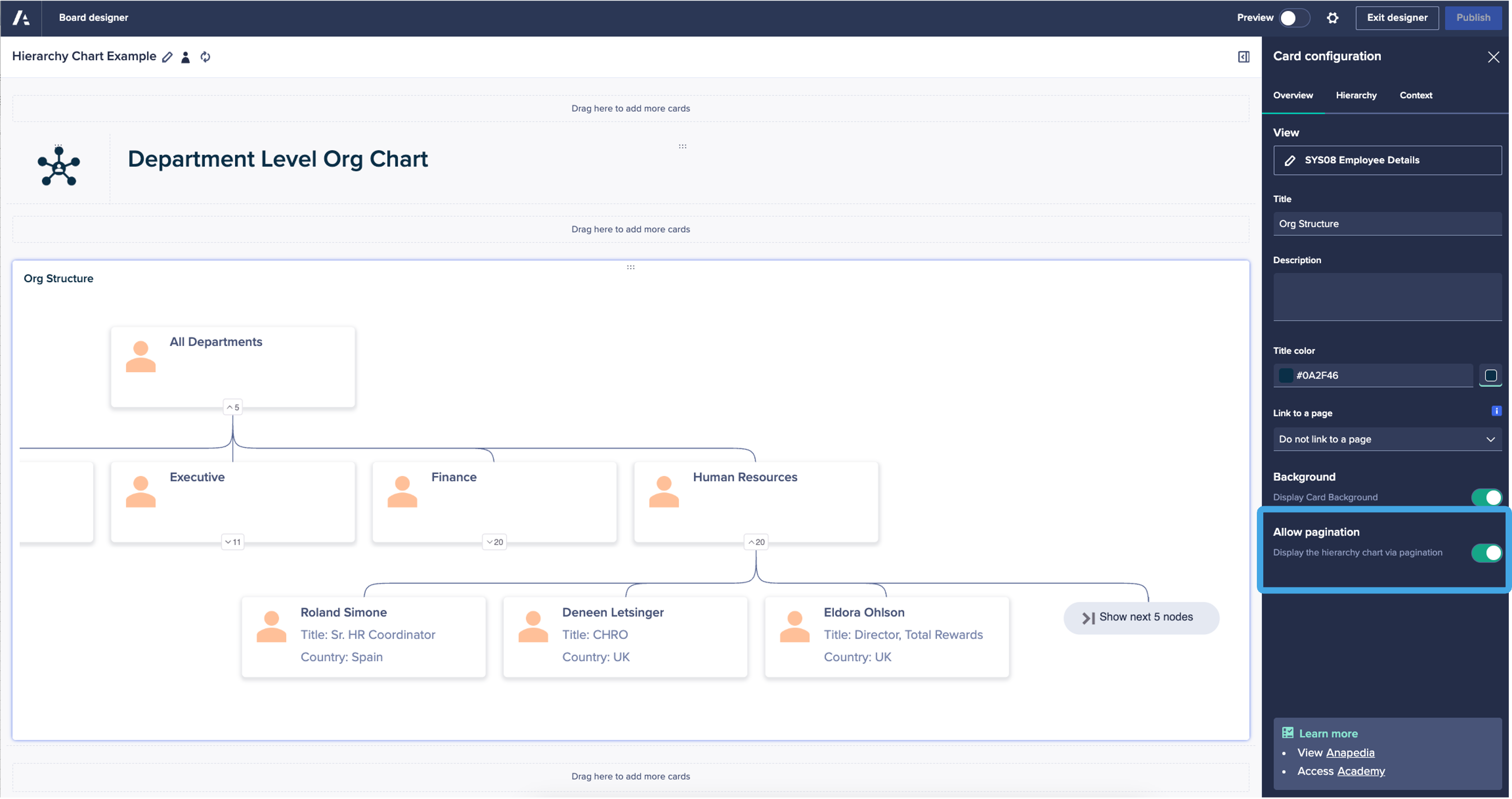
Page Builders can now enable pagination on a hierarchy chart so that only the first three nodes are shown by default. The user will be able to choose to reveal additional nodes in the chart. This allows greater visibility of the full hierarchy structure within a smaller screen space.
What's next?
Please note: The information here is subject to change right up to release go-live time. This post is not a commitment to provide any features by a certain time frame and enhancements to the product may change before release.
Modeling functionality
- 4-digit calendar launching soon
Anaplan modeling will soon support a four-digit calendar timescale, allowing plans to extend up to 100 years from a model’s start date. This will remove the previous two-digit year limitation and makes it easier to build and understand long-term plans, particularly for use cases that span multiple decades.
Enterprise experience
- Board insights panel coming soon
A powerful new addition to the Board page is coming soon. This will change the way users interact with the data. This new feature provides a dedicated, collapsible space for contextual information, key performance indicators (KPIs), navigation links and actions, allowing you to focus on what matters most without ever losing sight of the bigger picture.


- Workflow: Approve and reject directly from email
Approvers can soon take action right from the approval email they receive: buttons for Approve and Reject are included directly in the message. When builders configure an approval step with this option, users will be able to review and respond to submitted items quickly and securely without needing to open Anaplan first. This streamlines the business process, reduces friction, and helps decisions move faster.

- Mobile: Management Reporting on the Anaplan Mobile App
The Anaplan Mobile App now supports Report Pages, enabling models to surface structured, management-ready reporting views on mobile and tablet devices. Report Pages retain their layout and interactive components, allowing users to review key metrics and complete approvals directly from the app. This extends Anaplan’s reporting and decision-making capabilities to mobile environments without requiring separate mobile-specific builds.


Anaplan Data Orchestrator (ADO)
- Reorder columns
Transformation views will soon support saving column order, allowing builders to reorder columns in both Grid and Blueprint views and have that order preserved as part of the view definition. This makes complex transformations easier to build, review, and maintain by keeping columns in a logical, consistent order.
AI and analytics
- Workflow integration with Optimizer
You will soon be able to trigger and run Optimizer actions as part of automated business processes in Workflow. Previously, Optimizer (Anaplan’s optimization engine for solving complex planning and allocation problems) was run manually, through model action APIs or by Anaplan Connect.
With this enhancement, planners will add model actions that contain optimization steps directly in Workflow templates and processes, so tasks like solving for optimal resource allocation or cost-minimized plans can execute automatically alongside data updates and approvals. This makes it easier to build end-to-end, repeatable planning flows where optimization runs at the right point in the process without manual intervention, helping teams accelerate cycles and improve decision quality.
If you missed it…