Check out the latest Anaplan feature updates and enhancements in our November 2025 official release notes. The information below offers supplemental information to that post.
Intelligence
- Anaplan Forecaster: General enhancements
Anaplan Forecaster now supports list subsets for the item ID list and custom time, list format line items in attributes data, and data residency in a new AWS region (AE1). Additionally, weekly data no longer has to start on Mondays.
Planning Experience
- Polaris: On-demand Calculation
On-Demand Calculation is now available in Polaris, which allows the engine to defer significant amounts of aggregation until the data is 'viewed', such as in an export or by a user in a UX page. This enhancement may positive impact model open times, recalculation times on data input, and model size at open. - Anaplan XL (version 2511): General enhancements
Multiple enhancements for Anaplan XL have been released, including: The Excel workbook status bar for grids, freeforms, and table query objects now displays information about each query when a query cell is selected; the Activate Workbook button now only appears when an Anaplan XL workbook is disabled; the Extras menu now includes links to Anaplan Community and video tutorial pages; and the context menu now includes an option to add a workbook slicer. - Anaplan XL (version 2511): Freeform reports
There is now an option to repeat member labels when drilling on a nested dimension, improving readability and context.
What's next?
Please note: The information here is subject to change right up to release go-live time. This post is not a commitment to provide any features by a certain time frame and enhancements to the product may change before release.
Applications
- More flexibility with Saved Views as data sources
You can select a Saved View as the data source when pulling information from an Anaplan model — no longer limited to using entire modules. This gives you more control and precision when integrating data. - Application Framework available to all customers
The ability to implement Anaplan Applications using the Application Framework will soon be available to all customers. Once an Anaplan Application is purchased and users are assigned the Application Owner role, the Application Framework will automatically become visible. The Application Framework provides a structured, guided way to set up and manage Applications. With access to the Application Framework, customers can get their planning processes up and running faster and unlock more value from Anaplan Applications.
Anaplan Data Orchestrator (ADO)
- Enhancements to Data Preview
An enhancement has been made to the preview functionality within a model. Both Source & Derived Datasets can be previewed using a new Preview capability. For Source Datasets this opens automatically when the dataset is selected from the inventory page, whereas for Derived Datasets this is accessed through the preview option on the ellipsis menu on the inventory page. This allows:- The data that is displayed to be filtered using a Boolean expression based on values in the dataset
- The data that is displayed to be sorted based on the values in a number of columns from the dataset
- Displays up to 10,000 rows of data
- Displays the total number of rows in the dataset and the number that meet the filter conditions
- Allows a transformation view to be created based on the filter definition
- Allows the data to be exported to a CSV (this should be the selected data but it is currently exporting all the data and will be corrected soon.)
Note that it is not currently possible to save the preview definition and return to it later.
- Filter for process history
Filters can be defined for the process history in a similar manner to other inventory pages.
This is applied to the entries that meet the selection and is also applied to the rows that are included in the export.
Enterprise Experience
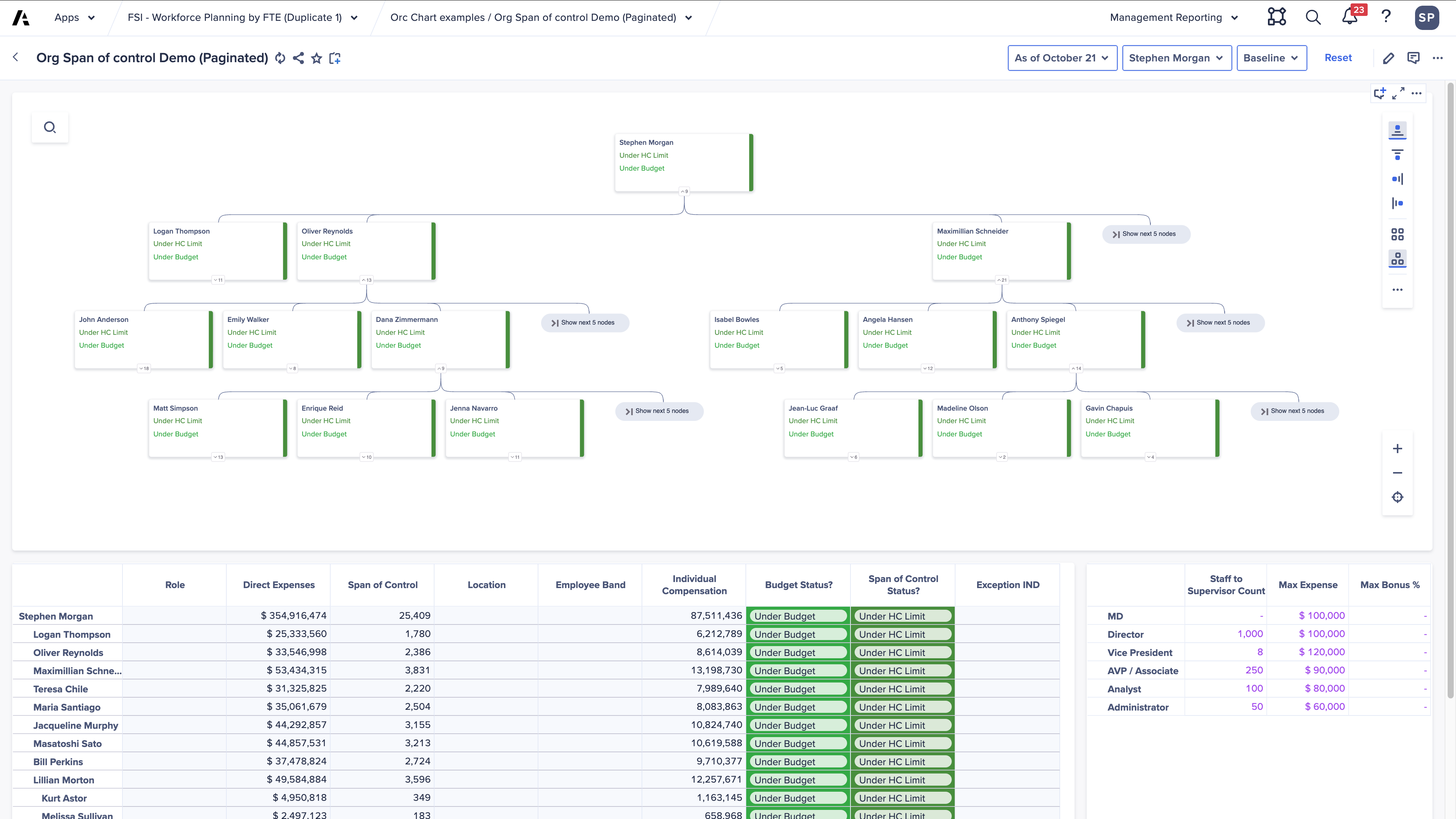
- Hierarchy Chart pagination
We have added the ability to enable pagination on hierarchy charts so it Is easier to see the hierarchy structure on a page. See example below of a paginated Org Chart and the setting to enable it.
- Nest more than 3 dimensions in an axis
Page builders and end users will now be able to use pivot to nest more than 3 dimensions in an axis. Unlocking deeper data exploration and more flexible analysis for highly dimensioned views. Important note: This feature is for Polaris models only. - Grid rich text formatting on mobile
End users on mobile can now apply rich text formatting to editable text in grids and field cards to add some commentary and highlight key areas. This includes the following formatting: Bold, Italics, Underline, Strikethrough, Text alignment, Bullet and Numbered list.
Forecaster
- Run forecasts where work happens
Forecast Actions can soon be triggered directly from UX pages using a configurable button. This means business users won’t need to navigate away from their dashboards or rely on back-end processes to run forecasts - helping teams embed forecasting faster and more directly into day-to-day decision-making. - Test and deploy forecasts with confidence
We’re introducing more flexible repointing for forecast results and explainability, allowing outputs to be written to a different model or workspace than the one used for configuration. This lets teams safely test and validate forecasts in non-production environments before deploying to production - without duplicating setup work - streamlining promotion cycles and reducing risk.
Previous release notes
Thank you!