Author: Tyler Beck is a Certified Master Anaplanner at TBLB LLC, and is currently a Team Lead at CVS Health.
Use case
A client requests a flat list for time that will change year over year and does not want to manually update the list, and does not want to use native time. Instead of creating a production list to update the months and years over time, a non-production flat list can be created using a numbered list and the years will update based on the current period and logic to create a dynamic display name.
What you will need:
- Current Period in native time settings
- Systems module for time settings
- Non-Production Flat List for Months Flat
- Non-Production Numbered List for Dynamic Time
- Systems module to reference the final Dynamic Time Display Name
Step 1: Create systems module and reference the current period
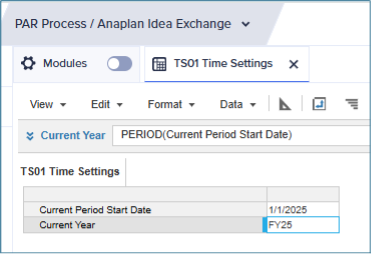
Create a systems module for Time Settings, and the create two line items:
- Date formatted line item to generate the current period start date
- Year formatted line item to produce the current year time period to be referenced in the dynamic time module

Step 2: Create non-production flat lists for time
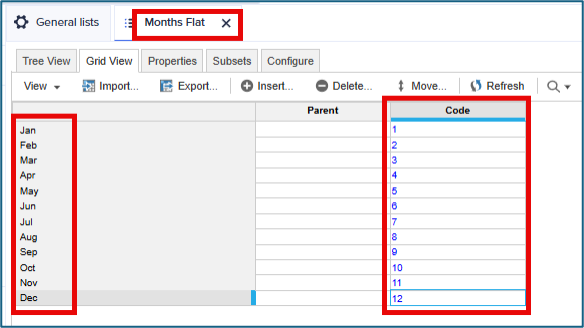
First, create a Months Flat list to show the MMM format for each of the 12 months and use the month number as the code:
Next, create a numbered list for Dynamic Time, then:
- Create a list property for the Display Name, formatted as text
- Add 12 items for each year, in this use case 3 years will be used (48 items)
- Generate a code for each year, and add a decimal for each year to represent the number of years past the current period:
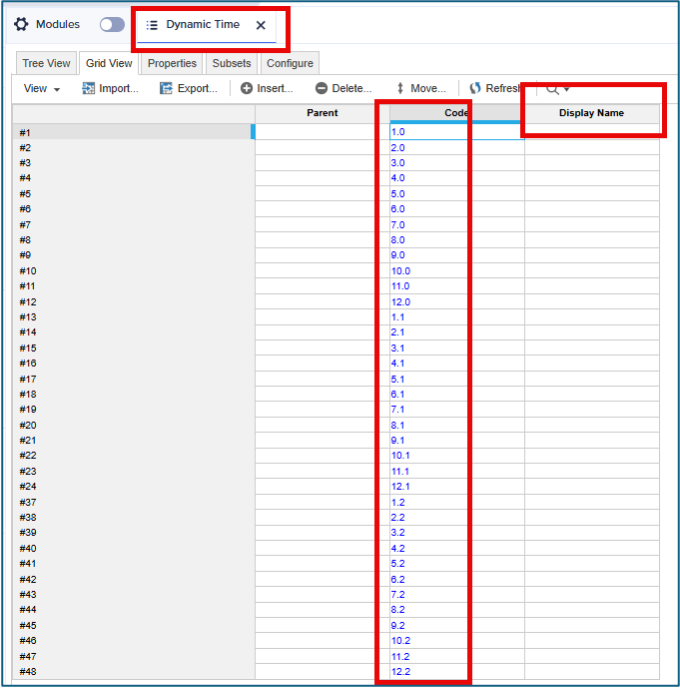 The code for the list will be used to generate the display name for the non-production numbered list to display the correct year based on the current period in the time settings.
The first 12 months are followed by a “.0” because they represent the current year months. Then the next 12 months represent CY+1, and CY+2 after that.
The general lists section should show both lists as non-production lists and one numbered list:

Step 3: Create systems module for dynamic time list
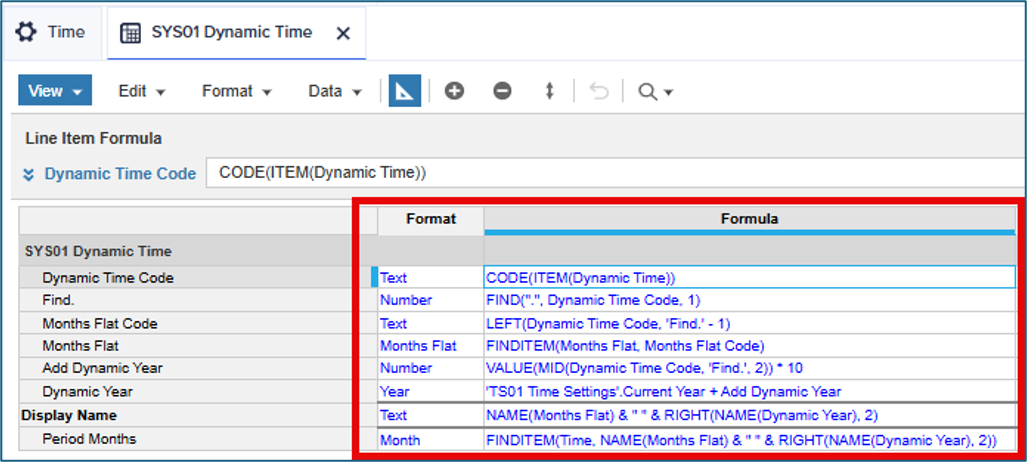
Create a systems module to generate the display name for the Dynamic Time numbered list, and to create a line item to SUM/LOOKUP native time. Line items to be included:
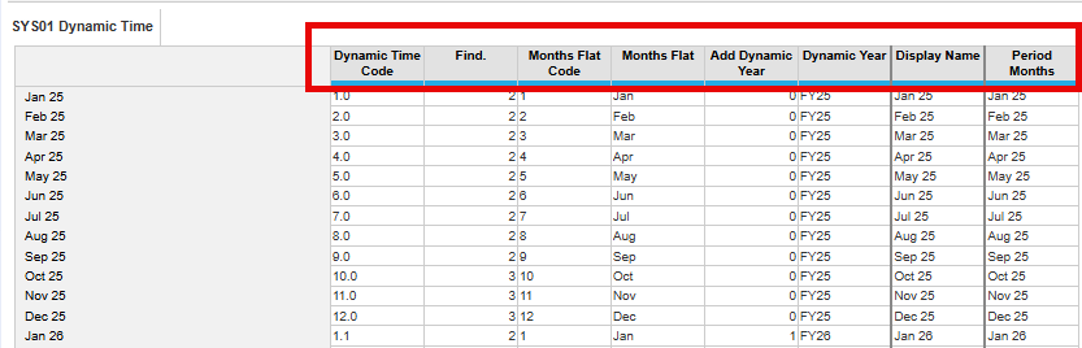
- Text format to produce the codes created in Step 2
- Number formatted line item to find the position of the period in the code
- Text Formatted line item to produce the code to populate months flat list
- List formatted line item using Months Flat, to generate the correct month based on the code
- Number formatted line item to represent the number of years to add to the current year
- Year formatted line item to produce the correct year based on the code and Time Settings year
- Text formatted line item for the Display Name, and to be referenced by the Dynamic Time list
- Month formatted line item to be used to SUM/Lookup native time in downstream calculations
The formulas for the line items are represented below:
Step 4: Reference the display name in the dynamic time numbered list
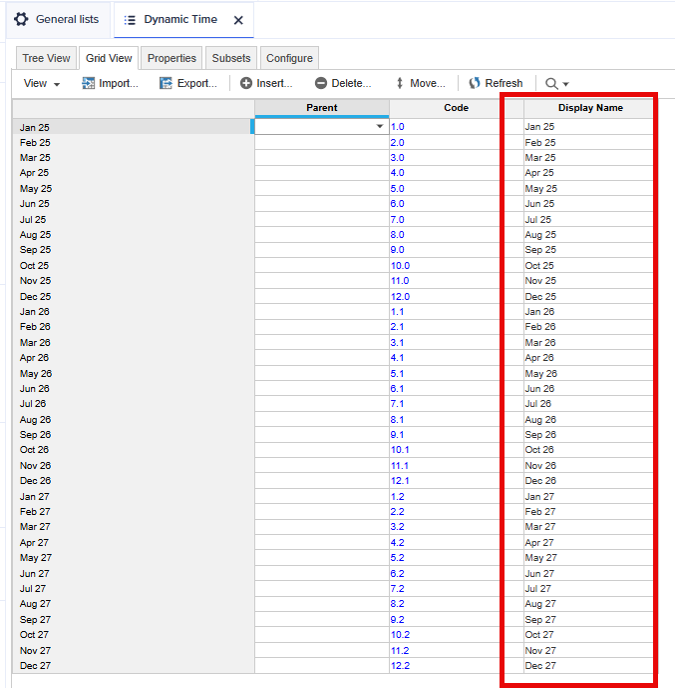
Enter the reference to the display name line item in the list property formula to generate a dynamic display name.

The dates will reflect the Current Year (CY), CY+1, and CY+2 based on the current period in the model and will update year over year automatically. This way a production list is not needed to manually update as the fiscal years change.
Conclusion
A non-production numbered list can be used to generate a dynamic display name based on the model’s current period using a series of line items to produce a time list that can be mapped back the native time list. This is a very powerful tool for clients who have specific requests for time periods because subsets can be created in the flat list instead of time ranges; and the native time list is not required to be applied as a dimension.
Questions or comments?
……………
Also by Tyler: Create export template for Anaplan users to import using months