It would be really useful to apply sorting based on line items in another module. Also when entering a subsidiary view.
The idea is a copycat for this Idea but about Sorting feature.
Absolutely! Only being able to sort A-Z or Highest-Lowest can only get you so far. It would be amazing to reference other criteria for the sort. Trying to manually add line items to make this easier jumbles the modules and is too complicated.
This would be hugely valuable. I have a client that needs to see their reports (Time based), in different ways at different times and by different users. eg. One report needs the dimension sorted alphabetically, another needs it to be sorted by Acquisition Date. I can easily create a "Sort" line item with a formula which will allow for them to toggle between sorting views, but I cannot apply it because the time range is in the columns, and the line items with the data need to be selectable. If we were able to point to other modules for sorting (like we can for filtering), I could solve this issue.
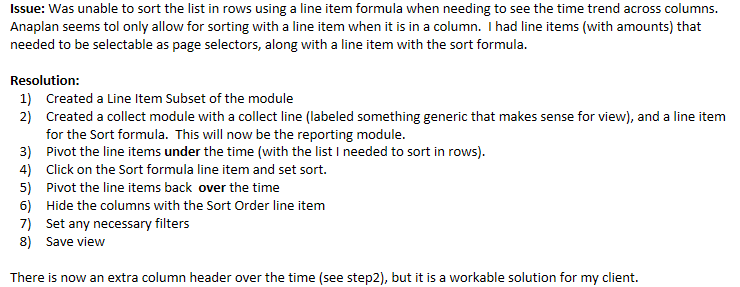
In case it is helpful for anyone, I was able to solve my above noted issue by doing the following. A bit clunky and touchy...but it seems to be working.
If anyone has another, more efficient solution, I would love to hear it.
Description Currently, scroll bars in Anaplan UX grids and cards only appear when content exceeds the visible area and when you hover over a card and the scroll bars appear. While this behavior is standard, it can create usability challenges for end users, especially when: Users are unsure if additional data exists beyond…
In as much detail as possible, describe the problem or experience related to your idea. Please provide the context of what you were trying to do and include specific examples or workarounds: I have a small improvement request for assigning security rights to different security groups in AnaplanXL - it makes sense having…
I would like to pre setup input Booleans by default to true in the blueprint view //GP