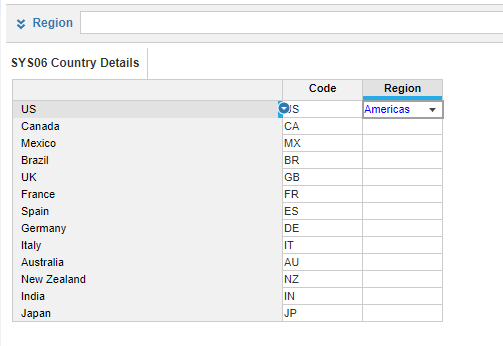
I am running into the following issues when trying to create the Country Details module by uploading the Countries.csv into the SYSO6 Countries Detail Module
Hi @mhinnes,
this seems like mapping issue. Can you share the screenshot of your import definition and mapping while importing the file?
Thanks so much in advance for the help, really appreciate it. Below is the mapping that I'm using.
hint: try mapping column headers to SYS06 Country Details Line Items.
Let me know if you manage to solve it!
Thanks Filip it worked! I really appreciate your help and expertise. 😀👍
Does the final result look like this?
Mine looks like that, but when I attempt to use the module as an import to G2 Country list it fails because the country codes are not there. As a test I imported countries.csv directly into the list and the import worked.
if mine didn't import like that what should i do?
Hi @ninja247 , did you get a solution in the end? I can see you posting in all the same threads I am looking at now 🙃
I have the same issue when loading the file and changed mapping to use Column Headers. The file was loaded and now looks like this
The Region column is blank and I can fill the column with Region Name. Can anyone help explaining what went wrong?
thanks @filip.sypniewski, it works.
Check out the latest Anaplan feature updates and enhancements in our November 2025 official release notes. The information below offers supplemental information to that post. Intelligence Anaplan Forecaster: General enhancements Anaplan Forecaster now supports list subsets for the item ID list and custom time, list format…
Check out the latest Anaplan feature updates and enhancements in our October 2025 official release notes. The information below offers supplemental information to that post. Planning experience Combined Grids This new capability gives page builders the ability to combine multiple modules into a single, unified grid on a UX…