Author: Miki Sato is a Product Manager, Product Management Team (Data Management) at Anaplan.
In my previous post, I outlined the different ways Salesforce and Anaplan integrate — from the Embedded UX experience (Anaplan Tab) to data-level integrations such as the Anaplan Data Orchestrator (ADO) Salesforce Connector.
Since October 2025, we have added a new option — Anaplan for Salesforce, a native managed package designed for customers using Revenue Performance Management (RPM) applications.
With three different integration choices now available, many customers ask:
- How is Anaplan for Salesforce different from the Anaplan Tab?
- How does it differ from the ADO Salesforce Connector?
- When should each be used?
The answer is simple: each addresses a different part of the planning-to-execution workflow, and together they enable a complete closed loop.
Two ways to connect Salesforce and Anaplan
1️⃣ Anaplan for Salesforce
A native Salesforce managed package developed by Anaplan and available for RPM customers for the initial release.
Purpose-built for execution alignment:
- Real-time CDC streaming from Salesforce to Anaplan
- Scheduled bidirectional sync (as frequent as every 5 minutes)
- Deep integration with RPM workflows (Territory & Quota, Sales Forecasting)
- Native UX for sales reps and managers
This solution keeps day-to-day operational data synchronized so that forecasting and territory activities always reflect the most current opportunity and account details.
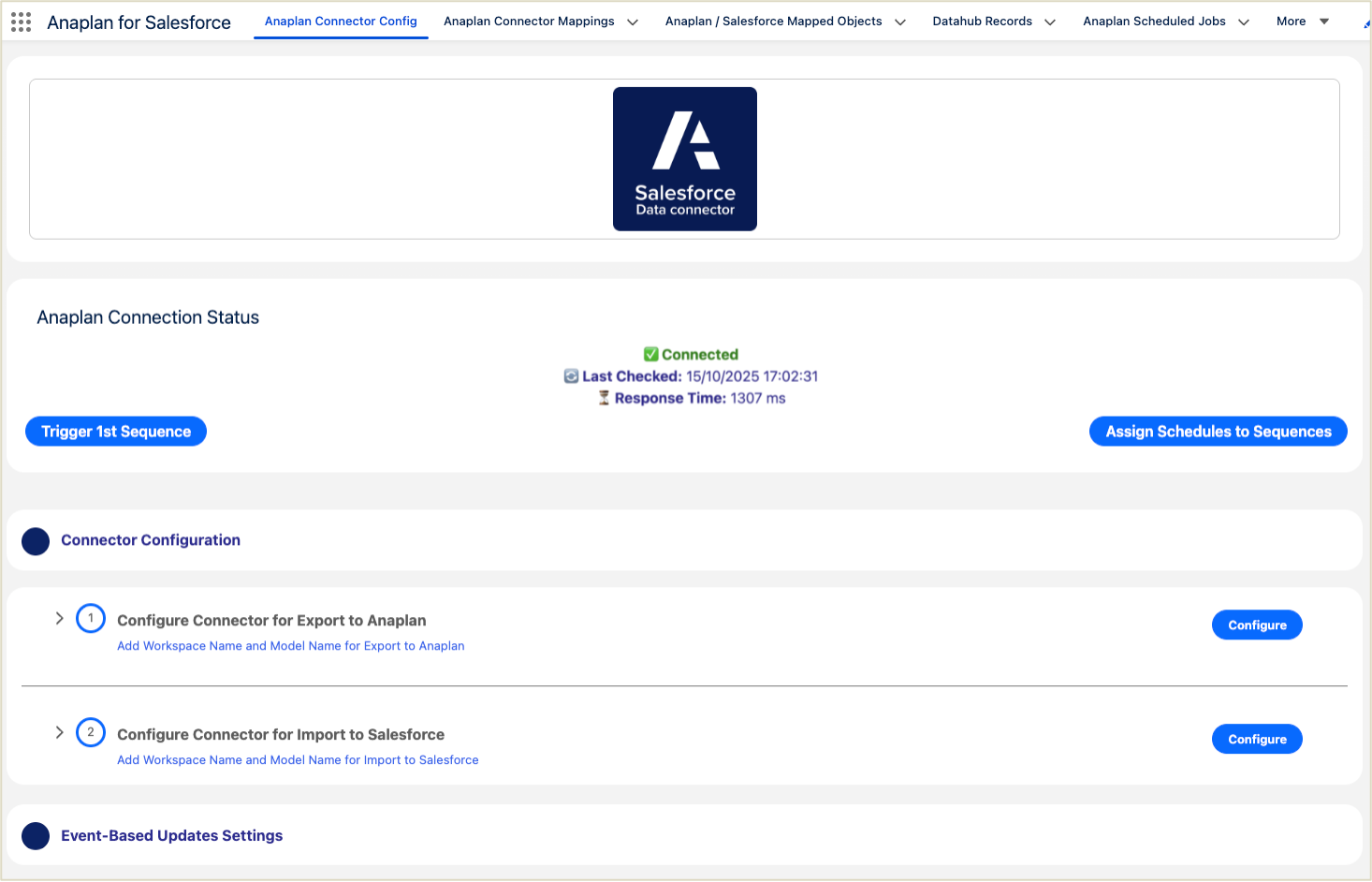
Figure 1: Salesforce-native interface of Anaplan for Salesforce, used to configure bi-directional data synchronization and real-time event-based updates.
2️⃣ ADO Salesforce Connector
Part of ADO, our enterprise data foundation layer.
Purpose-built for planning data management:
- Pulls Salesforce data alongside ERP, finance, supply chain, segmentation, and product data
- Offers transformation, validation, mapping, filtering, and governance
- Supports large historical datasets and lineage requirements
- Designed for stable, repeatable planning pipelines
ADO is also evolving toward bidirectional and near-real-time data flows, powered by future write-back capabilities and streaming support, strengthening its role as the enterprise planning data foundation.
Real‑world perspective: Combined approach
When I worked as a CRM product manager supporting territory and quota planning,
as well as sales pipeline management across multiple organizations,
I learned that no two teams ever operated on the same cadence.
- Some refreshed territories annually, while others adjusted mid-year during reorganizations
- Many revised quotas quarterly or monthly depending on performance
- Strategic or high-touch segments required weekly, sometimes ad-hoc, refinements
- And during quarter-end, pipeline updates continued until the final hours
This variability becomes especially critical in forecasting, where leaders cannot rely on yesterday’s batch data — they need current information.
Dan Koellhofer, head of our GTM Applications Group, emphasized this at Anaplan Connect London:
“Sales forecasting requires systems to be perfectly in sync at all times — especially in the final week of the quarter.”
— "Driving Growth with Anaplan Revenue Performance Applications", Anaplan Connect London 2025
Planning and execution run at fundamentally different speeds.
This is why many organizations adopt a hybrid model:
- ADO provides structured, multi-source data for planning cycles
- Anaplan for Salesforce keeps operational execution synchronized throughout the day
Together they minimize performance loss caused by cadence misalignment.
The following diagram shows how ADO and Anaplan for Salesforce work together to form a continuous planning-to-execution loop, with governed enterprise data feeding planning cycles and operational updates flowing back through Salesforce.
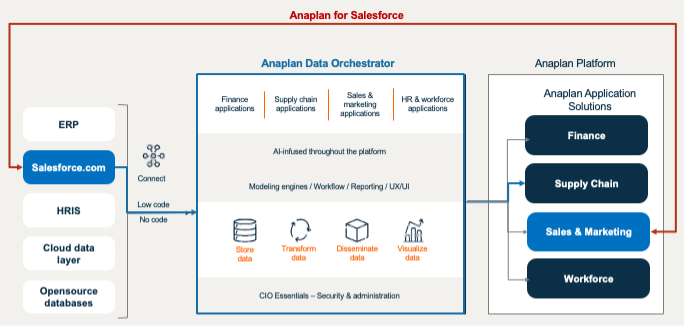
Figure 2: The Integrated Closed-Loop Data Flow using Anaplan for Salesforce and ADO Connector.
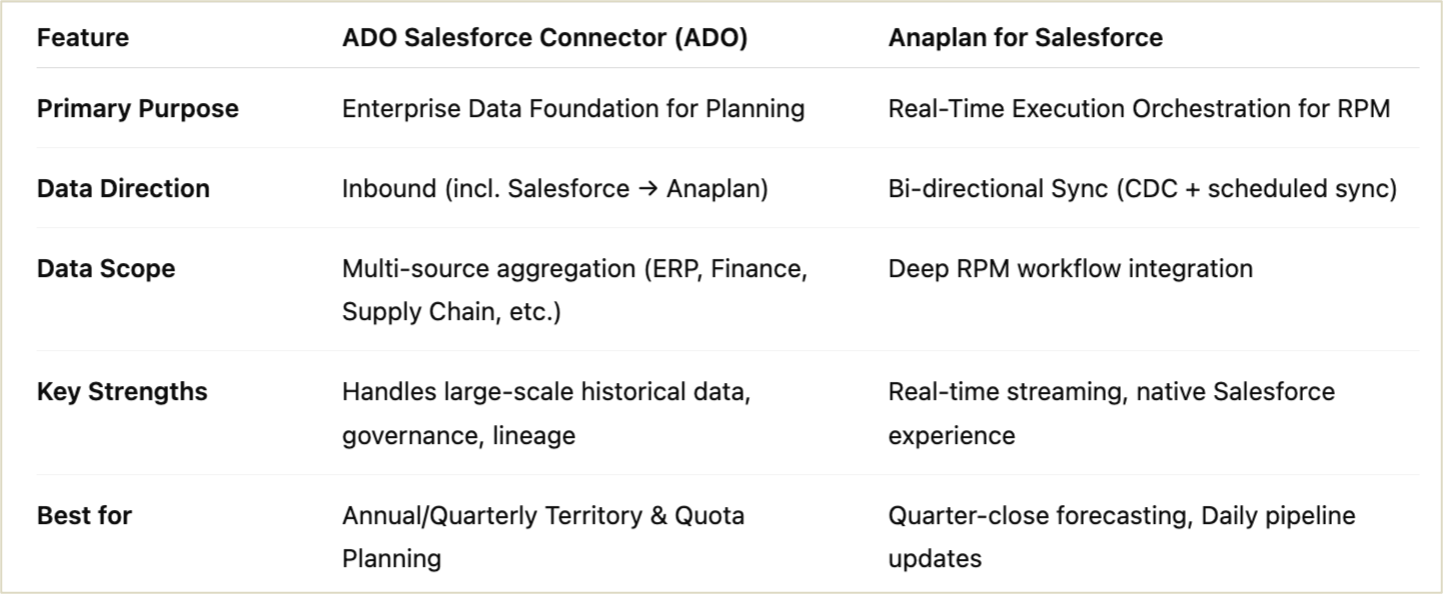
Figure 3: Summary comparison: ADO Salesforce Connector vs. Anaplan for Salesforce.
Key considerations for a combined approach
These considerations ensure that both systems operate without conflict and remain aligned as the integration of landscape evolves.
1️⃣ Ownership and required skills
- ADO Salesforce Connector
- Operated by data/integration specialists
- Transformation, scheduling, and monitoring occur in ADO
- Anaplan for Salesforce
- Implemented within Salesforce
- Requires Salesforce Admin expertise (permission sets, package management, API usage)
- Requires coordination between the Salesforce Admin and Anaplan model builder
Clear ownership prevents configuration of drifts and ensures reliable operations.
2️⃣ Field mapping and data responsibilities
- ADO mapping is configured in ADO
- Mappings can be created in both Anaplan and Salesforce.
To avoid unintended overwrites:
- Define which system owns each object/field
- Prevent both tools from writing to the same field concurrently
- Establish a process for updating mappings when new Salesforce fields are introduced
3️⃣ Refresh cadence and scheduling alignment
While both ADO and Anaplan for Salesforce support frequent updates, their refresh mechanisms operate differently and must be aligned:
- ADO: Flexible scheduled orchestration, supporting high-frequency runs (as frequent as every 15 minutes) and parallel flows
- Anaplan for Salesforce: Salesforce-native event-driven updates (real-time CDC) plus frequent scheduled sync
As ADO evolves toward bi-directional integration, defining clear refresh and overwrite rules becomes even more critical:
- When should planning changes overwrite Salesforce?
- When should Salesforce updates take precedence?
- How should schedules be aligned once both systems can be written back?
4️⃣ Access control and security
Because authentication and integration users differ:
- Use separate integration users for ADO and Anaplan for Salesforce
- Ensure consistency between Salesforce field-level security and Anaplan access rights
- Review permissions whenever mappings or data flows change
5️⃣ Conflict resolution and governance
Define the rules for:
- How to handle conflicting edits
- Whether CRM edits or Anaplan-approved changes take precedence
- Who approves mapping or field ownership changes
- How exceptions are logged and reviewed
This prevents silent overwrites and ensures long-term reliability.
Looking ahead
ADO and Anaplan for Salesforce are not substitutes — they are complementary:
- ADO → multi-source, governed data foundation for planning
- Anaplan for Salesforce → High-frequency execution alignment
- Together → A frictionless planning → execution → performance cycle
We will continue to deepen the alignment between both solutions, providing customers with a more unified experience across data orchestration, RPM workflows, and Salesforce integration.
Further reading
Concept and strategy: Planning, execution, and RPM
ADO: Planning data foundation and modern MDM
Anaplan for Salesforce: Execution alignment
Sessions and talks referenced in this article
