
Author: Jonathan Cushing is a Certified Master Anaplanner and Senior Consultant at Vuealta Consulting.
As a Chartered Accountant and someone who has experience in both in-house consulting roles for housebuilding and construction companies, I was excited by the release of Combined Grids in Anaplan.
For years, when end-users have shown me spreadsheets they wanted to replicate, I've had to explain that a direct replication wasn't possible, or that they'd have to settle for two separate grids with synchronized scrolling, a compromise. Combined Grids resolves this user experience challenge.
Below are two examples of where Combined Grids would improve the user experience from projects I’ve worked on in recent years.
Trial balance analysis
Any Financial Planning and Analysis Model generally involves loading a trial balance from an ERP system to Anaplan and mapping the general ledger codes to a line-item subset that creates the financial statements for historic periods. The below example combines the mappings and error checks into one grid. An end-user can then use the grid filters to look for any missing mappings across the year. This gives end-users greater control and autonomy. They can now use simple grid filters to:
- Instantly identify any missing GL mappings across the year.
- See which GL codes comprise their revenue, providing instant transparency.
By providing this single-source report, we empower end-users and save model builders time that would otherwise be spent creating bespoke filters.

Operational reporting for housebuilding and construction
Another example of a report that I’ve been asked to build on numerous occasions for construction or housebuilding companies is shown below. Users want to see the details of a building site or contract next to a KPI displayed over time. Housebuilders regularly report “by category”, so for example they want to forecast plot sales for secured land in FY27.
The view below gives an analyst a way of seeing this a validating that the data provided by the regional teams is correct. Again, simple end user filters can be applied to the grid on which ever site detail is being reported.
This could be further enhanced by applying conditional formatting based on the site status. This creates a visual Gantt-chart-like view, colored by security status, giving management a clear picture of future revenue stability.

Streamlined Excel exports
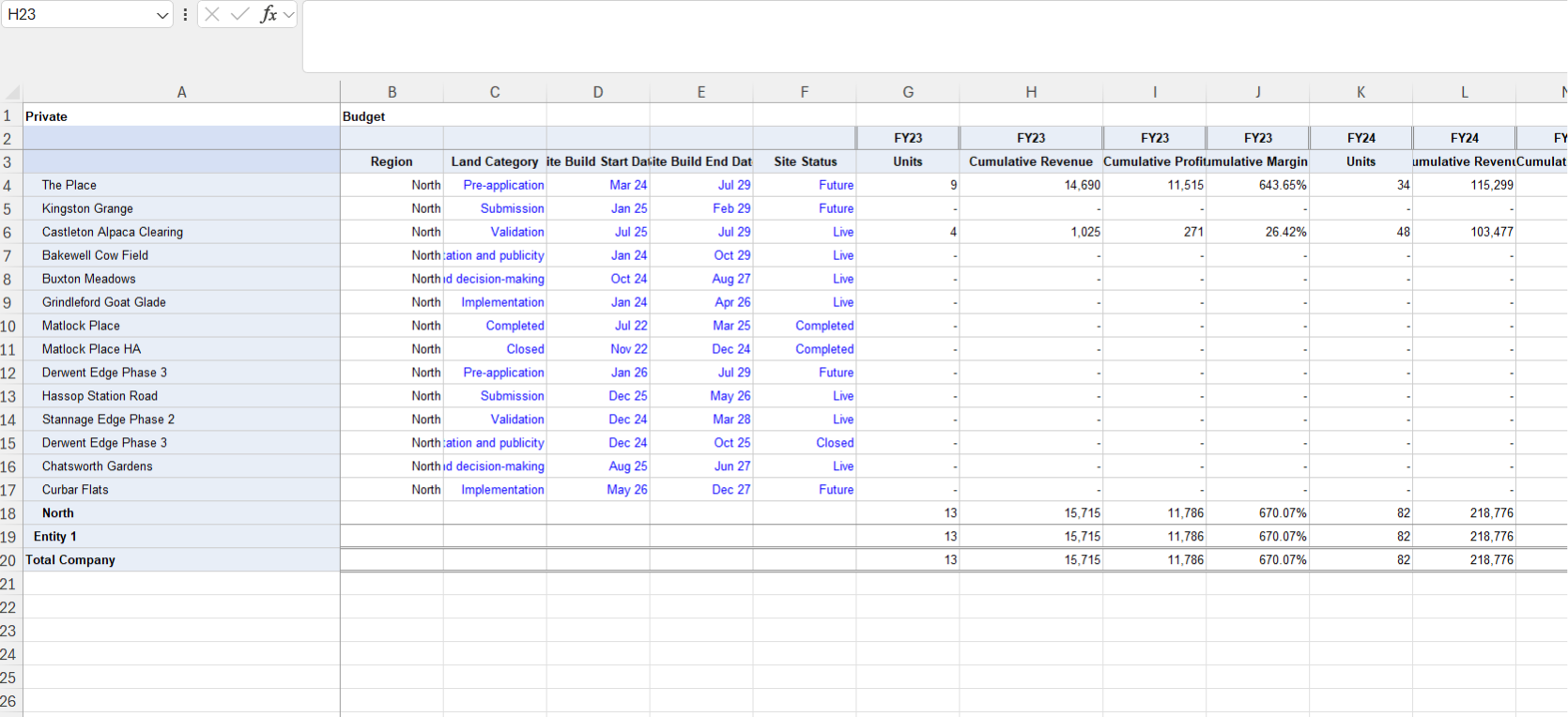
Let’s face it, many end users export Anaplan reports to excel. Having worked in FP&A teams and alongside analysts, I’ve often been asked to build an export that shows a contract with details of where it sits within the geographical hierarchy and certain other site information alongside their financials by month.
There are work arounds using labels on exports but generally it results in a lookup formula in excel. Combine Grids gives much better excel reports and the below example is like how the housebuilder I used to work for reported. Building well laid out Combined Grid reports will save end users a lot of effort in excel and will reduce the chance of excel errors in their reports.
Conclusion
It’s clear that combined grids will enhance the user experience, but it further re-enforces the need for a front to back model design approach and following the Anaplan way. Data and lists need to be structured so that modules can be combined, and consistent filters applied to modules.
Questions? Leave a comment!


