
Author: Misbah Ansari is a Certified Master Anaplanner, Anaplan Community Moderator, Leader India User Group, and Founder at Miz Logix.
Anaplan has consistently released several features monthly to stay ahead of the competition and enjoy being a leader in the Connected Planning world. 2025 was no different and there were so many additions to each area of the platform which includes modeling, UX, extensibility, intelligence and Workflow. Although there may be some of you who have followed these releases, many may have missed these updates and releases. In this article, I’ll share more about top 25 features that Anaplan released during the year 2025. Also, the Community recently hosted a November Challenge, and asked people to chime in with their favorite features from 2025. We have seen tremendous response from our Community members who actively participated and shared their favorites. I’ve noted the most popular fan favorites in my list below with quotes from the Community.
Note that this is the third year and article that I have had the privilege of writing it up and I must say that this year has been one of the toughest years to pick up top 25 features due to the sheer volume of the new features released. Anyway, these top 25 features are divided into their respective areas of their capabilities so that it is easy to understand. Let’s jump into it!
Modeling
1. Breakback functionality in Polaris
Breakback functionality is now available in Polaris models, taking advantage of Polaris's native handling of sparsity. This includes limiting the number of cells affected by a breakback to prevent failures.
2. New functions in Polaris
IRR (Internal Rate of Return) and NPV (Net Present Value) functions are available in Polaris, further increasing the breadth of domain-specific calculation capabilities available to users. ITEMLEVEL and HIERARCHYLEVEL, two new functions exclusive to the Polaris engine, have also been introduced, which will allow modelers to determine the level within a hierarchy of an item or list members. Modelers can easily use this information within their formulas, avoiding the need for more complex modeling constructs.
3. UX Page dependency data
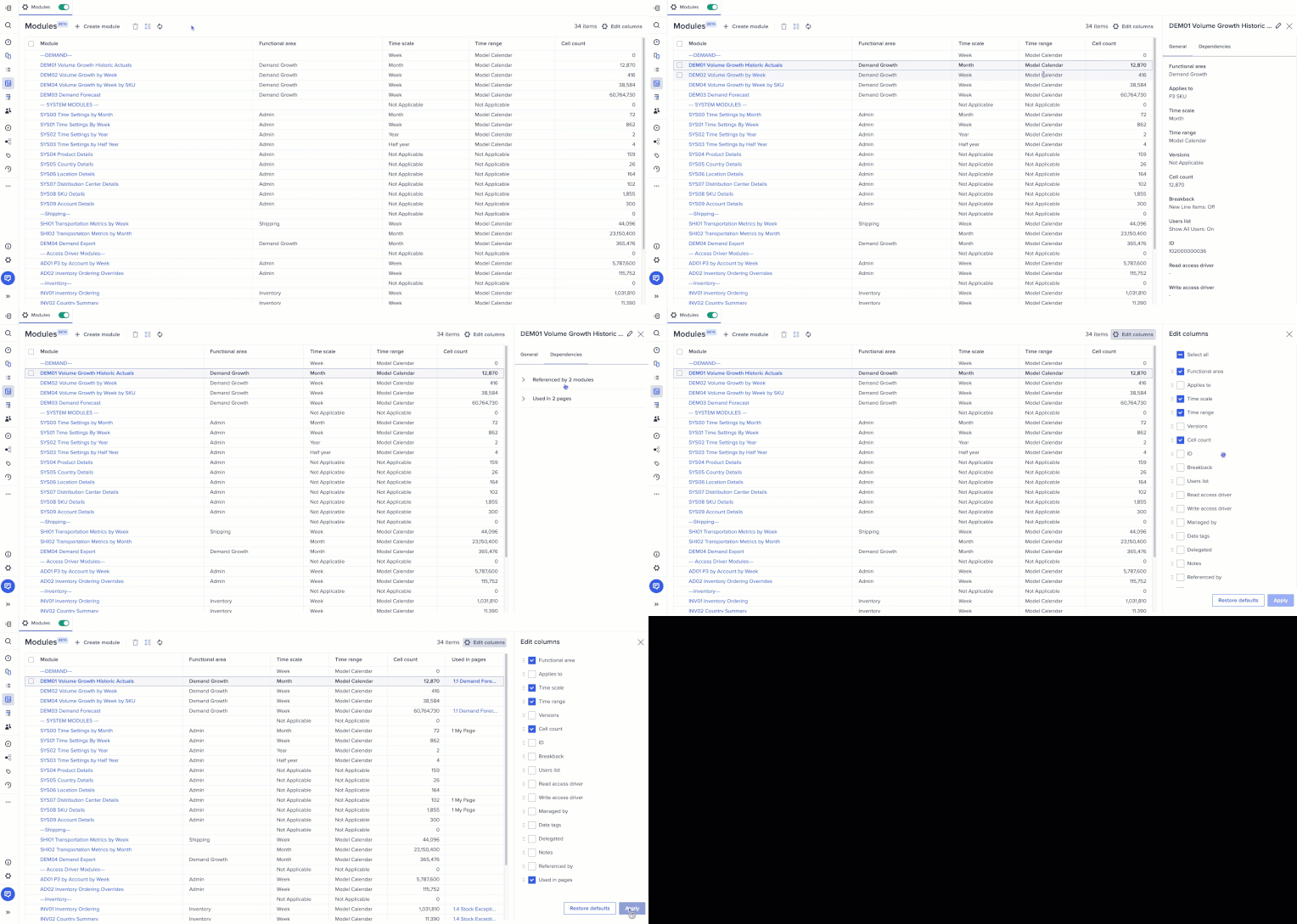
In the modules view beta experience, model builders can now see which UX pages are linked to each module, improving visibility into dependencies and reducing the risk of unintended changes.
Thoughts from the Community:
- @Tiffany.Rice: There have been so many great features this year!! A recent one that really helps those of us in the model builder persona is the "Used in pages" within Modules Beta.
- @Humay: As a Model Builder, I found the “Used in Pages” column in the Anaplan Beta Modules extremely valuable and a major improvement in model management.
- @SIVAPRASADPERAM: The Modules View Beta now enables model builders to identify which UX pages are linked to each module. This added visibility helps manage dependencies effectively and minimizes the risk of unintended changes.
4. Page List enhancements
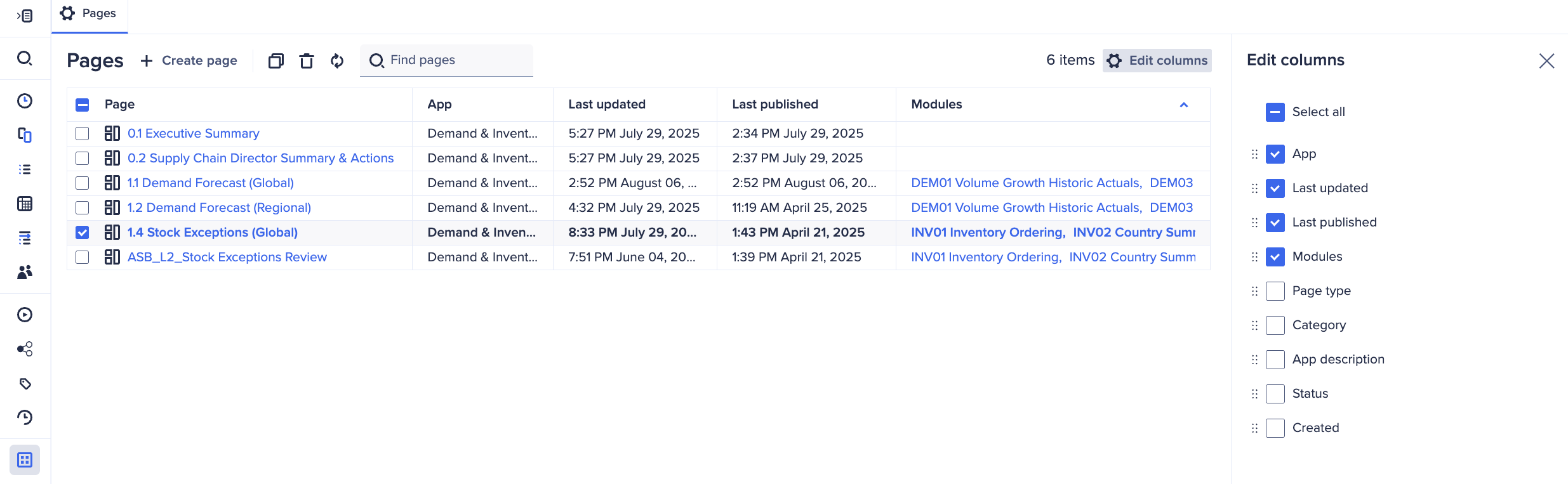
The Pages Inventory has been enhanced to provide a more seamless and unified experience, aligning closely with the functionality of the New Modules Inventory. This includes a compact toolbar, page deletion, editable table columns, enhanced column sorting and arrangement, modules attribute column, and persistent right-hand panel tabs.
5. Calc Effort % in Classic
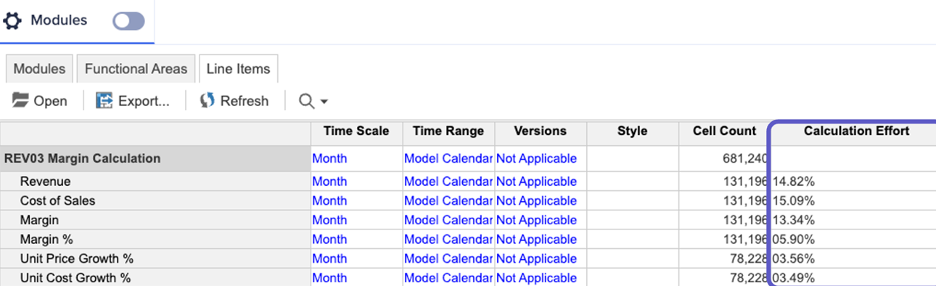
Calculation Effort is now available in Classic, either in Blueprint view or the Line Items section of the Module Panel. The column displays the percentage of computational effort required for each line item. Opening a model initiates the calculation of all its line items, which means opening time varies based on model complexity and data volume. Once the model is opened, the Calculation Effort column will show which line items in the model require the most computation and may require optimization. For more, check out this community article here.
Thoughts from the Community:
- @matthewreed: There have been some great enhancements this year, but the biggest game-changer for me was the visibility of calculation effort, which was added to the classic engine in March.
- @Bhumit285: From a Model Builder’s perspective, the most impactful improvement has been the Calculation Effort insight in Classic engine, which has significantly helped in model optimization.
- @SunnyNafraz: For model optimization, the platform introduced Calculation Effort Visibility in March 2025, which is like a built-in "speedometer" for formulas in classic models, helping builders see exactly which calculations are using the most processing power so they can be optimized for faster performance.
- @namdevgurme: See which line items are heavy on calculations. Great for optimizing performance and speeding up model.
- @jjayavalli: The March 2025 release introduced the Calculation Effort % metric for Classic-engine modules. This new column exposes how computationally “expensive” each line item is relative to the overall model.
- @Anjaneyulu Putta: Offers transparency into model performance and calculation complexity, helping optimize efficiency and reduce processing time.
- @Poojalakshmi, @shaik970, @devrathahuja, @Babu12, @PujithaB, @ShivankurSharma, and @parmod.kumar2 all also shared this feature as one of their favorites!
6. Clickable dependency links in the New Modules Inventory
In the New Modules Inventory, columns containing dependency data are now clickable, offering model builders quick, seamless access to linked objects for a more efficient modeling experience. Model builders can access the New Modules Inventory via a toggle on the current modules inventory page.
User Experience (UX)
7. Combined Grids
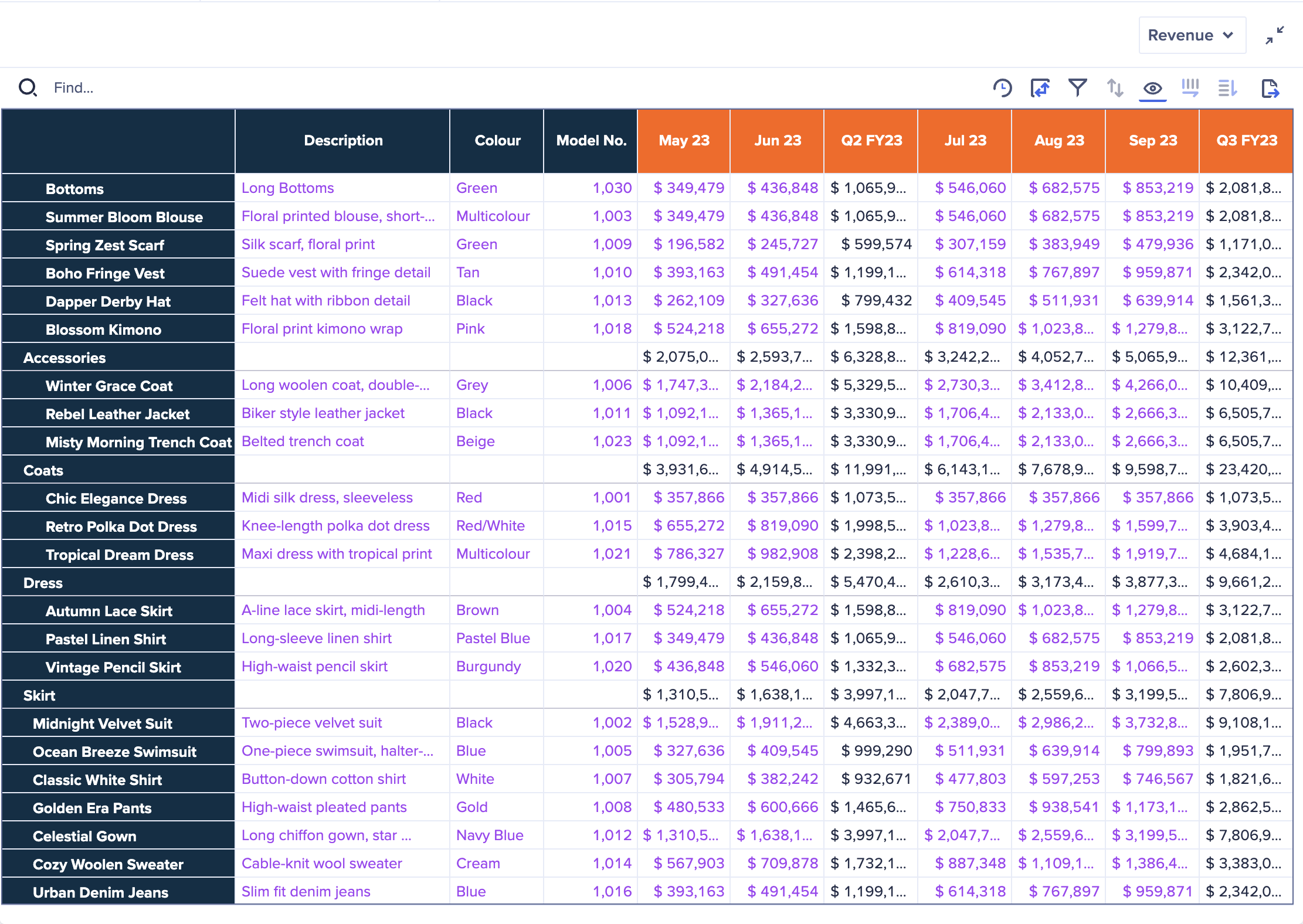
This new capability gives page builders the ability to combine multiple modules into a single, unified grid on a UX page. This functionality reduces manual effort and empowers faster decision-making by presenting related information side-by-side. For more information, check out this Community article: Combined Grids is now live!
Thoughts from the Community:
- Bhumit285: From a UX standpoint, the most awaited and valuable feature, in my opinion, is the Combined Grids capability.
- SunnyNafraz: To improve reporting, the Combined Grids (Multi-Module Reporting) feature, released in October 2025, significantly simplified dashboard views by allowing users to pull data from several different planning tables (modules) and display them together in a single, unified report with a shared row axis, making side-by-side comparisons much cleaner.
- namdevgurme: Now we can show data from multiple modules in one grid on a UX page. Super helpful for comparing and analyzing related info side-by-side.
- @pyrypeura: My favorite new features of 2025 are clearly used in pages and combined grids.
- Anjaneyula Putta: Improves user experience by consolidating multiple views into a single grid, making analysis and reporting more streamlined.
- Poojalakshmi, @lokesh1156, @Pradyumna, @KumariSuman, @shaik970, @Praveen8919639033, @MeghanaDhanokar, @PriyaKumari, Babu12, PujithaB, ShivankurSharma, and parmond.kumar2 all also shared this feature as one of their favorites.
8. Multi-browser tab syncing
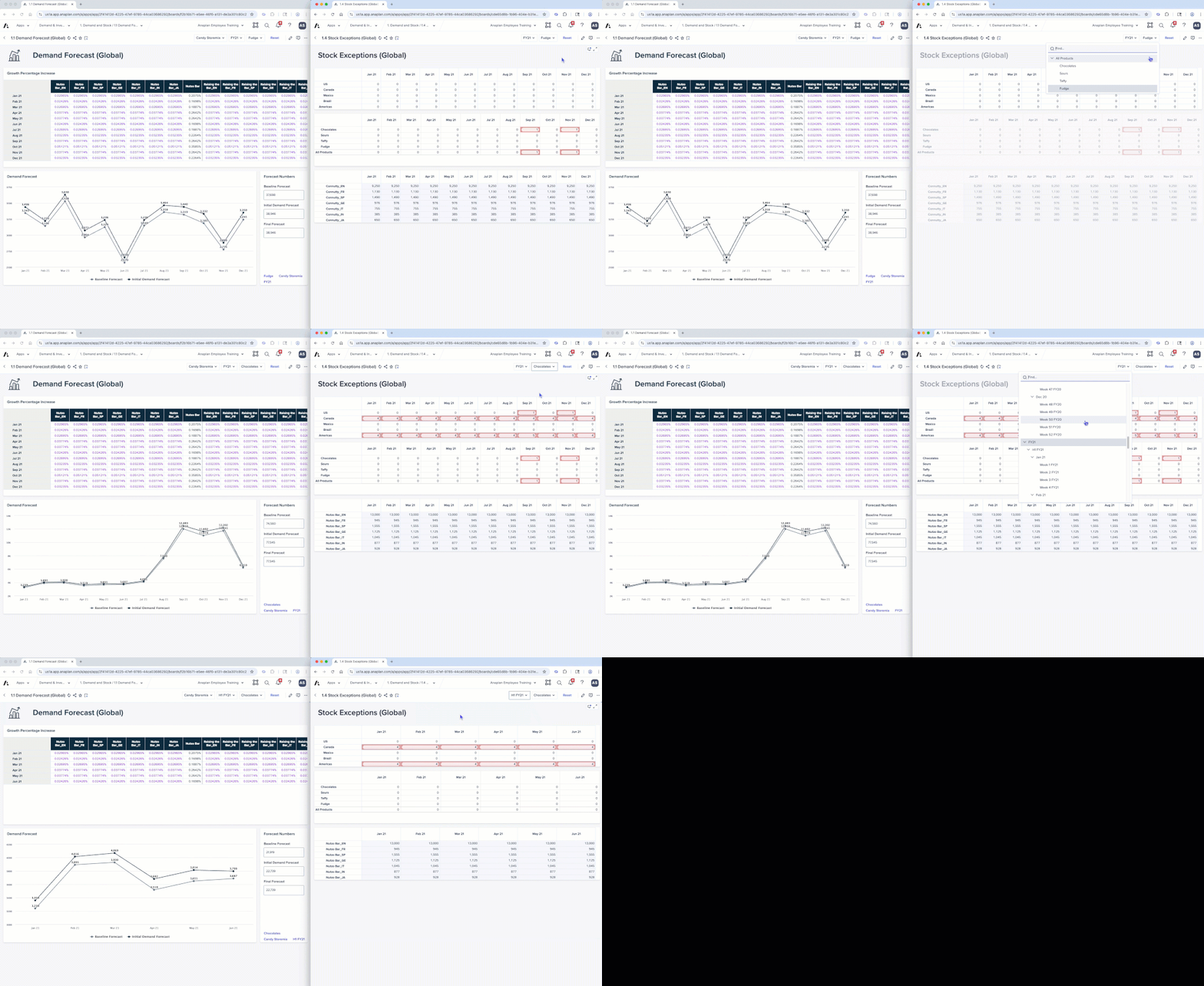
When changing context or data on a UX page, you can now view real-time data updates across up to five visible browser tabs without refreshing, streamlining workflows and improving planning efficiency. This feature must be enabled by page builders in the Edit Selectors section under the Overview tab. Multi-browser tab sync gif (end user):
Thoughts from the Community:
- @KirillKuznetsov: Multi-browser tab syncing (from the August release). It may look simple, but it’s significant for users who’ve built their workflow around browser tabs — and we all know it can take time to adjust to a new way of working, especially for new users of the platform.
9. Charts
Updates made to Charts throughout the year:
- Network Charts: This new card type enables customers to visualize their supply chain network in the UX, including visualizing the relationship from Suppliers to Plants to Distribution Centers to Customers and identifying bottlenecks. Use conditional formatting to highlight line items or production issues based on business logic, update the model and see the impact in real time, or model multiple scenarios and see the impact over time. More information available in the official Network Charts release notes.
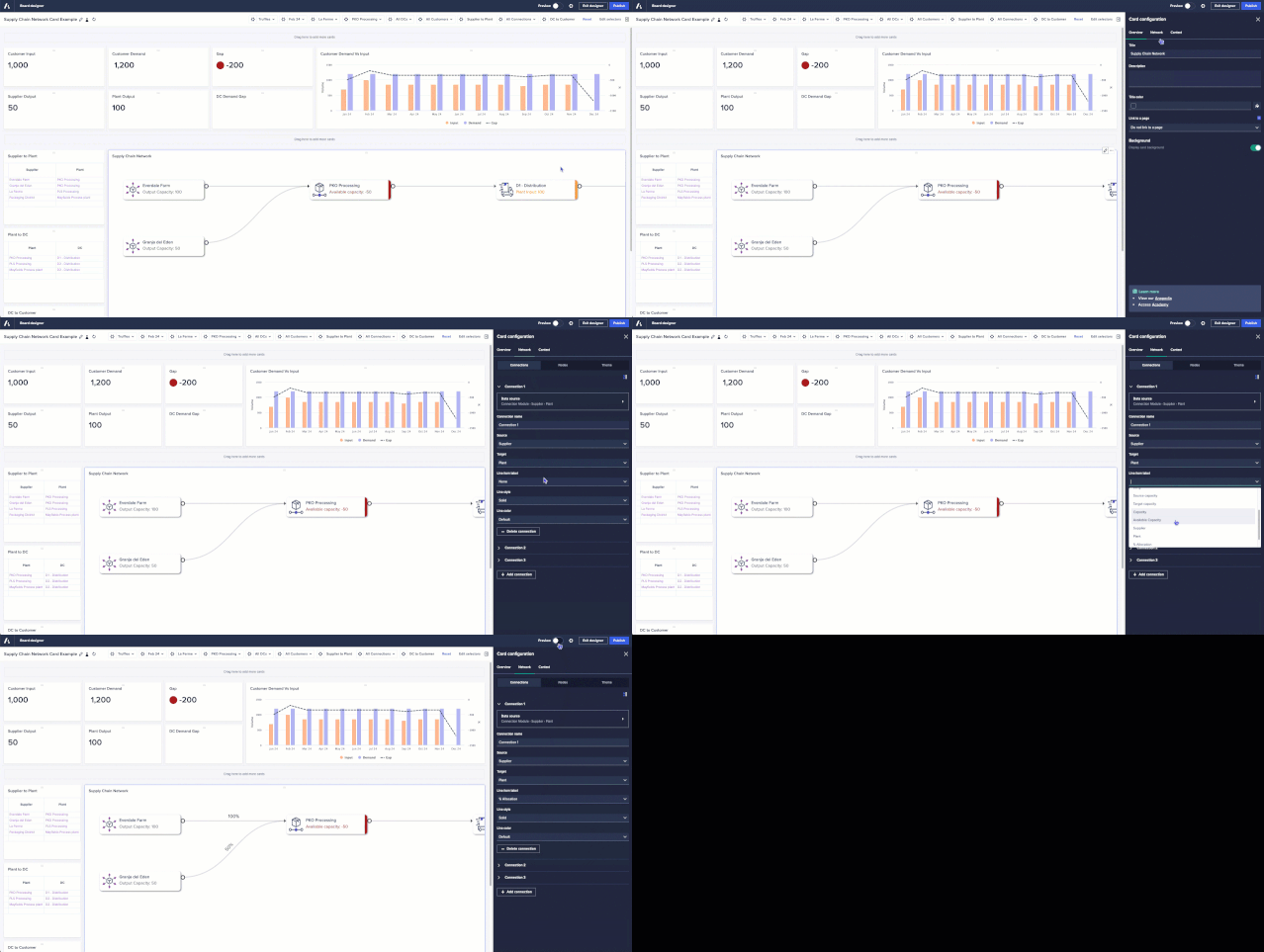
- Network charts: Connection labels
Users can display labels on network connections based on a selected line item. This will work for horizontal flows only and allow the value to be displayed, providing clearer visibility into flow values and allocations.
- Network charts: Reorder network connection
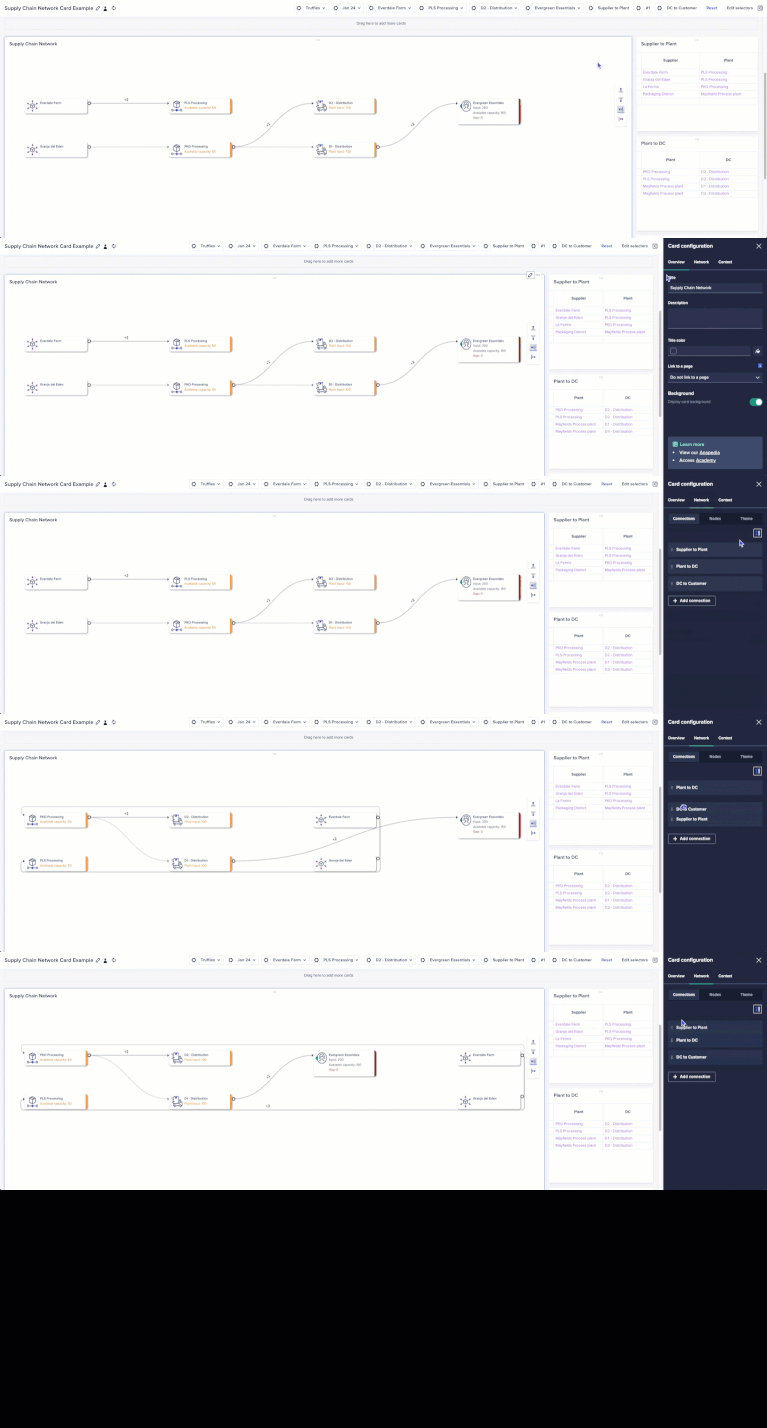
Users can reorder connection types in network charts, further improving customization and readability of planning visuals.
 Thoughts from the Community:
- SunnyNafraz: Finally, dramatically improving visualization and scenario planning, the Network Charts feature was released in January 2025, which allows users to visually map relationships between different parts of their business, like a supply chain.
- Scatter and Bubble chart
Page builders can enable the Sizes option in a bubble chart so that the size of each bubble is based on the absolute value of the data point it represents.
10. Hide 'maximize' and 'comments' options on All Cards
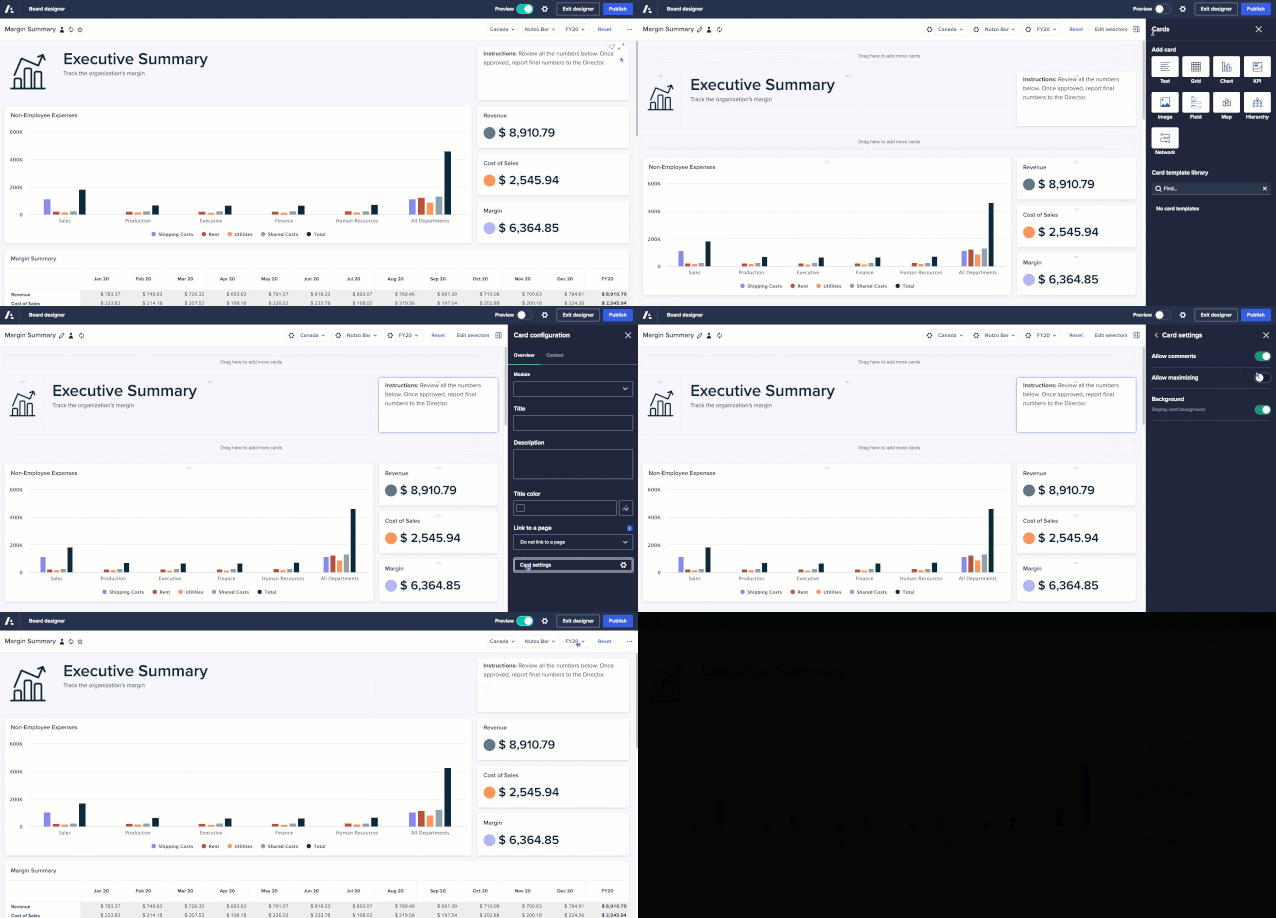
Page builders will be able to hide the ‘maximize’ and ‘comments’ options from the Card toolbar on all the cards. Simply disable the toggle option in the new Card settings in the Overview tab. Earlier this year it was released to only Text Cards, Image cards and Field cards but later it was added to all the cards.

11. Re-order uncategorized pages
Page builders can now reorder Uncategorized pages on the Apps contents screen using the grabber icon. They can also drag and drop pages within an app from one category to another, including the Uncategorized section. This enables page builders to create their own custom sequential view of pages to be displayed to end users.
Thoughts from the Community:
- @Prajjwal88: The ability to move or restructure pages across apps without rebuilding them from scratch is incredibly helpful, especially during deployments between lower environments and production.
12. Custom button styling
Page builders can now add custom images for buttons, offering greater flexibility to elevate the design and user experience of pages. Thoughts from the Community:
- namdevgurme: Add images and change button colors to match your dashboard style. Looks great and improves user experience!
- @Pradyumna: Page builders can now add custom images for buttons, offering greater flexibility to enhance the design and user experience of pages.
13. Improved keyboard navigation across cards
Across Boards, Insights, and Worksheets, tab navigation through toolbars in cards and navigating context selectors using the keyboard are now available. This enhancement makes navigation more seamless and inclusive for all users.
14. Multi-cell undo for paste and delete actions in a grid
End users can now use keyboard shortcuts (Ctrl + Z for Windows, Cmd+Z for Mac) to undo paste and delete actions directly in the grid, reducing accidental data loss and boosting confidence and speed when making edits. Thoughts from the Community:
- @manchiravi: Although this feature is simple but very impact for end users. It prevents accidental clearing of data but no way getting the data back on their own unless we (model builders) are involved to restore the model.
- Prajjwall88: It prevents accidental data loss and removes the manual cleanup that used to follow a mistaken paste or delete.
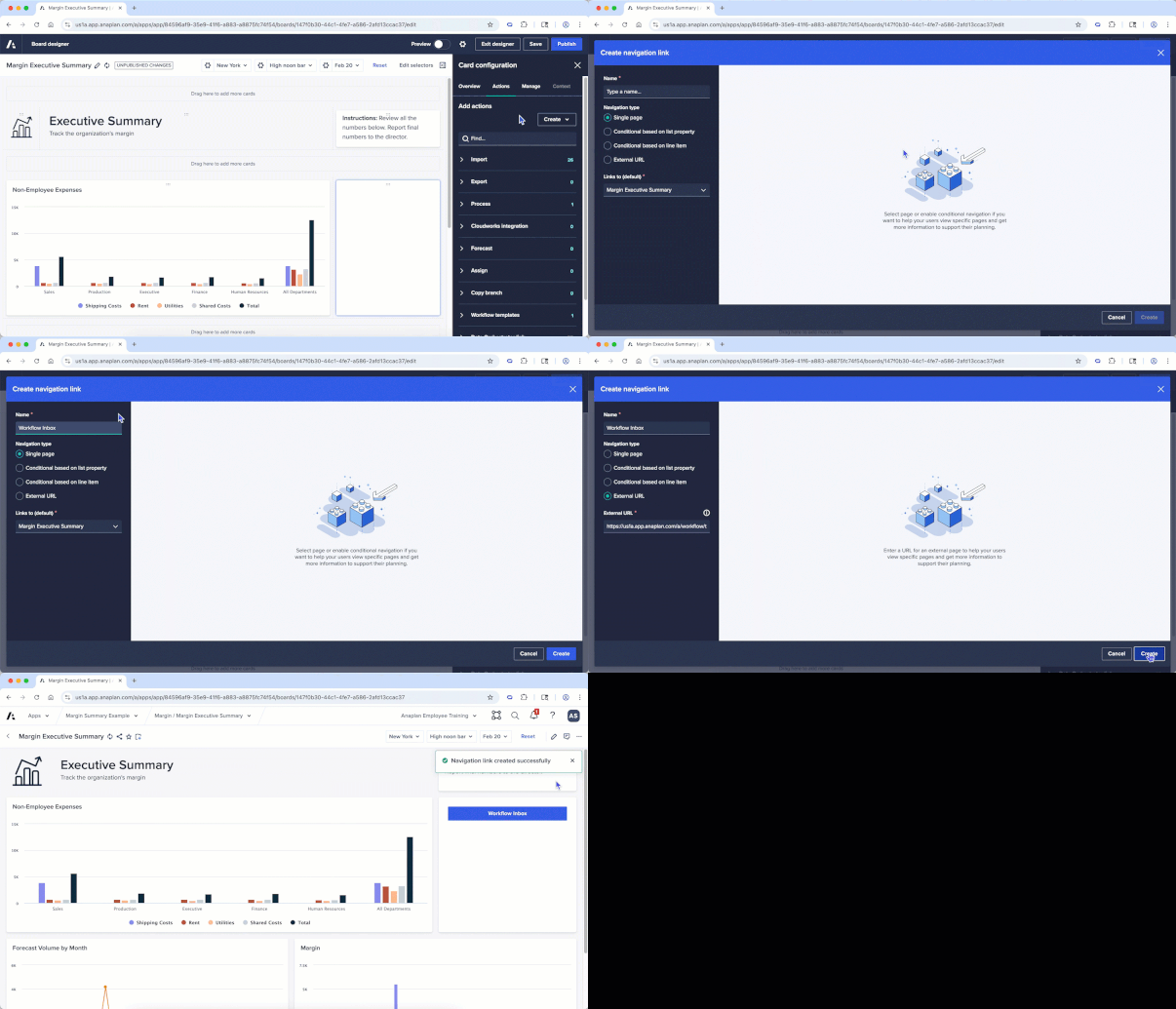
15. External URL navigation button
Page builders can configure navigation action buttons to link to external URLs, including non-Anaplan URLs, which will open in a new browser tab. This feature can be used to drive a more connected and streamlined experience by linking to other apps, providing shortcuts to platform pages such as their Workflow task inbox, and linking to external documentation, training, or job aids.
Workflow
16. Workflow: Updates related to Workflow
- Context in notifications: Context labels can now be included in the emails issued to task assignees and approvers. This can be especially useful when approving across multiple products, cost centers, regions, etc. or for user-triggered workflows where tasks and approvals are tied to specific line items. A tenant-level setting controls whether the context label, which is model data, is included in the email notification. The setting is set to off by default.
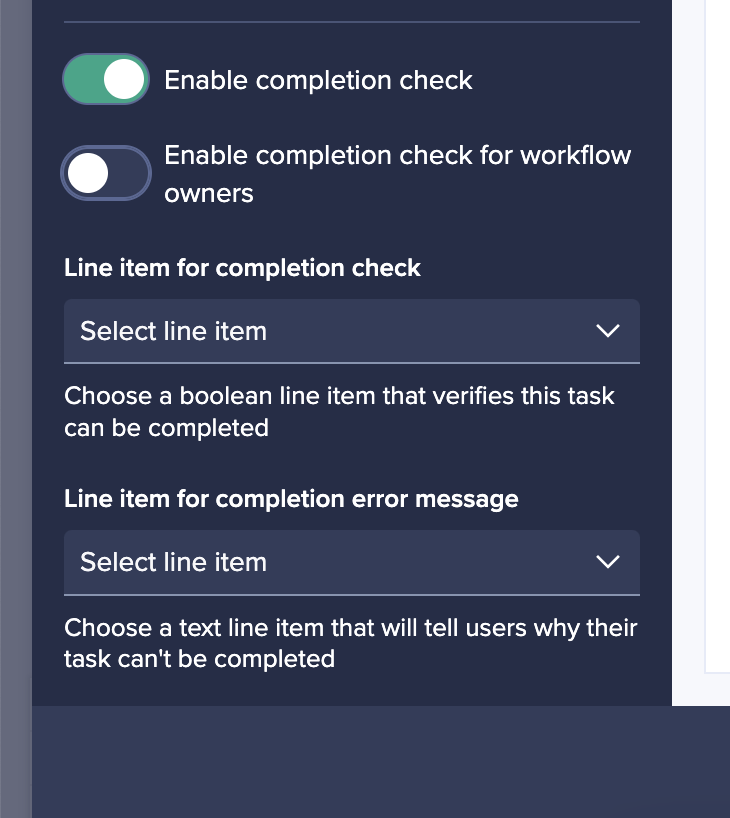
- Improved task completion checking: Workflow owners can now configure a completion rule to specify whether it should apply to Workflow owners as well as other users. Switching this setting on will mean everyone who completes the task will be forced to abide by the completion rule, reducing the risk of Workflow owners leaving tasks incomplete or inaccurately completed when part of someone else's workflow.
- Group approvals: Workflow owners can configure group tasks to jump straight to the approval stage of the task, allowing for "group approvals" to be configured while maintaining the ability to send work back to assignees should rework be required.
- Bulk notifications: End users who are assigned multiple subtasks as part of a group task can now be set to receive a single notification containing multiple calls-to-action, rather than multiple emails. This makes it easier for approvers to get notifications and less likely that notifications will be missed.
- Assignment filters and assignment data write: Group tasks can now be configured to only pick up context items where a filter Boolean is set, and automatically write Booleans when subtasks are assigned. This brings extra flexibility when using group tasks as part of scaled, scheduled business processes with multiple contributors.
- Reduced emails for Workflow owners: Email notifications to Workflow owners will now, by default, focus on the emails that inform an admin when action is required. Notifications that communicate updates are now turned off by default for Workflow owners, reducing the number of notifications Workflow owners receive and enabling them to focus on where action is needed.
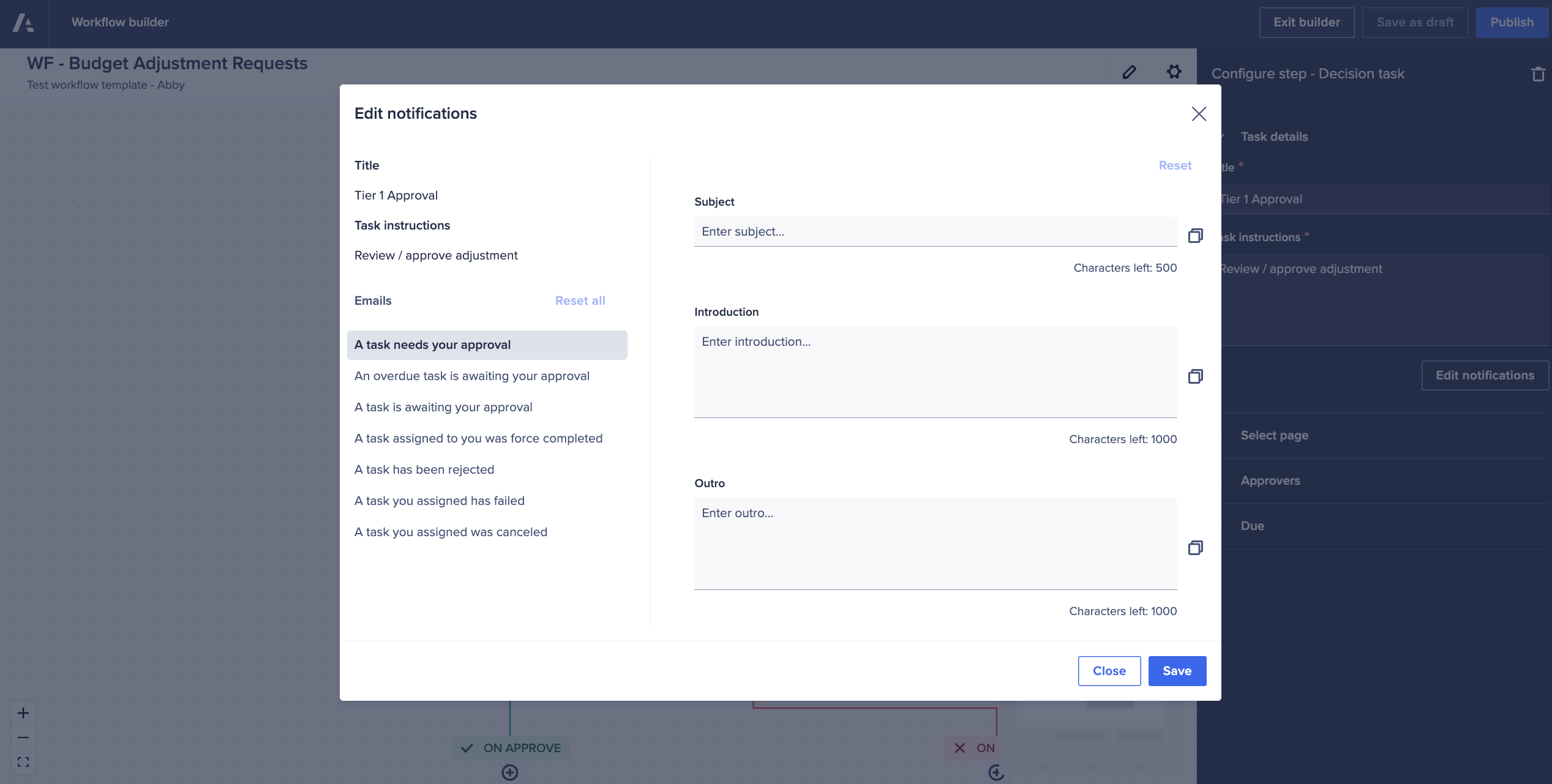
- Custom email contents: Workflow Owners can now write their own notification emails, including custom subject lines, intro text, and outro text. This enhances the experience by providing a more tailored and intuitive message that resonates more closely and drives more effective calls-to-action.
- Extra line items in emails: When sending task or approval notifications, Workflow owners can now provide more context to users and approvers by including hand-picked line items and their values. Tenant Administrators must enable this feature as it exposes model data via email.
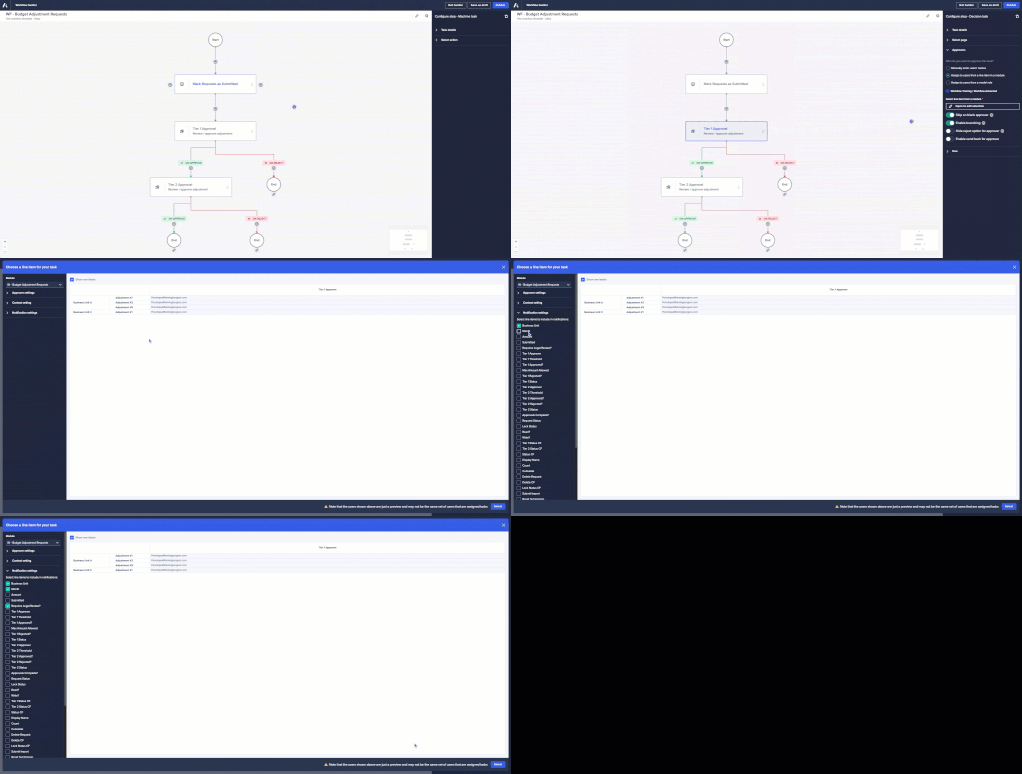
17. Workflow Advanced: Multiple features
Workflow Advanced is now available, which includes parallel steps, branch and reconnect, value-based decisions, and send back loops. These features empower businesses to visualize and automate processes with greater speed and confidence. Parallel steps allow multiple approvals to happen in parallel while providing different stakeholders with unique experiences. Branch and reconnect allows steps to be added to both the approval and rejection branch of a decision steps, as well as the reconnection of a branch to another step to bring two branches together. Send back loops allows, at a decision step, that the request can be sent back to a previous step in the workflow, providing a third response option for an approver (Approve, Reject, and Send Back). And value-based decision steps operate similarly to a decision task, but instead of requiring a user to make the decision, a workflow owner can use a value-based decision step to query model data and make the decision based on the model value.
Integrations & Extensibility
18. Anaplan Data Orchestrator (ADO)
- Metering improvements: The metering lozenge on the Overview page now includes consumption of storage and datasets, as well as Daily Usage of data extracts and model links.
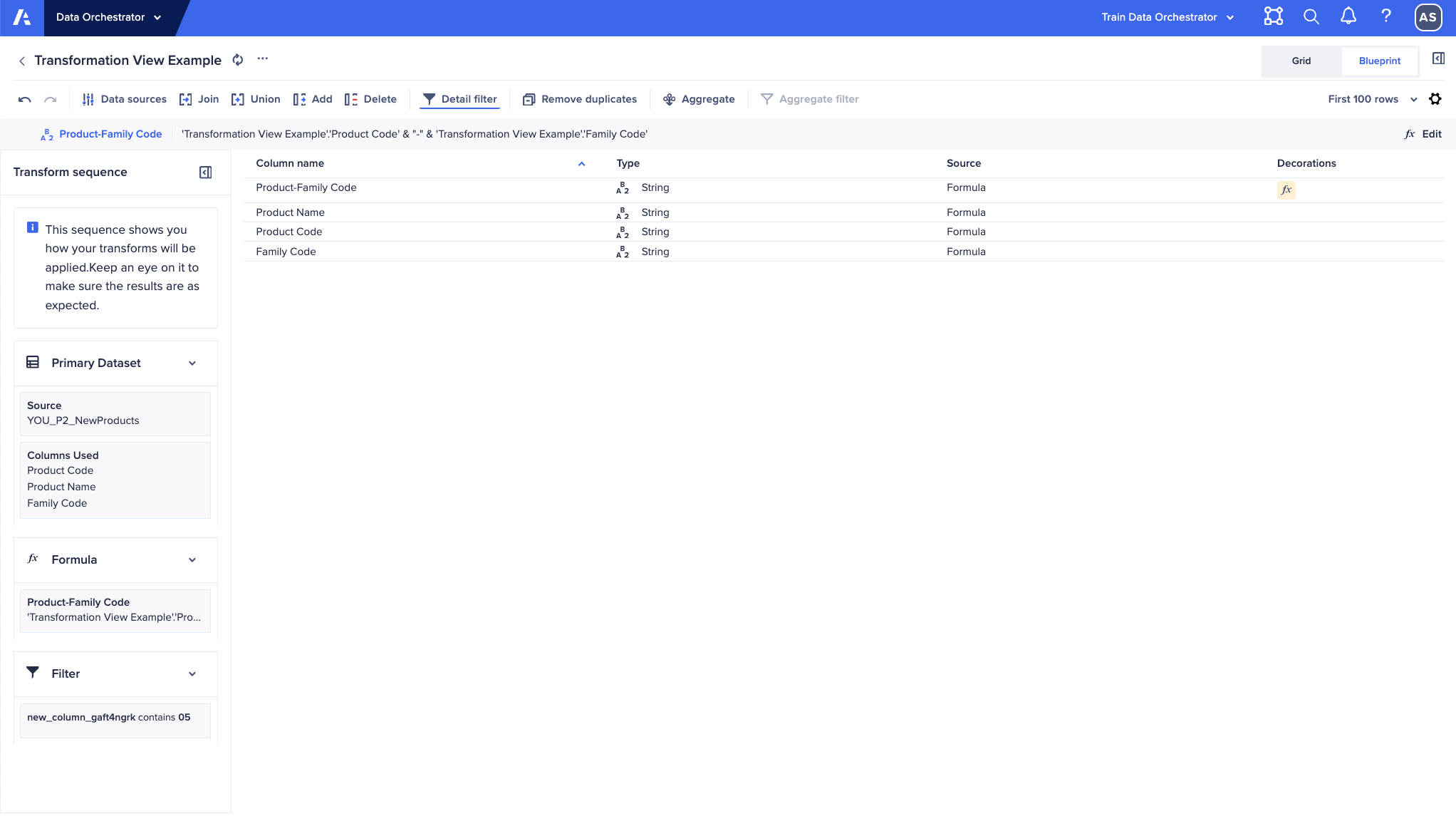
- Transformation Blueprint view: The Transformation page now includes Blueprint view, an alternative to Grid view. This view shows details of the transformation definitions and the data type and formula for each column in the transformation. It also displays the order in which transforms are applied, making it easier to debug complex transformations. This view does not require Data Orchestrator to apply the transformation to the data, so it will typically be more responsive than Grid view when working with large datasets.
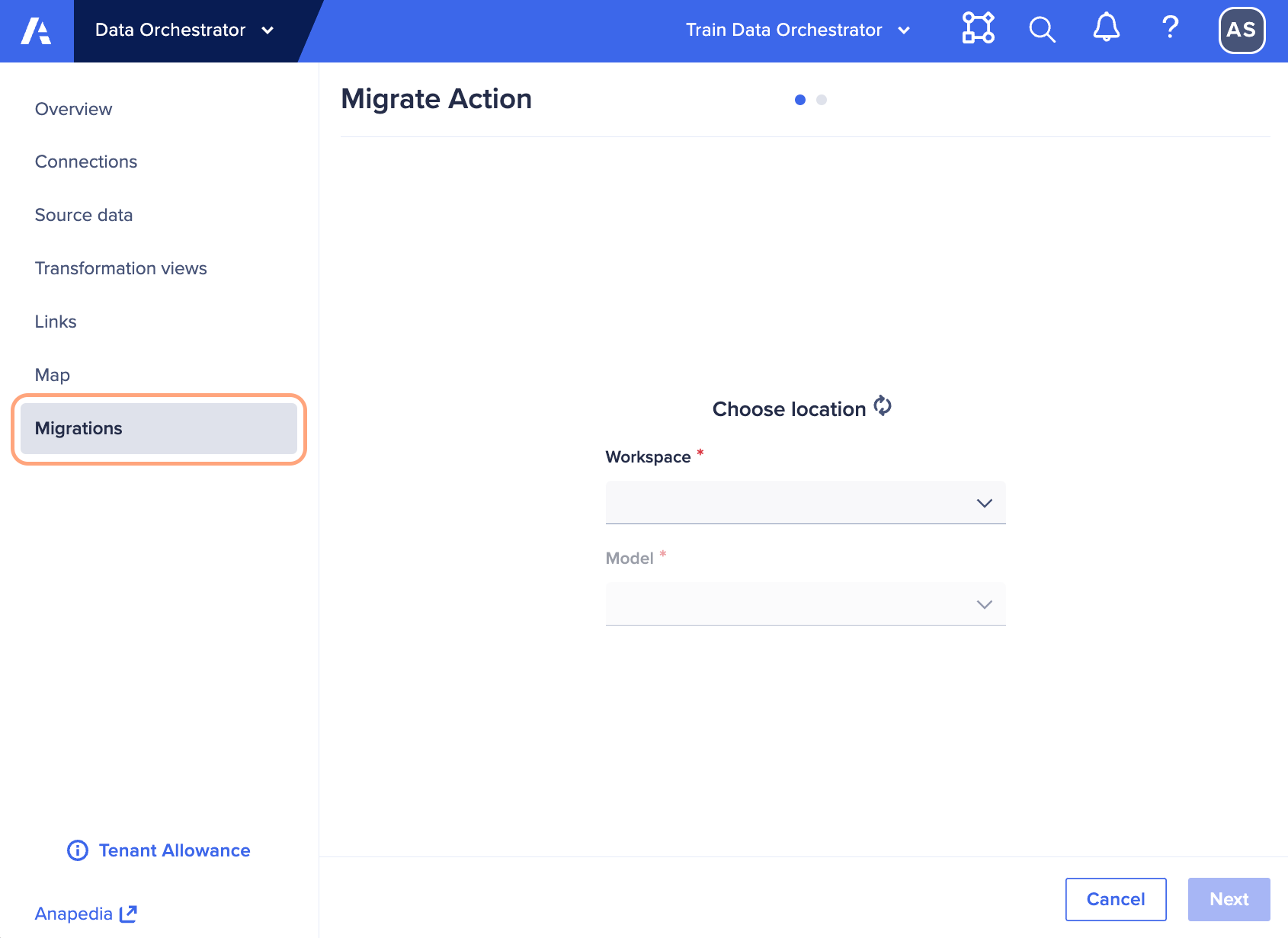
- Migrations menu item: The import Actions tab can now be found under the Migrations menu item for faster access and to clarify this as a basic migration capability when moving to Data Orchestrator from a classic Data Hub approach. This tab was previously on the Links page.
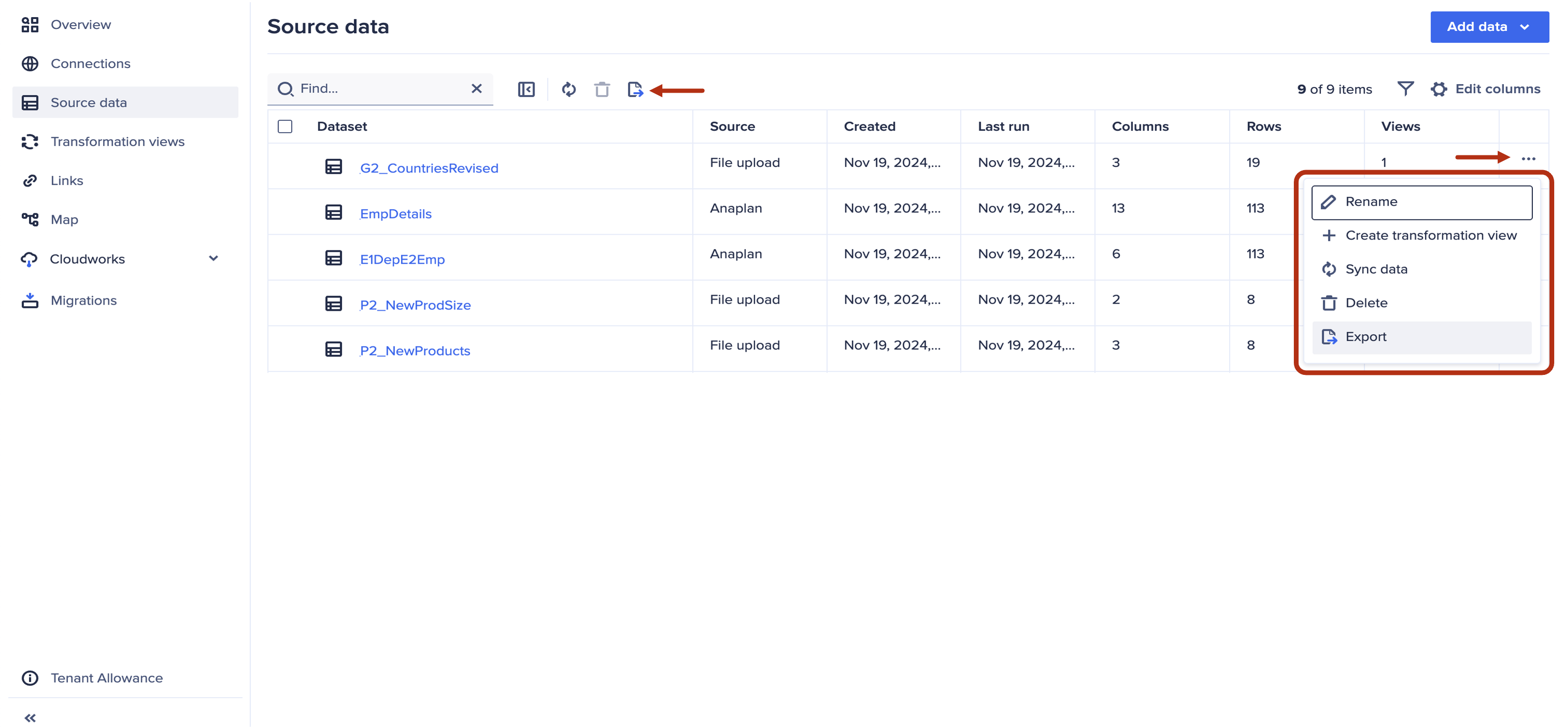
- Create a transformation view directly from a source dataset: On the Source data page, a transformation view of a source dataset can be created from the ellipsis to the right of the dataset.
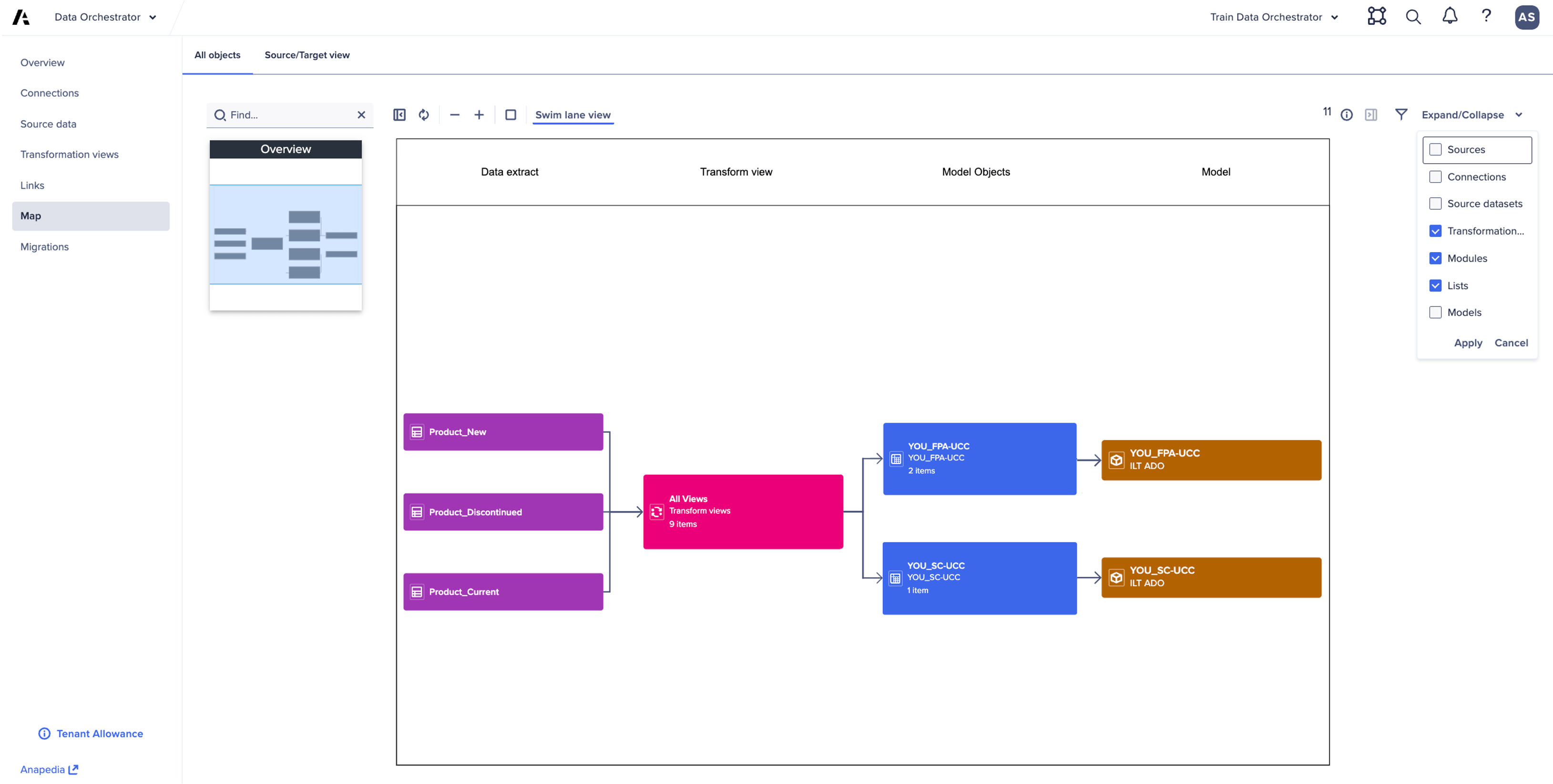
- Data lineage map: On the Map page, the display of objects can be organized into swim lanes, providing a more organized display when many objects are shown. Additionally, groups of objects can be collapsed and expanded, allowing the map to be focused on types of flows at different levels. A source/target view is also available as a tab, which auto filters datasets (both source datasets and those derived using transformation views) to provide a view focused on data sources and which models they target.
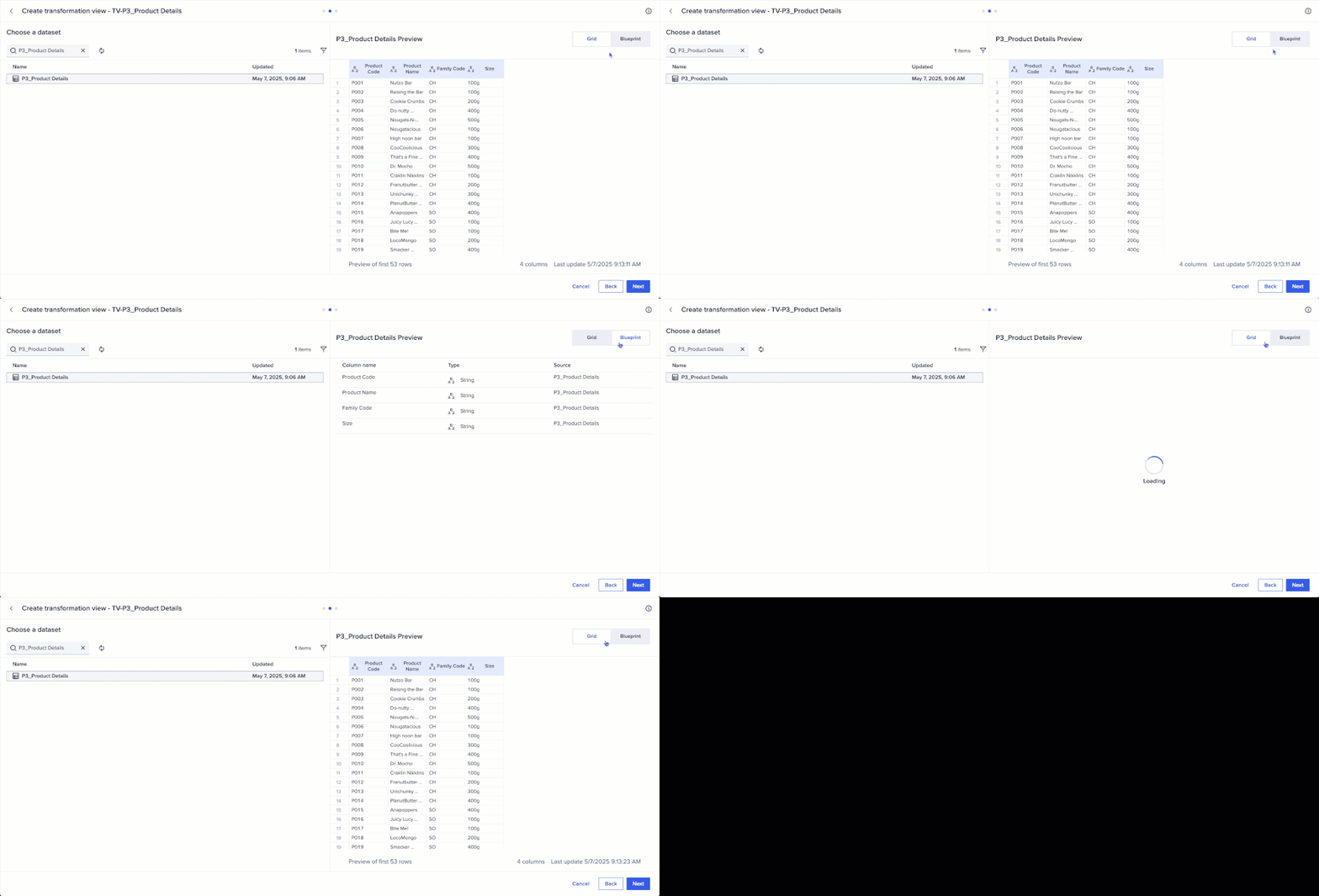
- Preview dataset when mapping to model or selecting for transformation view: When selecting a dataset to map to a model link or as the source of a transformation view, there is now the option to see a preview of the data in grid view or a definition of the dataset in blueprint view. This feature improves accuracy and efficiency during dataset selection-leading to more reliable models and smoother data transformations.
 Thoughts from the Community:
- jjayavalli: When mapping datasets, builders can now preview data in either Grid View or Blueprint View, making it much easier to validate structures, formats, and mappings before executing a process.
19. Export to CSV in Anaplan Data Orchestrator
Inventory pages for connections, source data, and links can now be exported to CSV, along with datasets (both source datasets and those derived from transformation views). The files are exported in 500MB segments. Download is currently limited to only the first segment, which would typically be more than 1 million rows.
20. Cloudworks: Self-manage long running process on CloudWorks
CloudWorks users will soon see a button to cancel long running processes on the CloudWorks UI. By being able to cancel jobs independently, users won't have to rely on Anaplan support, which minimizes delays and allows for quicker decision-making. This leads to a more streamlined and autonomous experience for users, enhancing overall productivity. It empowers users to have more control over their processes, improving their efficiency and saving time.
21. Anaplan XL
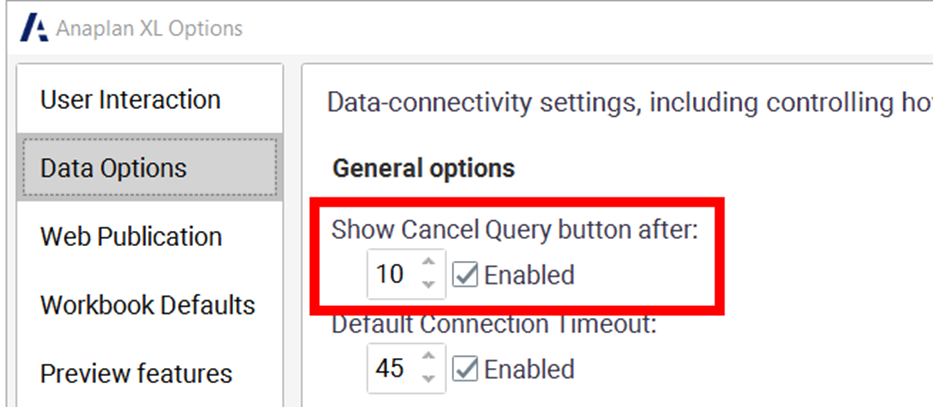
- General enhancements: Custom time-out queries can now be set, which will override the default time-out for any new connection added to a workbook, regardless of its connection type.
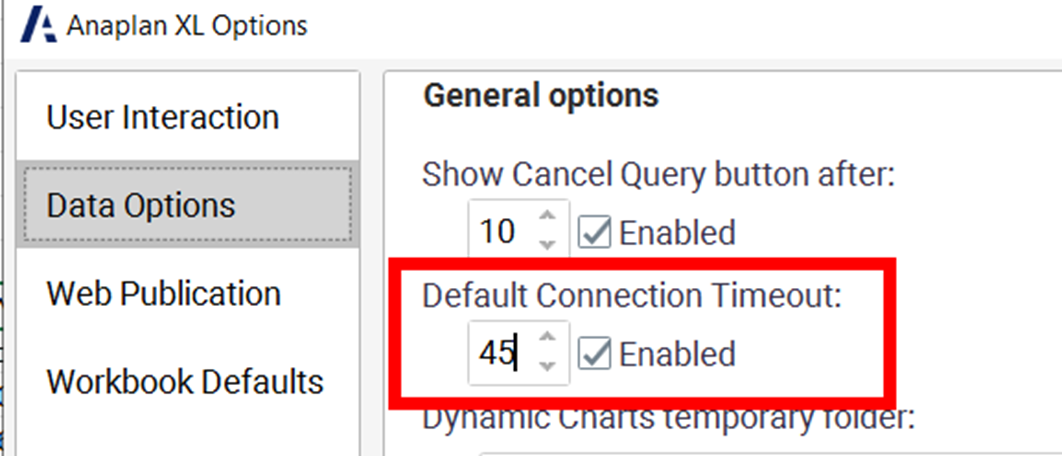 Users will now receive an additional confirmation warning when duplicate members are added to a filter dimension. And, if a user attempts to add a connection that already exists in the workbook, the system will suggest that the existing connection is used.
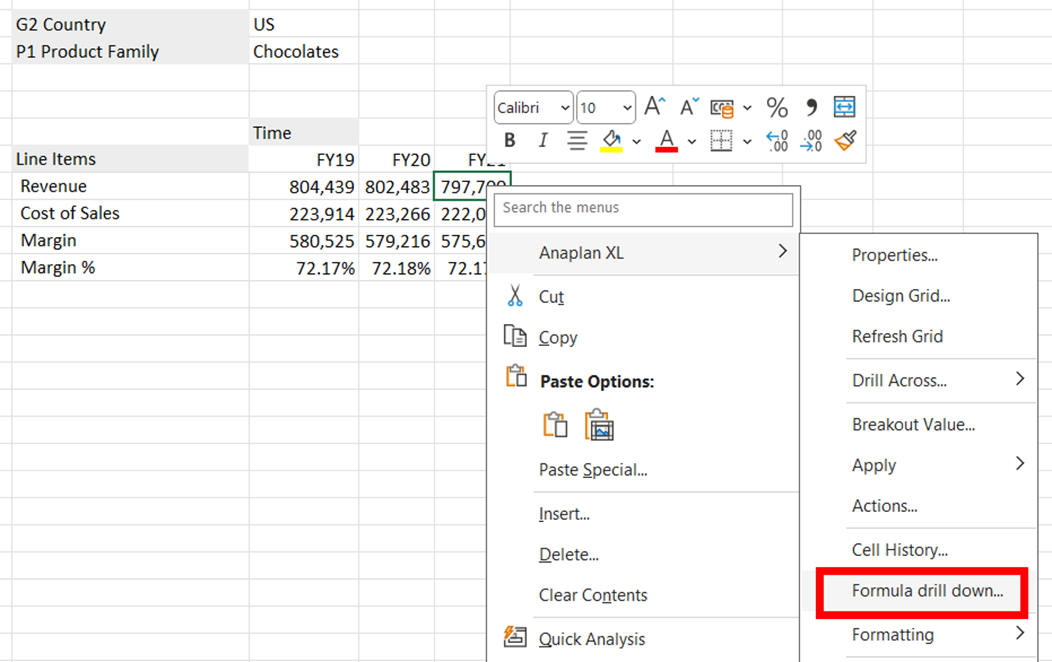
- Anaplan XL (version 2509) - Anaplan data source: Support has been added for drilling down in Anaplan models.
 Improvements have also been made to how unavailable models are handled. If an Anaplan model is unavailable when a workbook is opened, a user can turn off Anaplan XL to prevent further connection error messages from being displayed; Anaplan XL can be reactivated by the user.
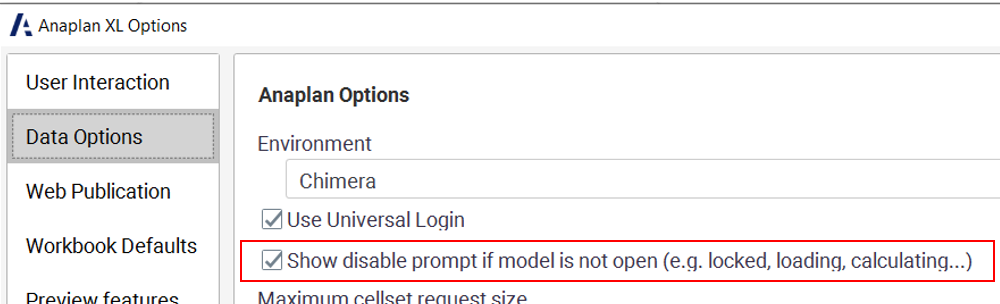 Users can now cancel queries and define how long to wait before the Cancel Query button appears.
- Anaplan XL Reporting (version 2510) - Freeform reports: Enhancements to freeform reports include more options for selecting members and navigating within a hierarchy, the ability to see the query text used to refresh a Freeform report, a confirmation message when all data cells or the first column of a freeform report are deleted to prevent unintentional data loss, and the ability to disable all formatting from the Freeform properties window.
- Anaplan XL Reporting (version 2510) - Anaplan data source: Only updated or new values will now be sent to Anaplan, increasing efficiency with how writes are handled. Additionally, custom calculations are now supported when selective access is used.
- Anaplan XL Reporting (version 2507) general enhancements: Support has been added for Anaplan workspace, model and module labels in grid titles and XL3ConnInfo function. Also improved Member Selector by adding an option for users to set a threshold for incrementally loading members. There is also single sign-on (SSO) support for Atoti connections from Anaplan XL Web edition.
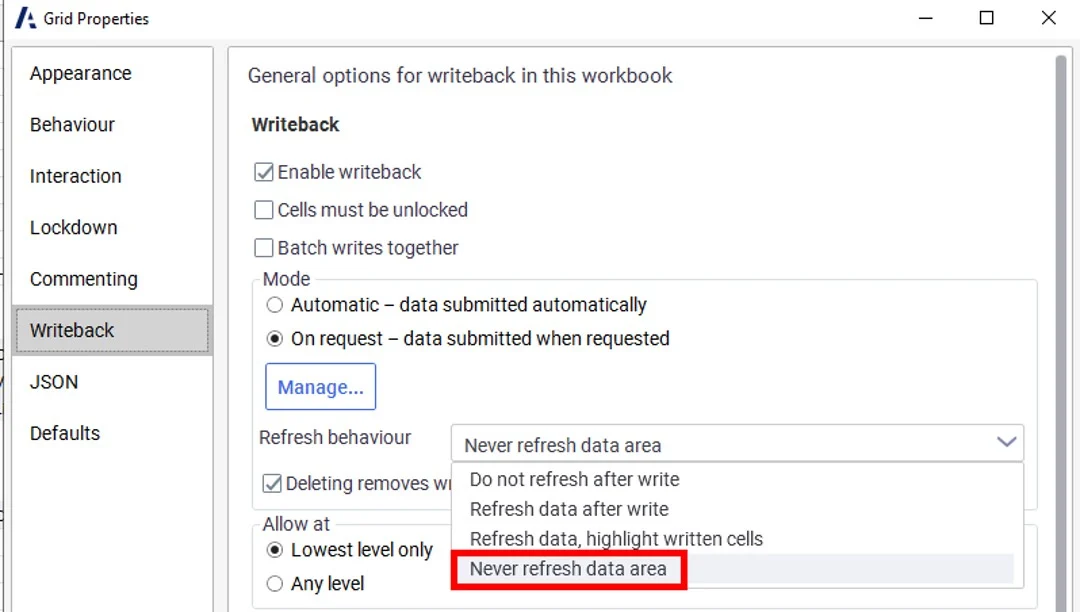
- Anaplan XL Reporting (version 2507) Writeback enhancements: The Writeback panel is now available in GA. Support for Anaplan Breakback has been added, as well as an option for Grids and FreeForm reports.
Security & Administration
22. License Management Reporting
With License Management Reporting (LMR), tenant and user administrators can now view, allocate, and track usage against the licenses an organization has purchased. LMR brings transparency and control to license management - streamlining license management and helping further optimize use of Anaplan. License Management Reporting here.
23. Other administration features
- Tenant administrations can assign the Application Owner role to users in their tenant. The user assigned this role will see the applications deployed to their tenant, initiate the generation of an application, and accept a new version update for each application. This role will further enhance operational efficiency with robust application governance.
- UX based audit: Events tracked in Anaplan's central Audit Service now include a variety of activities logged from the UX. This includes when apps and pages are opened, and details of which page type they were.
- Global navigation: End users with access to more than one tenant can now see which features are assigned to their selected tenant when opening the main menu in the global navigation bar. This makes it clear which features can or cannot be used by the logged-in user on the current tenant, enabling users to focus on what's relevant and making the platform more intuitive.
- Limit exception user assignment to Administration only: Tenant Administrators can turn on a "Limit exception user assignment to Administration only" switch to enable only Tenant Security Administrators to assign exception users in Administration. Workspace Administrators will be unable to assign exception users within models.
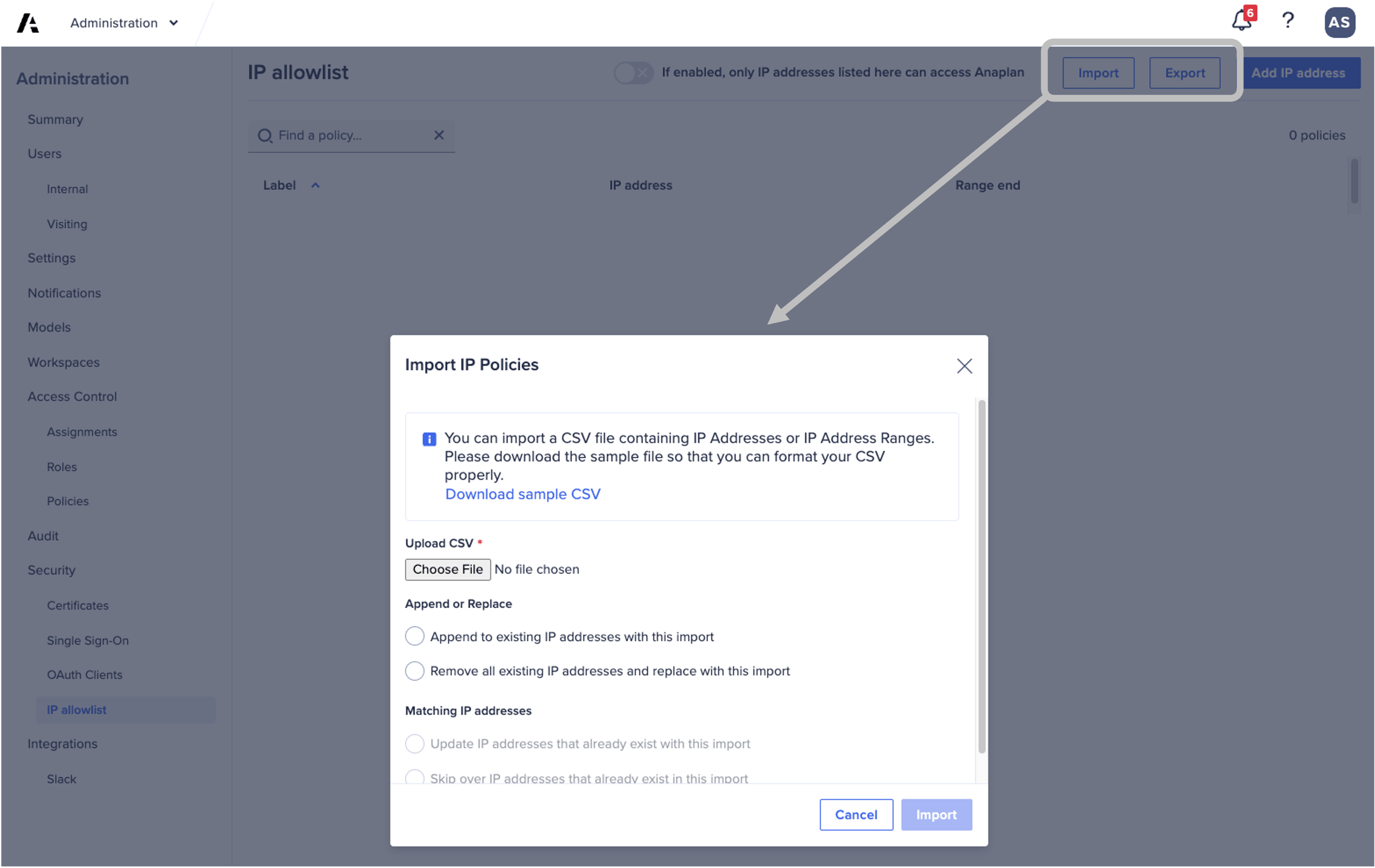
- IP allowlist enhancement: Tenant security administrators can now import or export IP address policies using a CSV file.
Anaplan Intelligence
24. CoPlanner: Link to relevant pages
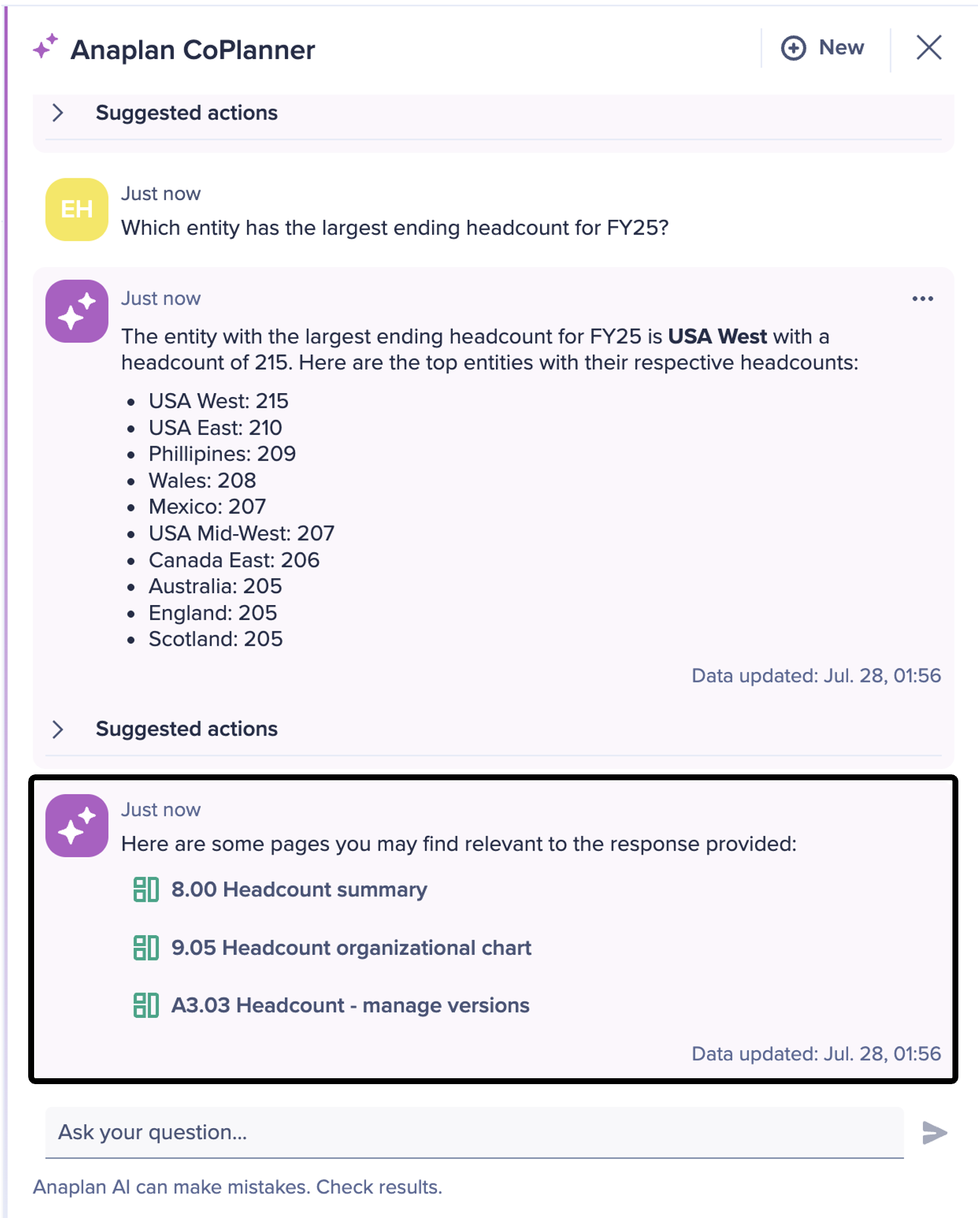
CoPlanner can now display up to three direct links to relevant pages in response to a user's question. These links are contextual, personalized based on access permissions. They're designed to help users explore insights, locate where key actions can be taken, and quickly access related content.
25. Anaplan Optimizer log API
Workspace Administrators can download Anaplan Optimizer logs via API for root cause analysis of optimization errors.
Conclusion
This list is not exhaustive and there are many more other features that were released to the platform which did not make it to our top 25. All official release notes are here, and also check out the Community’s top picks in the November Community Challenge blog!
…………..
More from Misbah: